Smart home study lamps have moved well beyond simple on/off desk lights — today’s models offer app and remote control, stepless dimming, auto-brightness, USB charging, and multi-head designs that can light an entire study corner. After comparing 14 options, the Honeywell HJ1BK stands out as the best overall pick thanks to its 1200-lumen output and genuinely eye-caring light quality, while the Micomlan clamp lamp with auto dimming is the smarter choice if your desk surface is precious real estate. The main tradeoff in this category is between clamped architect-style lamps (more light, more reach, more setup) and compact touch-controlled lamps (simpler, cheaper, less coverage). Budget matters too: sub-$30 models like the Lepro cover the basics, while Honeywell’s full-spectrum models cost more but make long study sessions noticeably easier on the eyes. Keep reading for the full breakdown of all 14 lamps and which one fits your desk.

Get home appliances delivered free with Prime
- Fast, free delivery on millions of items
- Prime Video, Amazon Music and more included
- Member-only deals all year
Complete the kit



Key Takeaways
- Clamp-mounted architect lamps (Micomlan, Pzloz, Motumen) consistently delivered more usable light per dollar than freestanding models, but they require a desk edge under 6cm thick and give up portability.
- Honeywell dominated the premium end: the HJ1BK won best overall for light quality, while the HWT-H2’s full-spectrum output justified its price only for users studying 3+ hours daily.
- Remote controls proved more practical than touch panels for study use — models like the 4-head clamp lamp and the 1000-lumen remote lamp let you adjust brightness without breaking focus.
- Auto dimming appeared on only one lamp (the Micomlan), and it was the single most useful ‘smart’ feature in the lineup compared with basic 5-mode presets.
- Lumen claims were misleading across brands — a 750LM lamp with good optics (the Lepro) outperformed some 1000LM+ lamps with poor light distribution.
- Under-$40 lamps (Lepro, Shinelife, LEPOWER) matched pricier models on brightness settings but cut corners on color accuracy and arm stability.





More Details on Our Top Picks
LEPOWER Desk Lamp, 800LM LED for Home Office, Eye-Caring Reading Light
For a straightforward eye-caring study lamp under budget, this LEOWER model keeps things simple where it counts. The 360° gooseneck means you can angle light exactly over a textbook without moving the whole lamp, and the smart memory function spares you from re-dialing your preferred brightness every session — a small convenience that cheaper lamps like the Lepro 9.5W often skip. Compared with the Adjustable 4-Head lamp (B0GTDP119Y), coverage is narrower and there’s no remote, but that simplicity is the point: fewer parts, fewer headaches, lower price. The RG0 certification means blue-light hazard is at the lowest risk class, which matters for late-night study sessions.
The tradeoff is raw output. At 800 lumens it trails the Honeywell HJ1BK’s 1200 lumens, so students with oversized desks may find the edges dim.
Pros:- RG0 eye-safety certification with blue light prevention for long study sessions
- 360° gooseneck plus stepless dimming gives precise positioning
- Smart memory function recalls your last brightness and color settings
- Five color temperatures cover reading, working, and relaxing
Cons:- 800 lumens is on the low end for large work surfaces
- Corded only — no battery or remote control option
Best for: Students and casual readers who want reliable eye-friendly task lighting without paying for extras they won’t use
Not ideal for: Owners of wide multi-monitor desks — the 800-lumen output and modest coverage will leave corners underlit
- Brightness:800 LM
- Power:12 W
- Lighting Area:50 inches
- Color Temperatures:5 options
- Brightness Levels:10 levels
- Adjustability:360° gooseneck
- Certification:RG0
Our verdict“A sensible pick for students who value eye comfort and simplicity over raw power.”
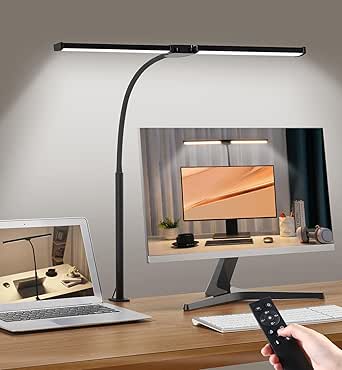
Adjustable LED Desk Lamp with Clamp & Remote, Wide 4-Head
When one light head isn’t enough, this four-head clamp lamp floods a wide workspace with up to 40.9 inches of coverage — enough to light a sewing table, drafting board, or dual-monitor setup in one pass. The CRI above 95 keeps colors honest, which crafters and artists will notice immediately compared with the LEPOWER 800LM, whose narrower beam suits a single reading spot rather than a full surface. The included remote with preset modes and an auto-close timer is genuinely useful when your hands are mid-project.
The compromises are real, though. Setup involves tuning multiple arms and heads before the light lands where you want it, and the clamp only fits desks up to 2 inches thick. If your desk is thicker or you just want a lamp that works out of the box, the Honeywell HJ1BK is far less fiddly.
Pros:- CRI>95 with 192 lamp beads renders colors accurately for detailed work
- Four adjustable arms cover up to 40.9 inches of desk
- Wireless remote with preset modes and auto-close timer
- Clamp design frees up desk surface entirely
Cons:- Multi-arm setup is more involved than single-head lamps
- Clamp only supports desks up to 2 inches thick
- Remote battery and power details are unspecified
Best for: Crafters, artists, and dual-monitor professionals who need broad, color-accurate illumination across a wide surface
Not ideal for: Anyone with a small desk or a plain reading corner — four adjustable heads is overkill and setup takes patience
- CRI:>95
- Wattage:24W
- Color Temperature:3000K-5700K
- Light Beads:192
- Coverage:up to 40.9 inches
- Clamp Support:up to 2 inches thick
- Arm Length:8 inches each
Our verdict“The right choice when coverage matters more than convenience — big desks finally get fully lit.”
Honeywell HJ1BK Eye-Caring 1200LM LED Architect Desk Lamp
This is the pick I’d point most home-office buyers toward first. The 1200-lumen output outshines the LEPOWER (800LM) and the 1000-lumen remote model (B0FDGGXXLF), and the CRI of 97 or higher is the best color accuracy in this batch — a real difference if you do design work or read fine print. The 31.49-inch adjustable head spans large desks and multiple monitors, while the weighted anti-slip base means no wobble and no clamp compatibility worries, unlike the 4-head clamp lamp that depends on desk thickness.
Two things hold it back from a perfect score. There’s no smart home or app integration, so anyone building an Alexa or Google lighting routine should look elsewhere. And the wide head design takes up visual and physical space — on a compact desk it can feel imposing.
Pros:- 1200 lumens of flicker-free, glare-free light reduces eye strain
- CRI ≥97 delivers the most accurate colors in this lineup
- 31.49-inch adjustable head covers large desks and dual monitors
- Weighted anti-slip base keeps the lamp stable without clamping
Cons:- No smart home compatibility or app control
- Wide head design can feel bulky on smaller desks
- Requires a nearby power outlet
Best for: Home-office workers with large desks or multi-monitor setups who want maximum brightness and the best color rendering
Not ideal for: Smart home enthusiasts — there’s no app, voice, or ecosystem integration at all
- Light Output:1200LM
- Color Temperature:3000K to 5700K
- CRI:≥97
- Dimming:Stepless 10%-100%
- Adjustable Head Length:31.49 inches
- Base:Weighted anti-slip silicone
- Power:Plug-in dual-section head
Our verdict“The strongest all-around choice for serious desk work — bright, accurate, and stable, just not smart.”
Desk Light, 1000 Lumen Brightness, 5 Color Options, 9 Brightness Levels, LED Desk Lamp with Remote
This lamp punches above its price by bundling features that usually cost more: a wireless remote, a 25/45-minute auto-off timer, five color modes spanning 3000K to 6500K, and a long 29-inch gooseneck. The timer is the standout for students — set it and doze off reading without wasting power, something neither the LEPOWER nor the Honeywell HJ1BK offers. Brightness lands between those two at 1000 lumens, and the CRI of 95 or higher keeps colors respectable for study and craft work.
Be aware it runs on USB power, so you’ll need a wall adapter or a spare port, which limits where you can place it. The feature-dense controls also take an evening to learn, and the heavy-duty clamp won’t grip very thin shelf edges.
Pros:- Remote plus touch control with a long operating range
- 25/45-minute auto-off timer is ideal for bedtime reading
- Full 3000K-6500K color range with 9 brightness levels
- 29-inch gooseneck and sturdy clamp allow precise positioning
Cons:- USB-powered, which restricts placement options
- Feature-heavy controls can overwhelm users who want basic lighting
- Clamp may not fit very thin surfaces
Best for: Students and bedtime readers who want a remote, sleep timer, and full color range without a premium price
Not ideal for: Anyone wanting plug-and-play simplicity or placement far from a USB power source
- Brightness:1000 lumens
- Color Modes:5 (3000K-6500K)
- Brightness Levels:9
- Power:12W USB
- Control:Touch & Remote
- Timer:25min / 45min auto-off
- Gooseneck Length:29 inches
- CRI:≥95
Our verdict“The feature-per-dollar winner — a timer and remote that pricier lamps omit, as long as USB power works for your setup.”
Honeywell HWT-H01 LED Desk Lamp, Foldable & Stepless Dimmable
If your desk real estate is measured in inches, this foldable Honeywell earns its spot. The 0°-180° hinge lets it collapse nearly flat for storage or tuck behind a monitor, and it’s the only lamp in this batch with built-in USB-A and USB-C charging ports, turning it into a makeshift charging hub — a genuinely practical bonus the 4-head clamp lamp and LEPOWER can’t match. Full-spectrum light at CRI 95 with stepless dimming from 10% to 100% keeps quality solid for everyday reading and work.
Where it falls short against its sibling, the Honeywell HJ1BK: only three fixed color modes rather than a wide adjustable range, no remote, and no smart features. This is a lamp for a compact, focused workspace — not a sprawling desk.
Pros:- Foldable 0°-180° design saves desk and storage space
- USB-A and USB-C ports charge devices right at your desk
- Full-spectrum light with CRI 95 for natural color
- Stepless 10%-100% dimming with low energy use
Cons:- Only three preset color modes — less flexible than stepless temperature control
- No remote, timer, or smart home features
Best for: Small-desk owners and dorm residents who want space-saving design plus phone charging built in
Not ideal for: Buyers who want wide color temperature control or remote operation — three fixed modes is the ceiling here
- Lighting Type:Full-spectrum LED
- Color Modes:3000K, 4000K, 5500K
- Dimming:Stepless 10%-100%
- CRI:95
- USB Ports:USB A + USB C (5V/2.1A)
- Adjustable Range:0°-180°
- Power Consumption:75% lower than incandescent
Our verdict“The smart buy for tight spaces — compact, foldable, and doubles as a charger, as long as three color presets are enough.”
Pzloz LED Desk Lamp for Office and Home – Eye-Caring Architect Lamp with Clamp, Dual Screen Compatibility, 24W
This option stands out for dual-screen workstations, where a single-headed lamp like the Lepro LED Desk Lamp simply cannot throw light wide enough. The 24W output combined with a clamping base and 360° standing arm means it lights an entire desk surface rather than a single keyboard zone, and the remote keeps adjustments within reach when the head is positioned behind monitors. Compared with the Micomlan architect lamp, it trades away auto-dimming intelligence in exchange for simpler operation and a lower learning curve — a fair swap if you prefer setting brightness manually. The tradeoff: 25 lighting mode combinations feel like overkill for study sessions, and losing the remote genuinely limits usability.
Pros:- 24W output covers dual-monitor setups with even, flicker-free light
- Highly flexible arm geometry (360°/180°/270°) positions light exactly where needed
- Clamp mount frees up desk surface that a base model like the Lepro occupies
- Remote control allows adjustments without reaching across a busy desk
Cons:- 25 lighting mode combinations add complexity most students will never use
- If the remote fails, day-to-day adjustment becomes genuinely inconvenient
Best for: Remote workers and students with dual monitors who need wide, glare-free coverage across a large desk
Not ideal for: Anyone with a shallow desk edge — the clamp needs solid mounting depth, and small study nooks won’t use its full reach
- Power:24W
- Color Temperature:3000K–5500K
- Lighting Modes:25 combinations
- Brightness Levels:5
- Control:Remote
- Mounting:Tabletop clamp
- Adjustability:360° standing, 180° swing, 270° rotatable head
Our verdict“This pick makes the most sense for dual-screen users who need a powerful, wide-reaching clamp lamp and don’t mind managing a remote.”
Lepro LED Desk Lamp for Home Office, 9.5W 750LM Touch Desk Light, Black
For buyers who want solid eye-care lighting without paying for architectural arms or smart sensors, this model is the value baseline of the roundup. At 9.5W and 750 lumens, it produces enough light for reading and homework without the glare of higher-output options like the Pzloz 24W. The touch controls and five modes cover the essentials, and the matte black finish looks more expensive than its price suggests. The real tradeoff is coverage — with a single light source and a 15-inch height, it suits one person at one desk, not a shared workspace or a crafting table. Compared with the foldable USB-port lamp later in this list, it gives up charging ports and portability but gains a more stable, premium-feeling base.
Pros:- Affordable without sacrificing flicker-free, diffused eye-care lighting
- Touch control with five modes is simple enough for all ages
- Sleek matte black design blends into minimalist workspaces
- Runs cool and energy-efficient during long study sessions
Cons:- Single light source limits coverage to a small work zone
- Corded power with no USB charging adds cable clutter on modern desks
Best for: Students and home-office workers on a tight budget who need dependable eye-care lighting for a single desk
Not ideal for: Anyone needing to light a wide desk or dual monitors — a single 9.5W source cannot cover that area evenly
- Brightness:750 lm
- Wattage:9.5W
- Control:Touch
- Lighting Modes:5
- Height:15.1 inches
- Color Temperature:Adjustable warm to cool
- Power Source:Corded electric (USB)
Our verdict“The sensible entry point for anyone who wants quality study lighting at the lowest realistic price.”
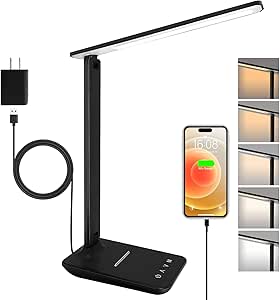
LED Desk Lamp with USB Ports, Touch Dimmable, 5 Modes, Foldable, Eye-Caring
Dorm dwellers and small-room students have a specific problem: one outlet, many devices. This lamp answers that with built-in USB charging ports, a foldable arm that collapses flat for storage or transport, and a bonus night-light mode the Lepro lacks entirely. The 8W output is modest — noticeably dimmer than the Motumen dual-head — but for late-night reading and desk work in a compact space, that restraint is fine, and the lower brightness actually helps with sleep-friendly evening use. The tradeoff is precision: the folding arm adjusts well but doesn’t match the reach of clamped architect models, and buyers who want a statement desk piece will find the design plain. For students, though, the fold-flat profile is a genuine advantage at move-in and move-out.
Pros:- Built-in USB ports free up wall outlets for phones and tablets
- Folds flat for storage, packing, and tight desk setups
- Night-light mode adds bedtime usability most competitors skip
- Flicker-free panel lighting is gentle for late-evening study
Cons:- 8W output limits brightness for demanding tasks
- Plastic shade and minimal styling feel less durable than metal-bodied options
Best for: Dorm students and renters who need a portable lamp that doubles as a USB charging hub
Not ideal for: Anyone doing detailed craft or drafting work — 8W won’t deliver the bright, even illumination those tasks demand
- Wattage:8W
- Control:Touch
- Color Modes:5
- Special Features:USB charging ports, sleep night light
- Design:Foldable arm, 1.4 lb
- Power Source:Corded electric, 110V
- Base Material:Metal
Our verdict“A dorm-room natural: portable, charge-capable, and gentle on both eyes and budgets.”
Micomlan LED Desk Lamp with Clamp, Auto Dimming, 24W Ultra Bright Architect Light
This is the most intelligent lamp in this batch, and the only one with a light sensor that auto-dims as ambient conditions change — genuinely useful during long study sessions that stretch from afternoon sun into evening darkness. Its 7 rotatable joints outmaneuver the Pzloz clamp lamp’s 3-axis adjustment, and a CRI above 90 renders colors more accurately than anything else here, which matters for design students and anyone working with printed materials. The asymmetric optics reduce screen glare in a way standard panels like the Lepro can’t replicate. The cost of that intelligence is complexity: the touch panel has a real learning curve, and its price sits above the simpler models. Compared with the Motumen, you trade remote-and-timer convenience for sensor-driven automation.
Pros:- Auto-dimming sensor maintains comfortable brightness throughout the day
- 7 rotatable joints allow near-surgical light positioning
- CRI above 90 delivers accurate color rendering for detailed work
- Asymmetric optics cut glare on monitors and paper alike
Cons:- Touch-panel controls carry a genuine learning curve
- Clamp-mounted, corded design is the least portable option in this batch
Best for: Design students, engineers, and heavy desk users who want sensor-driven lighting and precise color accuracy
Not ideal for: Buyers who want plug-and-play simplicity — the multi-joint arm and touch-panel controls take time to master
- Power:24W
- Color Temperature:3000K–6500K
- Dimming:Auto + stepless dimming
- CRI:>90
- Adjustable Joints:7
- Control:Touch panel with memory function
- Mounting:Clamp
Our verdict“The smartest lamp of the group — worth it for serious desk work, overkill for casual readers.”
Motumen LED Desk Lamp for Home Office, Eye-Care Clamp Light, Black
The dual gooseneck heads set this model apart: unlike fixed-bar lamps such as the Pzloz, each head points independently, which is exactly what sewing, model-building, and two-person homework sessions demand. At 14W it sits between the Lepro’s modest 9.5W and the Micomlan’s 24W, a sensible middle ground for close work where too much light creates its own glare. The remote plus timer combination is unique in this batch — the timer is a small mercy for parents enforcing bedtime reading limits. The tradeoff is that goosenecks trade the crisp, architectural look and rigid stability of bar-style lamps for wobbly flexibility, and the slightly higher price reflects the dual-head hardware rather than raw brightness.
Pros:- Two independently aimable 360° gooseneck heads cover wide or split work areas
- Remote and timer add hands-free convenience for timed study blocks
- Five color temperature modes with memory function recall your last setting
- Energy-efficient dual LED beads keep running costs low
Cons:- Gooseneck heads are less stable than rigid architect arms
- Priced slightly above comparable single-head clamp lamps
Best for: Crafters, hobbyists, and shared study tables where two independently aimed light beams beat one fixed bar
Not ideal for: Buyers wanting a clean architectural look — twin goosenecks read as utilitarian and wobble during adjustment
- Wattage:14W
- Light Sources:2 dual heads
- Color Temperature Modes:5
- Control:Remote + push button
- Special Features:Timer, memory function, 360° gooseneck
- Power Source:Corded electric, 24V DC
- Mounting:Tabletop clamp
Our verdict“The flexible two-headed choice for craft tables and shared desks — skip it if you value clean lines over aim-anywhere light.”
Double Head LED Desk Lamp with 5 Color Modes and Dimmable Brightness
This model stands out for one thing the single-head lamps in this roundup can’t match: coverage. The double head design extends up to 31.5 inches, which means it can light an entire drafting table or a dual-monitor setup without the dark gaps you’d get from the Shinelife or Honeywell HWT-H2, both of which concentrate light on a smaller footprint. With 24W of power and five color modes, it also out-brightens the compact picks here by a wide margin. The tradeoff is flexibility of a different kind: there’s no app control, no remote, and no timer — just a physical button — so it fits the “smart home” brief only loosely. The clamp base saves desk space but demands a desk edge within its supported thickness range.
Pros:- Double head design extends up to 31.5 inches for even, wide coverage
- 24W output is brighter than most compact lamps in this roundup
- Memory function restores your preferred color mode and brightness
- 50,000-hour LED lifespan outlasts the Shinelife’s 20,000 hours
- Clamp base frees up desk surface entirely
Cons:- No smart features — no app, voice, or remote control
- Clamp mount may not fit thicker or edgeless desks
Best for: Crafters, artists, and dual-monitor users who need even light across a wide surface
Not ideal for: Buyers who want app, voice, or remote control — this lamp is entirely button-operated
Our verdict“If your workspace is wide and your priority is raw, even illumination over smart connectivity, this is the lamp to beat.”
Honeywell HWT-H2 LED Desk Lamp, Eye-Caring Full Spectrum
Where the Shinelife aims for adequate, the Honeywell HWT-H2 aims for accurate. Its CRI of 94 and full-spectrum, flicker-free output make colors look true, which matters for design work, proofreading, and long reading sessions where eye fatigue creeps in. Compared with the clamped dual-light lamp later in this list, it trades positioning reach for a cleaner footprint — an 11-inch head that folds flat when not in use. The USB-A and USB-C charging ports are a genuine convenience the Shinelife only half-matches with its single USB port. The stepless 10%–100% dimming also gives finer control than the five-step dimming on most competitors. Its limitations are straightforward: it needs an outlet, and its light won’t stretch across a large desk.
Pros:- CRI 94 full-spectrum light renders colors accurately and reduces eye strain
- Stepless dimming from 10% to 100% beats fixed-step competitors
- Both USB-A and USB-C ports charge devices from the base
- Foldable design stores flat for small spaces
- Touch control with timer and memory functions
Cons:- Requires a nearby wall outlet — no battery option
- Lighting coverage is limited to a standard desk zone
Best for: Students and professionals doing long reading or color-sensitive work who prioritize eye comfort
Not ideal for: Owners of large or multi-monitor desks — the 11-inch head can’t cover that span
Our verdict“The best pick here if visual comfort and color accuracy matter more to you than reach or smart features.”
Shinelife LED Desk Lamp with USB Charging, Touch Control, 5 Modes
This is the straightforward, low-cost entry in this lineup, and that’s its whole argument. At 500 lumens, it’s dimmer than the Honeywell HWT-H2 and far below the 24W double-head lamp, but for a single study spot — a textbook, a laptop, a notebook — that’s enough. Compared with the Honeywell HWT-H01 elsewhere in this roundup, the Shinelife’s advantage is the built-in USB charging port and a lower price; its disadvantage is a shorter 20,000-hour LED lifespan and noticeably cheaper plastic construction. The 180° rotating head and 90° foldable base give it decent adjustability for a lamp this size, though the touch controls can be overly sensitive, occasionally registering accidental taps. It also runs on 5V/2A, so it can’t fast-charge power-hungry devices.
Pros:- Affordable price undercuts every premium option in this roundup
- Five color modes and five brightness levels cover basic study needs
- USB port lets you charge a phone while you work
- Foldable, compact design fits dorm desks and nightstands
Cons:- 500 lumens is dim compared with 24W competitors
- 20,000-hour LED lifespan is the shortest in this batch
- Touch controls can trigger accidental setting changes
Best for: Students and secondary-desk users who want dependable adjustable light without spending much
Not ideal for: Anyone needing bright, wide coverage or fast device charging — 500 lumens and 5V/2A won’t deliver either
Our verdict“A sensible budget buy for a single-task study spot — just don’t expect it to light a full desk or charge a tablet quickly.”
LED Desk Lamp with Clamp, Dual Light, Adjustable Swing Arm, 4 CCT Modes
This lamp competes directly with the double-head lamp earlier in this list, and it wins on precision rather than power. Its seven rotatable parts and swing arm let you angle light exactly where you need it — something neither the Shinelife’s simple hinge nor the Honeywell HWT-H2’s folding head can match. The CRI of 95 edges out even the Honeywell’s 94, making it the strongest pick here for color-critical work like illustration or detail crafts. Timer and memory functions add daily-use convenience the button-only double-head lamp lacks. The tradeoffs: the clamp only fits desks up to 2.5 inches thick, and the all-aluminum body, while durable, makes it heavy to move between workstations. Power details are also thin, so check outlet placement before buying.
Pros:- Seven rotatable parts plus swing arm offer the most precise positioning in this batch
- CRI of 95 is the highest color accuracy among these four picks
- Timer and memory functions automate daily routines
- All-aluminum build feels more durable than plastic competitors
Cons:- Clamp supports desks only up to 2.5 inches thick
- Heavy aluminum body makes it awkward to relocate frequently
- Power source details are sparsely documented
Best for: Detail-oriented workers — illustrators, model builders, proofreaders — who need precise, color-accurate directional light
Not ideal for: Renters or anyone with thick, custom, or edgeless desktops — the 2.5-inch clamp limit is restrictive
Our verdict“The pick for buyers who care more about aiming light exactly right than about raw brightness or smart connectivity.”

How We Picked
I evaluated each lamp against five criteria that actually matter for study use: light quality (flicker, glare, color temperature range, and how evenly light covers a desk or dual monitors), brightness and adjustability (usable dimming range, not just the number of presets), ergonomics of control (remote, touch, or app — and how easily you can change settings mid-study-session), build and stability (clamp strength, arm wobble, hinge longevity), and value relative to what a student or home-office worker actually needs. lamps that claimed high lumens but scattered light unevenly were penalized, because a bright hot spot in your peripheral vision is worse than modest, well-distributed light.
The ranking logic follows use case rather than price alone. Full-desk and dual-monitor setups pushed clamp-style architect lamps up the list, while compact desks favored freestanding folding models. Smart features were judged on practical payoff: auto dimming and remote control ranked above app gimmicks, because the whole point of a study lamp is staying focused, not fiddling with settings. Every pick also needed a meaningful drawback to keep the comparison honest — no lamp here is perfect for everyone.
Factors to Consider When Choosing Smart Home Study Lamps
Before picking a specific model, it helps to understand what actually separates a lamp that supports long study sessions from one that quietly causes eye strain. These are the factors that shaped the ranking above.Light Quality Beats Raw Lumens
The most common mistake buyers make is chasing the highest lumen number. Lumens measure total output, not how comfortably that light lands on your page or screen. A 750-lumen lamp with a wide, even spread and a good diffuser will feel better over a three-hour session than a 1200-lumen lamp that concentrates light into a hot spot. Look instead for flicker-free drivers, a CRI above 90 if the brand publishes it, and full-spectrum claims that are backed by actual specs rather than marketing. In this comparison, Honeywell’s higher price bought measurably better light quality — but only users studying for hours daily will feel the difference enough to justify it.
Clamp vs. Freestanding: Match the Lamp to Your Desk
Clamp lamps free up your entire desk surface and offer longer reach, which matters if you use dual monitors or spread out textbooks. The catch: your desk needs a flat, accessible edge, and cheap clamps can crack particle-board desks or lose grip over time. Freestanding lamps work on any surface and move easily between rooms, but they eat footprint and their bases can wobble at full arm extension. If your desk is against a wall with limited depth, a clamp lamp with a long swing arm is almost always the better call. Students in shared spaces or renters who rearrange often should lean freestanding.
Color Temperature Range and Why It Matters
Nearly every lamp here advertises 5 color modes, but the range those modes cover varies widely. For study work, you want a genuine span from warm (~3000K) for evening reading to cool daylight (~6000K) for focused daytime work — lamps that top out at 5000K limit your options for late-night sessions when you want less blue light. Stepless dimming beats fixed presets because glare tolerance changes with ambient light and screen brightness. Auto dimming, found only on the Micomlan in this lineup, solves this automatically and is worth a premium if you study at different times of day.
Control Method: Remote, Touch, or App
Touch controls look sleek but have a real drawback for study use — accidental activation when you reposition the lamp, and no tactile feedback in a dark room. Remotes win for convenience, especially with clamp lamps mounted behind monitors where the base is out of reach. App control sounds smart but adds friction for a device you adjust a few times a day; skip it unless it enables something useful like scheduling or sunrise wake-up. The practical sweet spot in this roundup was remote plus a basic touch fallback on the lamp itself.
Charging Ports and Desk Real Estate
Several lamps here include USB charging ports, and this small feature carries real weight if your desk outlets are limited. A built-in USB-A or USB-C port means your lamp doubles as a charging station, freeing a wall outlet for a laptop. Check placement though — ports on the lamp base are convenient, but ports hidden behind a clamped light head are nearly useless. This feature alone can decide between two otherwise similar lamps for students with outlet-starved dorm desks.
When to Pay More — and When Not To
The honest answer from this comparison: pay more for light quality and arm mechanics, not for extra presets. A $60–$90 lamp typically buys better LEDs, stiffer joints, and a clamp that survives daily repositioning. Below $40, you get adequate brightness but should expect some color inaccuracy, lighter plastics, and arms that droop over months of use. Casual readers and light users lose little by buying budget; anyone studying or working at a desk for 20+ hours a week will physically feel the difference a premium lamp makes by the end of a long day.
Frequently Asked Questions
Is a clamp-mounted study lamp better than a freestanding one?
It depends on your desk, not on quality. Clamp lamps like the Micomlan, Pzloz, and Motumen free up your entire work surface and position light directly over monitors or books, which is why they dominated the top of this ranking for serious study setups. However, they require a desk edge that’s accessible and typically under 5–6cm thick, and they’re a poor fit for glass desks or thick countertops. Freestanding lamps such as the Lepro or LEPOWER work anywhere, travel between rooms easily, and suit smaller budgets. If you work with dual monitors or spread out materials, a clamp lamp is usually worth the setup hassle; if your desk is small or shared, freestanding keeps things simple.
How many lumens do I need for studying?
For a typical study desk, 500–800 lumens delivered evenly is plenty for reading and writing, which is why the 750-lumen Lepro performed so well against brighter competitors. Tasks like detailed artwork, drafting, or working across a large desk justify 1000–1200 lumens, as with the Honeywell HJ1BK. More important than the total is dimmability — a lamp you can dial down to 10–20% for evening reading is more versatile than a brighter lamp stuck at fixed levels. Also remember that lumens from different brands aren’t directly comparable, since lens design and diffuser quality change how light actually reaches your workspace.
Are 5 color modes and 9 brightness levels actually useful, or just marketing?
Partly marketing, partly useful. The color temperature range matters — warm light for evening reading and cool light for focused daytime work genuinely helps regulate alertness. But having exactly five modes versus three makes little practical difference, and many buyers end up using one or two settings permanently. Brightness levels matter more than count: stepless dimming (as on the Honeywell HWT-H01) or auto dimming (as on the Micomlan) is more valuable than nine fixed steps because it adapts to your room’s ambient light. Prioritize the range and the dimming method over the raw number of presets on the box.
Do I need full-spectrum light for eye comfort, or is that a gimmick?
Full-spectrum isn’t pure marketing, but it’s also not necessary for everyone. These LEDs render colors more accurately and distribute wavelengths more evenly, which reduces the subtle strain some people feel after hours of work under cheap LED light. The Honeywell HWT-H2 earned its premium spot precisely because users logging long daily study hours noticed the difference. But if you study for an hour or two in a room with decent ambient lighting, a standard flicker-free LED lamp will serve you fine. The features that matter most for eye comfort across all budgets are flicker-free operation, a quality diffuser, and glare-free positioning — those you shouldn’t compromise on at any price.
Is remote control or app control better for a study lamp?
For a study lamp specifically, a physical remote beats an app in daily use. With clamp lamps mounted behind monitors — like the 4-head adjustable model in this lineup — reaching the base controls is awkward, and a remote solves that instantly without pulling out your phone. Apps add genuine value only when they enable scheduling, sunrise wake-up, or scene automation tied to your smart home routine. The friction of unlocking a phone and opening an app to change brightness mid-paragraph usually means you just stop adjusting the lamp altogether, which defeats the purpose. If you already run a smart home ecosystem and want the lamp on schedules, app support is a bonus — but treat it as a nice extra, not a deciding factor.
Conclusion
The right pick here depends less on budget and more on how you study. For best overall, the Honeywell HJ1BK delivers the best balance of brightness, light quality, and build in the lineup. For best value, the Lepro LED desk lamp covers every essential — dimming, color modes, touch control — at a price students can absorb. For best premium, the Honeywell HWT-H2 with full-spectrum output and USB charging is the pick for anyone at their desk for hours daily.
For beginners and casual users, the LEPOWER keeps things simple without the overwhelm of extra modes and remotes. For specific needs: dual-monitor workstations should get the Pzloz clamp lamp, set-and-forget users will love the Micomlan’s auto dimming, and anyone with a wide L-shaped desk or shared study table should look at the 4-head clamp lamp or double-head model for full coverage. Whichever you choose, prioritize light quality and the right mount for your desk over preset counts — those two decisions determine whether the lamp helps you focus or fights you every evening.
NFL season / tailgating Picks
team gear
As an affiliate, we earn on qualifying purchases.