For most home users, I would start with the Creality Otter Lite Basic as the best overall pick for a practical mix of everyday scanning needs. The Revopoint POP3 Plus stands out for buyers who want full-color capture, while the Creality CR-Scan Ferret Pro is a wireless option for people who value freedom of movement. The main tradeoffs are how much setup a scanner needs, what kinds of objects it handles well, and whether portability or specialized scanning matters more to you. A scanner suited to small detailed parts may be less convenient for larger household objects, and a more specialized model may ask more of a beginner. Read on for the full comparison and guidance on choosing a scanner that fits your home projects.

Get home appliances delivered free with Prime
- Fast, free delivery on millions of items
- Prime Video, Amazon Music and more included
- Member-only deals all year
Complete the kit


Key Takeaways
- The Otter Lite Basic is my best overall starting point because its general-purpose positioning makes it a more natural fit for varied home projects than a narrowly specialized scanner.
- The POP3 Plus separates itself with full-color scanning, a useful distinction for users who care about appearance and color in addition to shape.
- Wireless models such as the CR-Scan Ferret Pro favor flexible movement; that convenience matters when moving around larger objects, though wireless operation may not be every buyer’s priority.
- The MetroY, MetroX Pro, and Sermoon S1 options point toward buyers with more specific scanning demands, so their appeal depends on whether those needs justify a more focused choice.
- There are two Fox entries and two Raptor entries in the lineup; compare the exact model and bundle name carefully, since similar family names do not mean every listing is the same configuration.
| Creality Otter Lite Basic 3D Scanner |  | Best for Versatile Home Scanning | Accuracy: 0.05 mm | Scanning speed: Up to 30 fps | Camera design: Quad-camera | VIEW ON AMAZON | See Our Full Breakdown |
| Revopoint MetroY Ultra 3D Scanner |  | Best for High-Detail Projects | Single-frame precision: Up to 0.01 mm | Volumetric accuracy: 0.015 + 0.04 mm × L (m) | Scanning speed: Up to 90 fps with NVIDIA GPU; up to 60 fps with CPU | VIEW ON AMAZON | See Our Full Breakdown |
| Creality Pika Wireless 3D Scanner |  | Best Compact Wireless Pick | Accuracy: 0.03 mm | Scan range: 5–2,000 mm | Light sources: 7 parallel blue lasers and NIR structured light | VIEW ON AMAZON | See Our Full Breakdown |
| Creality CR-Scan Ferret Pro Wireless 3D Scanner |  | Best Ready-to-Carry Kit | Accuracy: Up to 0.1 mm | Color depth: 24-bit | Supported object size: 50–2,000 mm | VIEW ON AMAZON | See Our Full Breakdown |
| Creality CR-Ferret SE 3D Scanner |  | Best Simple Desktop Starter | Accuracy: 0.1 mm | Color capture: 24-bit | Camera: 2 MP | VIEW ON AMAZON | See Our Full Breakdown |
| 3DMakerpro Fox Handheld Medium-Format 3D Scanner |  | Best for Beginner Hobbyists | Scanner type: Handheld, medium-format 3D scanner | Accuracy: 0.07 mm | Resolution: 0.10 mm | VIEW ON AMAZON | See Our Full Breakdown |
| Creality Sermoon S1 3D Scanner with Scan Bridge | 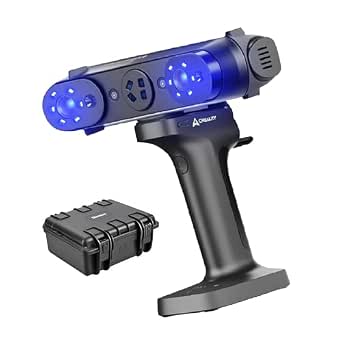 | Best for Versatile Workshop Scanning | Detail accuracy: Up to 0.02 mm | Volume accuracy: 0.02 mm + 0.08 mm/m | Scanning rate: Up to 4,600,000 points per second | VIEW ON AMAZON | See Our Full Breakdown |
| Revopoint MetroY Pro Blue Laser 3D Scanner |  | Best for Home Metrology | Resolution: 0.05 mm | Precision: Up to 0.01 mm | Accuracy: Up to 0.02 mm | VIEW ON AMAZON | See Our Full Breakdown |
| Revopoint POP3 Plus Full-Color 3D Scanner |  | Best for Color and Device Flexibility | Accuracy: Up to 20 microns | Scanning speed: Up to 18 fps | Point distance: 0.05 mm | VIEW ON AMAZON | See Our Full Breakdown |
| Revopoint MetroX Pro Blue Laser 3D Scanner |  | Best for Automated Detail Capture | Single-frame precision: Up to 0.01 mm | Single-frame accuracy: Up to 0.02 mm | Volumetric accuracy: 0.02 mm + 0.04 mm × L(m) | VIEW ON AMAZON | See Our Full Breakdown |
| Creality Pika Portable 3D Scanner |  | Best for Portable, Versatile Scanning | Precision: 0.03 mm | Scanning modes: Blue laser and NIR structured light | Maximum scan rate: Up to 110 fps via USB 3.0 | VIEW ON AMAZON | See Our Full Breakdown |
| Creality CR-Scan Raptor Handheld 3D Scanner |  | Best for Fine Detail Across Object Sizes | Scanning technologies: Blue light and near-infrared | Accuracy: Up to 0.02 mm | Supported object size: 5 × 5 × 5 mm to 2,000 × 2,000 × 2,000 mm | VIEW ON AMAZON | See Our Full Breakdown |
| Revopoint INSPIRE 2 Handheld 3D Scanner |  | Best for Reflective and Dark Objects | Scanning modes: Infrared structured light and multi-line laser | Accuracy: Up to 0.05 mm | Precision: Up to 0.03 mm | VIEW ON AMAZON | See Our Full Breakdown |
| 3DMakerpro Fox 3D Scanner, 0.07mm Accuracy 3D Scanner for 3D Printing, Entry-Level Easy Scanning for Small to Large Objects |  | Best for Learning DIY Scanning | Scanning technology: Near-infrared | Accuracy: Up to 0.07 mm | Supported object size: 40 mm to 1,200 mm | VIEW ON AMAZON | See Our Full Breakdown |
| Creality CR-Scan Raptor 3D Scanner |  | Best for Marker-Free Large-Object Scans | Scanning technologies: Blue laser and NIR | Blue laser accuracy: Up to 0.02 mm | Blue laser scanning speed: Up to 60 fps | VIEW ON AMAZON | See Our Full Breakdown |
| 3d scanners for home use | Accuracy | Weight |
|---|---|---|
| Creality Otter Lite Basic 3D S | 0.05 mm | — |
| Revopoint MetroY Ultra 3D Scan | — | 450 g |
| Creality Pika Wireless 3D Scan | 0.03 mm | 260 g |
| Creality CR-Scan Ferret Pro Wi | Up to 0.1 mm | 105 g |
| Creality CR-Ferret SE 3D Scann | 0.1 mm | 105 g |
| 3DMakerpro Fox Handheld Medium | 0.07 mm | — |
| Creality Sermoon S1 3D Scanner | — | 7.98 pounds |
| Revopoint MetroY Pro Blue Lase | Up to 0.02 mm | 450 g |
| Revopoint POP3 Plus Full-Color | Up to 20 microns | 190 g |
| Revopoint MetroX Pro Blue Lase | — | — |
| Creality Pika Portable 3D Scan | — | — |
| Creality CR-Scan Raptor Handhe | Up to 0.02 mm | 372 g |
| Revopoint INSPIRE 2 Handheld 3 | Up to 0.05 mm | 190 g |
| 3DMakerpro Fox 3D Scanner | Up to 0.07 mm | — |
| Creality CR-Scan Raptor 3D Sca | — | — |
More Details on Our Top Picks
Creality Otter Lite Basic 3D Scanner
The Otter Lite Basic is the most flexible fit here for a home user who expects to scan different kinds of objects, from small parts to larger household items. Its listed 0.8–78-inch scan range, color capture, and ability to handle dark or metallic surfaces without spray give it broader everyday reach than the more size-limited Ferret Pro. It also works across Windows, macOS, iOS, and Android, which can suit a household with several devices. The tradeoff is that the optional Scan Bridge handle is sold separately, so the basic package may not give every buyer the setup they expect. Compared with the more precision-focused MetroY Ultra, its stated accuracy is less exact, but its platform flexibility and broad object range make it an easier all-round home choice.
Pros:- Scans dark and metallic surfaces without spray
- Captures 24-bit color textures
- Supports a broad range of object sizes
- Works with Windows, macOS, iOS, and Android
Cons:- Scan Bridge handle is sold separately
- Its 0.05 mm stated accuracy is less precise than the MetroY Ultra’s 0.01 mm single-frame precision
Best for: Home makers who want to scan varied object sizes and work across a phone, tablet, or computer
Not ideal for: Buyers who need the highest stated precision or expect the Scan Bridge handle to come in the basic package
- Accuracy:0.05 mm
- Scanning speed:Up to 30 fps
- Camera design:Quad-camera
- Scan object size:0.8–78 inches
- Color depth:24 bits per pixel
- Connection:Wi-Fi 6
- Supported platforms:Windows, macOS, iOS, Android
- Export formats:PLY, OBJ, STL, ASC, 3MF, GLTF, FBX
Our verdict“Choose the Otter Lite Basic if you want one adaptable scanner for varied home projects and devices.”
Revopoint MetroY Ultra 3D Scanner
The MetroY Ultra is the precision pick for home workshops where small details matter more than a simple setup. Its 0.01 mm single-frame precision and blue laser plus structured-light modes are aimed at capturing detailed small and medium objects; it can also scan dark and shiny surfaces without spray. Wireless use and outdoor scanning add flexibility beyond a fixed workbench. That capability comes with a demanding computer requirement: the listed Windows setup calls for 32 GB RAM and an RTX 3060, so this is a poor match for a basic family laptop. The Otter Lite Basic is more accommodating across devices and object sizes, while the MetroY Ultra makes the stronger case for demanding detail work. Its roughly 2.5-hour battery life also limits long sessions away from power.
Pros:- High stated single-frame precision for detailed scans
- Blue laser and structured-light scanning modes
- Handles dark and shiny surfaces without spray
- Wireless operation and outdoor scanning support
Cons:- Fastest scanning calls for a dedicated NVIDIA GPU
- Battery life is about 2.5 hours
- Listed computer requirements are demanding for casual home setups
Best for: Experienced hobbyists with a capable computer who scan detailed parts or glossy objects at home and outdoors
Not ideal for: Casual users with entry-level computers or anyone who needs long wireless sessions without recharging
- Single-frame precision:Up to 0.01 mm
- Volumetric accuracy:0.015 + 0.04 mm × L (m)
- Scanning speed:Up to 90 fps with NVIDIA GPU; up to 60 fps with CPU
- Scanning modes:5
- Connection:USB, Wi-Fi 6
- Weight:450 g
- Battery capacity:5500 mAh
- Battery life:About 2.5 hours
- Maximum sunlight:100,000 lux
Our verdict“Pick the MetroY Ultra when detail capture justifies its computer demands and shorter battery sessions.”
Creality Pika Wireless 3D Scanner
At 260 g, the Pika is the compact wireless option for home users who want to carry a scanner between a desk, workshop, and other locations. It covers an unusually broad stated range, from 5 mm to 2,000 mm, with blue lasers and infrared light, while AI-assisted hole filling can help complete models when a scan misses areas. That makes it more adaptable to object size than the Ferret Pro, whose stated minimum is 50 mm, and more portable than the 450 g MetroY Ultra. The Pika’s listed 0.03 mm accuracy is a middle ground between the MetroY Ultra’s finer single-frame precision and the Ferret Pro’s 0.1 mm figure. It still depends on lithium-ion batteries, and the product data does not explain the unusual stated body dimensions in enough detail to judge how it handles in use.
Pros:- Scans a wide range of object sizes
- Lightweight body at 260 g
- Wi-Fi 6 connectivity and hot-swappable batteries
- AI tools can assist with hole filling and model completion
Cons:- Requires lithium-ion batteries for wireless use
- Battery runtime is not specified in the provided product data
- Listed dimensions appear unusually thin compared with the pocket-sized description
Best for: Makers who want a lightweight wireless scanner for both small components and larger objects
Not ideal for: Buyers seeking detailed battery runtime information or a scanner with a clearly documented handling setup
- Accuracy:0.03 mm
- Scan range:5–2,000 mm
- Light sources:7 parallel blue lasers and NIR structured light
- Weight:260 g
- Dimensions:100 × 60 × 42.5 mm
- Connectivity:Wi-Fi 6
- Battery:Two hot-swappable 3,350 mAh batteries
- Export formats:STL, OBJ, PLY, ASC
Our verdict“Choose the Pika if portability and a wide scan range matter more than a fully documented battery runtime.”
Creality CR-Scan Ferret Pro Wireless 3D Scanner
The Ferret Pro suits home users who value a light, portable kit and straightforward wireless scanning over fine-detail work. At 105 g, it is much lighter than the Pika and MetroY Ultra, and the included Wi-Fi box, tripod, power bank, phone holder, and case give buyers more of the supporting gear in one package. Its 24-bit color and anti-shake tracking can help with handheld capture, but its 50–2,000 mm object range rules out very small components. Reflective, transparent, very dark, or highly detailed surfaces can also be difficult, where the Otter Lite Basic and MetroY Ultra have stated support for dark or shiny materials without spray. With 0.1 mm accuracy, this is a convenience-first choice for larger household objects, not the lineup’s detail specialist.
Pros:- Lightweight at 105 g
- Includes a Wi-Fi box, tripod, power bank, phone holder, and case
- Captures 24-bit color with anti-shake tracking
- Supports Windows, macOS, Android, and iOS
Cons:- Does not suit objects smaller than 50 mm
- Reflective, transparent, very dark, and highly detailed surfaces can affect results
- 0.1 mm stated accuracy is less suited to fine detail than the Pika or MetroY Ultra
Best for: Beginners who want a lightweight wireless kit for scanning medium and larger household objects
Not ideal for: Hobbyists scanning tiny parts, intricate details, or reflective and transparent objects
- Accuracy:Up to 0.1 mm
- Color depth:24-bit
- Supported object size:50–2,000 mm
- Connectivity:Wi-Fi 6
- Weight:105 g
- Output formats:OBJ, STL, PLY
- Operating systems:Windows, macOS, Android, iOS
- Included accessories:Wi-Fi box, tripod, power bank, phone holder, carrying case
Our verdict“Choose the Ferret Pro for a light, accessory-rich kit to scan larger everyday objects with a phone or computer.”
Creality CR-Ferret SE 3D Scanner
The CR-Ferret SE is the pared-back choice for a Windows or Mac owner who wants color capture and basic stabilization without a more complex feature set. Its anti-shake stabilization can help keep handheld scans steady, while the 24-bit camera and stated ability to scan dark and metallic objects without spray support common home projects. Compared with the wireless Ferret Pro, the SE has less detail in its supplied specifications: there is no stated scan volume or speed, and compatibility is limited to Mac and Windows. That makes it harder to tell whether it fits a particular object or workflow before buying. The Pika is a more capable choice for small parts and portability; the SE makes more sense for straightforward scanning on a computer, provided its unspecified range suits the intended objects.
Pros:- Anti-shake stabilization supports steadier handheld scanning
- Scans dark and metallic objects without spray or markers
- Captures 24-bit color with a built-in 2 MP camera
- Lightweight at 105 g
Cons:- Scan speed and supported scan volume are not specified
- Compatibility is limited to Mac and Windows
- Less documented for choosing against the more fully specified Ferret Pro
Best for: Mac and Windows users who want a lightweight scanner for simple color scans of ordinary household objects
Not ideal for: Buyers who need a known scan volume, speed, mobile-device support, or detailed small-part capture
- Accuracy:0.1 mm
- Color capture:24-bit
- Camera:2 MP
- Weight:105 g
- Compatibility:Mac, Windows
- Manufacturer:Creality
Our verdict“Pick the CR-Ferret SE for simple computer-based color scanning when its unspecified scan range is acceptable.”
3DMakerpro Fox Handheld Medium-Format 3D Scanner
The 3DMakerpro Fox suits home makers who want a handheld scanner with approachable tracking and tools for preparing models. Its markerless AI tracking can reacquire an object if tracking drops, which may reduce interruptions while moving around a household item. JMStudio combines scanning, editing, and model optimization, giving beginners a route from capture toward 3D printing without assembling a separate software workflow. At 10 FPS, though, it is a more measured option than the Revopoint POP3 Plus, which lists speeds up to 18 fps and adds full-color capture. The Fox’s stated 0.07 mm accuracy and 0.10 mm resolution make it a practical entry point, but its entry-level positioning leaves less headroom for demanding inspection work. Choose it for learning and hobby projects; skip it if professional-grade metrology is the priority.
Pros:- Markerless AI tracking can reacquire an object after tracking is lost
- JMStudio includes scanning, editing, and model optimization tools
- Stated accuracy of 0.07 mm and resolution of 0.10 mm
- Handheld design supports scanning objects in place
Cons:- Entry-level positioning may not meet advanced professional needs
- 10 FPS is slower than the listed 18 FPS of the POP3 Plus
- The provided specifications do not state mobile compatibility or full-color capture
Best for: First-time home makers who want handheld scanning, markerless tracking, and built-in tools for preparing models for 3D printing.
Not ideal for: Professional inspection teams or advanced users who need higher-end metrology capabilities and workflows.
- Scanner type:Handheld, medium-format 3D scanner
- Accuracy:0.07 mm
- Resolution:0.10 mm
- Scan speed:10 FPS
- Tracking:Markerless AI visual tracking
- Software:JMStudio
- Item weight:2.39 pounds
Our verdict“Pick the Fox if you are learning handheld scanning at home and value tracking recovery and an included editing workflow over professional metrology.”
Creality Sermoon S1 3D Scanner with Scan Bridge
The Creality Sermoon S1 stands apart in this group for the range of jobs its modes cover: blue lasers and structured light span small details through larger objects, with a stated size range from 5 mm³ to 1245 × 754 mm. Up to 0.02 mm detail accuracy, color mapping, and support for bright conditions give it more reach for workshop parts and outdoor captures than the beginner-oriented 3DMakerpro Fox. The included Scan Bridge allows wireless scanning, but that setup and the scanner’s nearly eight-pound listed weight make it less appealing for quick, casual household projects. Its computer requirements are also substantial, and the headline capture rates are not a substitute for a capable PC. This makes most sense for a technically equipped maker who wants one scanner for varied objects; a simpler hobby setup should look elsewhere.
Pros:- Multiple blue laser and structured light modes cover varied objects and distances
- Up to 0.02 mm detail accuracy
- Scan Bridge enables wireless scanning
- Color mapping and support for bright ambient light in some modes
Cons:- Requires a powerful computer with at least 8 cores and 16 threads
- Wireless scanning depends on the included Scan Bridge
- Listed weight of 7.98 pounds makes it less convenient to move around
Best for: Makers with a powerful Windows or macOS computer who scan varied workshop parts, larger objects, or items in bright conditions.
Not ideal for: Casual beginners seeking a light, simple home scanner or buyers without a computer that meets the stated processor requirements.
- Detail accuracy:Up to 0.02 mm
- Volume accuracy:0.02 mm + 0.08 mm/m
- Scanning rate:Up to 4,600,000 points per second
- Maximum scanning speed:90 fps
- Working modes:Blue single-line, 7-line and 34-line lasers; short- and long-range structured light
- Object size range:5 mm³ to 1245 × 754 mm
- Working distance:150–1200 mm
- Connectivity:Wireless scanning with Scan Bridge
- Weight:7.98 pounds
Our verdict“Choose the Sermoon S1 for a well-equipped home workshop that needs broad scanning modes, and skip it if portability or a modest computer setup matters most.”
Revopoint MetroY Pro Blue Laser 3D Scanner
For home users doing reverse engineering, measurement, or detailed part capture, the MetroY Pro brings five scanning modes and stated accuracy up to 0.02 mm. Its laser modes can handle shiny and dark surfaces without scanning spray, a useful advantage when a part’s finish should remain untouched. Wi-Fi 6 supports wireless scanning and live streaming, while temperature monitoring adjusts fan speed to help maintain accuracy during longer sessions. That makes it a more metrology-focused choice than the full-color, multi-device POP3 Plus, but it asks more of the computer: the listed Windows configuration includes 32 GB RAM and an RTX 3060, and its minimum macOS specification calls for an M2 Pro and 16 GB RAM. Revo Design and Revo Measure cost extra and support Windows only. It is a specialist tool for capable setups, not the easy default for casual scanning.
Pros:- Five modes include deep-hole and turntable scanning
- Laser modes can scan shiny and dark surfaces without scanning spray
- Wi-Fi 6 supports wireless scanning and live scan streaming
- Temperature monitoring adjusts fan speed to help maintain accuracy
Cons:- Revo Design and Revo Measure are sold separately
- Those two software tools support Windows only
- Listed computer requirements are demanding, including a dedicated GPU for Windows
Best for: Technically inclined home makers who measure or reverse engineer shiny, dark, or detailed parts and have a high-spec computer.
Not ideal for: Casual users who want simple color capture, broad device compatibility, or a complete workflow without separately sold software.
- Resolution:0.05 mm
- Precision:Up to 0.01 mm
- Accuracy:Up to 0.02 mm
- Volumetric accuracy:0.02 mm + 0.04 mm × L(m)
- Scanning modes:5
- Maximum laser scanning speed:2,000,000 points per second
- Maximum structured light scanning speed:7,000,000 points per second
- Connection:USB, Wi-Fi 6
- Weight:450 g
Our verdict“Choose the MetroY Pro for measurement-oriented home projects if your computer can handle it and you are comfortable with the software costs.”
Revopoint POP3 Plus Full-Color 3D Scanner
The Revopoint POP3 Plus is the easiest fit here for makers who want recognizable color in a scan and plan to work across phones, tablets, or computers. Its HD RGB camera captures full-color models, and connections over Wi-Fi 6 or USB-C pair with iOS, Android, Windows, and macOS. At 190 g, it is also far easier to carry around the house than the 7.98-pound Sermoon S1. Its stated accuracy reaches 20 microns, with speeds up to 18 fps, but it does not offer the MetroY Pro’s five metrology modes or stated 0.01 mm precision. Calibration and careful handling can matter for accurate results, and the software’s x86_64 limitation may narrow compatibility on some devices. Pick this for flexible hobby capture and color; choose a laser-focused scanner for measurement work.
Pros:- HD RGB camera captures full-color scans
- Works with iOS, Android, Windows, and macOS devices
- Lightweight at 190 g
- Exports to common formats including PLY, OBJ, STL, 3MF, and FBX
Cons:- Calibration and careful handling may be needed for accurate scans
- Software is compatible only with x86_64 architecture
- Does not list the specialized metrology modes offered by the MetroY Pro
Best for: Home hobbyists who want color scans of medium-sized objects and expect to connect the scanner to mobile devices or a computer.
Not ideal for: Users focused on metrology or deep part measurement, or owners of devices that do not support x86_64 software.
- Accuracy:Up to 20 microns
- Scanning speed:Up to 18 fps
- Point distance:0.05 mm
- Object size range:20 × 20 × 20 mm to 2 × 2 × 2 m
- Weight:190 g
- Connectivity:Wi-Fi 6, USB Type-C
- Compatibility:iOS, Android, Windows, macOS
- Export formats:PLY, OBJ, STL, ASC, 3MF, GLTF, FBX
- Warranty:Two years
Our verdict“Pick the POP3 Plus for portable, full-color home scanning across devices, and look to the MetroY Pro for more specialized measurement work.”
Revopoint MetroX Pro Blue Laser 3D Scanner
The MetroX Pro combines multiple capture and tracking modes with an automated dual-axis turntable, making it a strong fit for repeatable home workshop scans of smaller parts. Its 30 cross-line lasers, 15 parallel lines, and full-field structured light give users ways to adapt capture to different surfaces, while feature, marker, and global marker tracking offer further workflow flexibility. The listed maximum reaches 7 million points per second, with single-frame precision up to 0.01 mm. Compared with the handheld POP3 Plus, this is a more elaborate setup geared toward detailed modeling and inspection rather than casual, mobile color scanning. At 14.82 pounds per the listing, it is also much less convenient to carry. Revo Design and Revo Measure are sold separately, and those apps support Windows only, even though the scanner itself is listed for Windows and macOS.
Pros:- Automated dual-axis turntable supports repeatable part capture
- Multiple laser and structured light modes adapt to different scanning needs
- Feature, marker, and global marker tracking options
- Can scan shiny or dark surfaces without scanning spray in specified modes
Cons:- Revo Design and Revo Measure are sold separately
- Those software tools support Windows only
- Listed item weight of 14.82 pounds limits portability
Best for: Home workshop users who scan detailed parts repeatedly and can make room for a turntable-based setup and compatible software.
Not ideal for: Mobile-first hobbyists or Mac users who need Revo Design or Revo Measure as part of their workflow.
- Single-frame precision:Up to 0.01 mm
- Single-frame accuracy:Up to 0.02 mm
- Volumetric accuracy:0.02 mm + 0.04 mm × L(m)
- Scanning modes:30 cross-line lasers, 15 parallel lines, 62-line full-field structured light, auto turntable
- Maximum scanning speed:Up to 7 million points per second
- Tracking modes:Feature, marker, global marker
- Camera:HD RGB
- Compatible platforms:Windows and macOS
- Item weight:14.82 pounds
Our verdict“Choose the MetroX Pro for a stationary home workshop that benefits from automated, detailed part capture, and skip it for a portable or Mac-centered setup.”
Creality Pika Portable 3D Scanner
The Pika suits a home workshop that needs one scanner for more than small rigid parts. Its blue laser and NIR modes cover detailed object capture as well as color and body scanning, while the built-in screen and Wi-Fi 6 make it easier to work away from a desk. Compared with the Creality CR-Scan Raptor, the Pika puts more emphasis on portability and on-device controls; the Raptor lists a higher maximum accuracy and a broader stated object-size range. The Pika’s advertised 110 fps requires a USB 3.0 computer connection, so phone users should expect lower listed rates. It also asks buyers to trust performance claims that come without independent reliability evidence. This is a flexible home pick, but not a set-and-forget one.
Pros:- Blue laser and NIR modes support different object and body scanning needs
- Built-in touchscreen and Wi-Fi 6 support portable, less tethered workflows
- 24-bit color capture and common STL, OBJ, PLY, and ASC exports
- Marker-free blue laser scanning is stated to work on black metal without coating
Cons:- The maximum 110 fps rate requires a USB 3.0 computer connection
- No independent performance or reliability evidence is provided in the product data
Best for: Home makers who want a compact scanner for varied objects and occasional body scans, with the option to use a phone or computer
Not ideal for: Buyers prioritizing independently verified results or top listed accuracy, or those who expect the maximum scan rate while using a phone
- Precision:0.03 mm
- Scanning modes:Blue laser and NIR structured light
- Maximum scan rate:Up to 110 fps via USB 3.0
- Display:3-inch touchscreen
- Connectivity:Wi-Fi 6 and USB 3.0
- Color capture:24-bit
- Supported platforms:Windows, macOS, Android, iOS
- Export formats:STL, OBJ, PLY, ASC
Our verdict“Choose the Pika if portability and multiple scanning modes matter more to your home projects than the Raptor’s higher listed accuracy.”
Creality CR-Scan Raptor Handheld 3D Scanner
The handheld Raptor is the strongest fit here for home users who need fine detail across both small components and much larger objects. Its blue-light accuracy up to 0.02 mm is higher on paper than the Pika’s stated 0.03 mm precision, and its listed capture range runs from 5 mm objects to objects measuring 2,000 mm. That breadth can matter when a workshop scans small mechanical parts alongside larger household pieces. Blue light and near-infrared also let it serve different scanning situations, with color and texture capture for more informative models. The tradeoff is the computer: the recommended Windows setup calls for an i7, a graphics card with 8 GB VRAM, and 32 GB RAM. Compared with the INSPIRE 2, this is a more demanding desktop workflow, and direct blue-light exposure may cause minor eye discomfort.
Pros:- Blue-light accuracy is listed up to 0.02 mm
- Stated object-size range spans 5 mm to 2,000 mm
- Blue-light and near-infrared scanning with color and texture capture
- Handheld weight of 372 g
Cons:- Recommended Windows configuration requires substantial memory and graphics capability
- Direct exposure to blue light may cause minor eye discomfort
Best for: Experienced home makers with a capable computer who need detailed scans of parts ranging from tiny components to large objects
Not ideal for: Casual users with an older or basic computer, or anyone who wants a lightweight, low-setup scanning workflow
- Scanning technologies:Blue light and near-infrared
- Accuracy:Up to 0.02 mm
- Supported object size:5 × 5 × 5 mm to 2,000 × 2,000 × 2,000 mm
- NIR capture range:Up to 930 × 580 mm at 1,000 mm
- Color and texture:Supported
- Supported file formats:OBJ, STL, PLY
- Weight:372 g
- Recommended Windows configuration:10th-gen Intel Core i7, Nvidia graphics with 8 GB VRAM, 32 GB RAM, Windows 10/11 64-bit
Our verdict“Pick the handheld Raptor for fine-detail work across very different object sizes if your computer can handle its software demands.”
Revopoint INSPIRE 2 Handheld 3D Scanner
For household projects involving shiny or dark objects, the INSPIRE 2 addresses a common source of scanning friction: it is described as capturing those surfaces without scanning spray. Its infrared structured-light and multi-line laser modes, full-color texture capture, and 190 g weight make it a convenient handheld choice for moving between small jobs around the home. The Pika also offers multiple modes and a built-in display, but the INSPIRE 2’s stated surface capability gives it a clearer role for tricky materials. Its listed accuracy reaches 0.05 mm, below the Raptor’s 0.02 mm claim, so it is less suited to buyers putting fine measurement detail first. Wireless scanning and outdoor use up to 20,000 lux add flexibility, though that lighting range is specified for shaded or semi-bright conditions. Revo Design scan-to-CAD software is sold separately and only supports Windows.
Pros:- Designed to scan reflective and dark surfaces without scanning spray
- Lightweight at 190 g with USB-C and Wi-Fi 6 connectivity
- Captures full-color textures
- Includes calibration and scanning accessories such as markers, a mini turntable, and calibration board
Cons:- Listed accuracy is lower than the CR-Scan Raptor’s 0.02 mm
- Revo Design scan-to-CAD software is sold separately and supports Windows only
- Outdoor lighting specification is limited to up to 20,000 lux
Best for: Home repairers and hobbyists scanning dark or reflective parts who value a light handheld unit and wireless use
Not ideal for: Buyers who need the highest listed accuracy, bright-sunlight scanning, or included Windows scan-to-CAD software
- Scanning modes:Infrared structured light and multi-line laser
- Accuracy:Up to 0.05 mm
- Precision:Up to 0.03 mm
- Resolution:0.1 mm
- Weight:190 g
- Connectivity:USB Type-C and Wi-Fi 6
- Outdoor lighting:Up to 20,000 lux
- Included accessories:USB-C cable, tripod, markers, mini turntable, calibration board, outdoor filters
Our verdict“Choose the INSPIRE 2 if reflective or dark household objects are your main challenge and you can accept its lower listed accuracy.”
3DMakerpro Fox 3D Scanner, 0.07mm Accuracy 3D Scanner for 3D Printing, Entry-Level Easy Scanning for Small to Large Objects
The Fox is aimed at home users who want to learn a scan-to-print workflow without applying tracking dots to every object. Its markerless NIR tracking and anti-shake feature reduce setup work and help compensate for minor hand movement, while the 40–1,200 mm object range suits desktop miniatures, parts, and some larger household items. Compared with the INSPIRE 2, the Fox is positioned more clearly as an entry-level DIY and STEM tool, but its stated 0.07 mm accuracy is lower than the Revopoint’s 0.05 mm. “Entry-level” also does not mean effortless: the product description calls out patience, mesh refinement knowledge, and a capable PC with a dedicated GPU. For home printing, that means the scanner can capture a starting model, but buyers should expect to spend time preparing it before slicing.
Pros:- Markerless tracking avoids placing target dots on objects
- NIR scanning is described as suitable for face and body capture
- Anti-shake technology compensates for minor hand tremors
- JMStudio supports scanning, editing, fusion, and OBJ, STL, PLY, and ASC exports
Cons:- The product description warns that the workflow has a learning curve and calls for mesh refinement knowledge
- A capable PC with a dedicated GPU is strongly recommended
- Its stated 0.07 mm accuracy is lower than the INSPIRE 2 and Raptor figures
Best for: DIY 3D-printing learners and STEM users who want markerless scans of small to medium objects and are willing to refine meshes
Not ideal for: Buyers seeking polished printable meshes with little editing, or those using a computer without a capable dedicated GPU
- Scanning technology:Near-infrared
- Accuracy:Up to 0.07 mm
- Supported object size:40 mm to 1,200 mm
- Optimal working distance:150–400 mm
- Tracking:Markerless with anti-shake
- Software:JMStudio for scanning, editing, fusion, and export
- Export formats:OBJ, STL, PLY, ASC
- Included items:65 W charger, data cable, manual turntable
Our verdict“The Fox makes sense as a learning scanner for DIY printing if you have a capable PC and are ready to refine your meshes.”
Creality CR-Scan Raptor 3D Scanner
This CR-Scan Raptor pairs a fine-detail blue laser mode with marker-free NIR scanning, making it a flexible option for a home workshop that handles both small parts and larger objects. Its listed range of 5 mm to 2,000 mm is broad, while up to 60 fps blue laser scanning can help capture movement through a scan more quickly. Compared with the handheld Raptor, this model lists the same 0.02 mm accuracy and object-size span, but adds explicit blue-laser and NIR scan-rate figures; the handheld listing gives more detail about color and texture. The tradeoff is a powerful computer requirement, and blue laser mode requires markers, which adds preparation for detailed work. It is a stronger fit for varied workshop tasks than for someone who wants a quick, casual scan with minimal setup.
Pros:- Blue laser accuracy is listed up to 0.02 mm
- Combines blue laser and NIR scanning
- Broad stated object-size range from 5 mm to 2,000 mm
- Blue laser scans at up to 60 fps
Cons:- Requires a high-performance computer
- Blue laser scanning requires markers
- No color capture or export format details are provided in the supplied product data
Best for: Home workshop users scanning both small parts and large objects who can provide a capable computer and use markers for laser scans
Not ideal for: Casual users who want marker-free operation in every mode or do not have a computer meeting the listed requirements
- Scanning technologies:Blue laser and NIR
- Blue laser accuracy:Up to 0.02 mm
- Blue laser scanning speed:Up to 60 fps
- NIR scanning speed:Up to 20 fps
- Object size range:5 × 5 × 5 mm to 2,000 × 2,000 × 2,000 mm
- Blue laser lines:7 parallel lines, each as thin as 0.1 mm
- Windows requirements:7th-gen Intel Core i7, Nvidia GPU with 6 GB, 16 GB RAM
- macOS requirements:Apple M, M2, or M3; 16 GB RAM; macOS 11.7.7 or later
Our verdict“Choose this Raptor for a broad home-workshop scanning range if you have the required computer and are comfortable placing markers for laser mode.”

How We Picked
I ranked these scanners for realistic home use, weighing how broadly each appears suited to household projects, how approachable its scanning workflow seems, and whether its distinguishing features solve a clear buyer need. I also considered versatility, portability, and the practical cost of choosing a more specialized device, without relying on customer ratings or price claims.
The order gives preference to well-rounded options that make sense across more than one kind of project. Scanners with a clear specialty, such as full-color capture, wireless operation, or blue-laser positioning, rank for the users who need that distinction rather than automatically outranking general-purpose picks. Product names in this lineup include closely related models and differently described listings, so buyers should verify the specific model and included accessories before choosing.
Factors to Consider When Choosing 3d Scanners For Home Use
Before choosing a scanner, I would match the device to the objects you actually plan to capture and the amount of setup you are willing to handle. A few practical decisions can matter more than a headline accuracy figure.
Match the Scanner to Object Size and Detail
Start by listing the objects you expect to scan, from small replacement parts to larger household items. A scanner that suits detailed, compact pieces may require more passes or repositioning on a larger object. Large objects can also be awkward to hold still or move around in a crowded room. Fine surface detail matters for some projects, while overall shape is enough for others. Do not assume one model will be equally convenient for every size. I would choose around the object that would be hardest for you to capture, then check that the scanner still fits your more routine tasks.
Choose Between Portability and a More Fixed Setup
Handheld scanning can make it easier to move around an object, but it asks you to keep a steady pace and follow the scanning workflow. Wireless operation can reduce cable clutter and give you more freedom to move, which may help with larger objects. A wired setup may suit a desk-based workflow where the scanner stays near a computer. Think about where you will work and whether you can rotate the object instead of walking around it. A portable device is only an advantage if you will use that freedom. For occasional scanning at a workbench, simplicity and repeatability may matter more.
Decide Whether Color Capture Matters
Shape data is the priority when the goal is to reproduce dimensions, make a printable model, or archive an object’s form. Color capture becomes useful when visual appearance is part of the result, such as sharing a realistic digital keepsake or documenting a painted object. It can also add steps and file complexity that are unnecessary for a shape-only project. Think about what you will do with the scan after capture, including the software or service that will open it. A colorful scan does not by itself make a model ready for 3D printing. Choose color for a clear visual purpose, rather than treating it as a default requirement.
Read Accuracy Claims in the Context of Your Project
Accuracy figures are useful only when they relate to the size, surface, and workflow of the object you need to capture. Small parts with mating surfaces may demand more care than a decorative object whose broad shape is enough. A single specification cannot describe how easy it is to capture a difficult surface or combine multiple passes. Check what the manufacturer says about the conditions and scanning mode behind a figure. Also consider whether your downstream software can use the resulting mesh or point cloud. I would pay for higher capability only when a real project depends on it, rather than assuming a larger number automatically improves every scan.
Account for Setup, Software, and the Full Workflow
A scanner is part of a workflow that can include calibration, object preparation, alignment, cleanup, and export. Those steps affect how quickly a home user can move from a physical object to a useful file. Before buying, check the supported computer or mobile devices, required software, export formats, and whether accessories are included in the exact listing. Small objects may need a turntable or careful handling, while reflective or dark surfaces can call for additional preparation depending on the device. This is where an approachable model can save time even if another option has more specialized capabilities. Match the scanner to the software you already use whenever possible.
Frequently Asked Questions
Which scanner in this roundup makes the most sense for a first home scanner?
I would begin with the Creality Otter Lite Basic if you want a general-purpose starting point, since this roundup gives it the best overall role. If portability matters more to you, compare it with the CR-Scan Ferret Pro; if color is a central goal, look at the POP3 Plus. Before deciding, check the required device, software workflow, and included accessories for the exact listing. Your first project should guide the choice: a small part, a large object, and a color keepsake can call for different strengths.
Do I need a blue-laser scanner for projects at home?
Not automatically. The MetroY and MetroX Pro models are presented as blue-laser options, which may appeal if their particular scanning capabilities match a specific project. For general household scanning, a more broadly positioned scanner may be easier to justify. Check the manufacturer’s stated limits and recommended scanning conditions against the materials and details you expect to capture. I would choose a specialized scanner when a project calls for its particular strengths, rather than buying one just because its technology sounds advanced.
Can one home scanner handle both small parts and larger objects?
Some models may cover a broad range, but convenience can change with object size. A compact part may need careful detail capture, while a large object may take more passes, repositioning, and room to move around it. Compare the manufacturer’s supported object range with the things you plan to scan most often. If your projects span very different sizes, favor versatility and a workflow you can manage over a single standout specification. For demanding work at both extremes, check whether the model’s software and scanning modes support each use.
Is full-color scanning useful if I mainly want to 3D print objects?
Usually, the shape and dimensions matter more for a printable model than its color. The POP3 Plus is the roundup’s color-focused option, so it suits buyers who also want the scan’s appearance represented. Color data may be helpful for documentation or visual sharing, but it does not replace mesh cleanup or checking the model for printability. If your output is a functional part, direct your attention to capture quality, supported workflow, and how easily you can edit the file. Choose color when you have a clear use for it.
How should I compare products with similar names, such as the Fox or Raptor listings?
Use the full product name and exact listing details rather than relying on the shared family name. This roundup includes two Fox entries and two Raptor entries, and their descriptions are not identical. Check the model identifier, included accessories, software support, and any stated scanning modes before ordering. A bundle can change what is included without changing the core scanner name. If two listings appear similar, compare their official product pages and confirm which version matches your planned workflow.
Conclusion
For the best overall home pick, I recommend the Creality Otter Lite Basic as the roundup’s broad-use starting point. The Creality CR-Scan Ferret Pro is my best value in practical flexibility for buyers who want wireless movement, while the Revopoint POP3 Plus is the best premium-style choice for color-focused work. Beginners should start with the Otter Lite Basic and verify that its software and setup fit their computer; the 3DMakerpro Fox listings are worth comparing for buyers drawn to an entry-level positioning. For specific needs, consider the MetroY or MetroX Pro for a blue-laser workflow, the Sermoon S1 with Scan Bridge for its named bundle, and the portable Pika models when carrying a scanner matters. Pick the exact model around your objects and output, then confirm the listing details before buying.