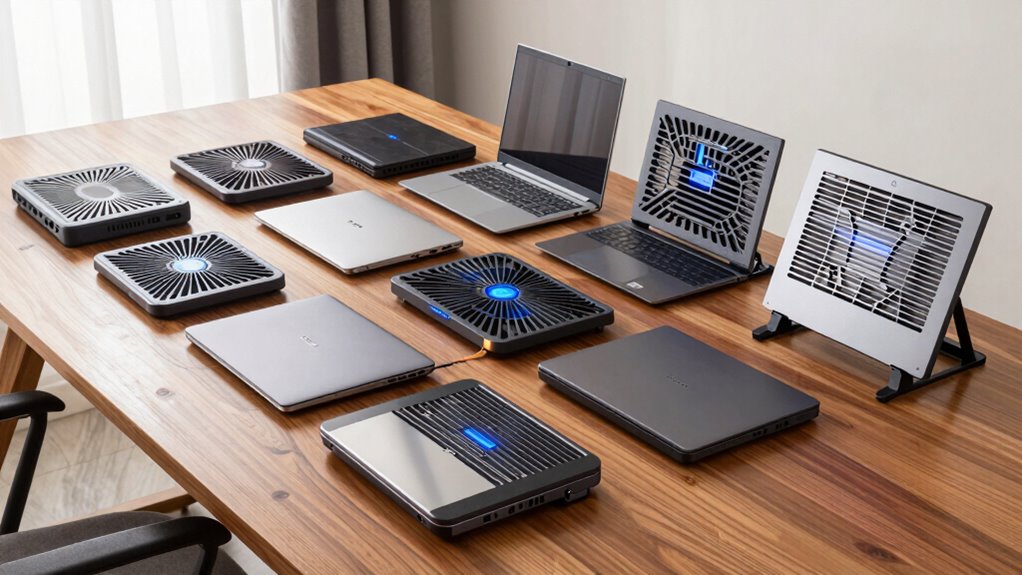

Among these laptop cooling pads, I’d make the llano V12 Gaming Laptop Cooling Pad with 5.5-inch Turbo Fan my best overall pick for buyers who want a focused, high-airflow design. The Razer Laptop Cooling Pad stands out for adaptive fan control, while the Targus 17-Inch Dual-Fan Pad offers a simpler fit for larger laptops. The main tradeoff is between concentrated airflow and broad multi-fan coverage, with size, noise, adjustability, and extra controls shaping the rest of the decision. More fans do not automatically mean a better match; the pad needs to fit the laptop’s vents and your desk setup. Read on for the full breakdown of all 15 options and which buyer each one suits.

Get home appliances delivered free with Prime
- Fast, free delivery on millions of items
- Prime Video, Amazon Music and more included
- Member-only deals all year
Complete the kit



Key Takeaways
- The llano V12 with 5.5-inch Turbo Fan leads for buyers prioritizing focused airflow, while its gaming-oriented design may be more than a casual user needs.
- Razer’s adaptive fan control is the standout control feature; buyers who prefer straightforward cooling can avoid paying attention to software and lighting features.
- Fan count varies widely, from two to thirteen, but the comparison shows that laptop fit, vent alignment, and usable controls matter more than the headline count alone.
- Adjustable stands appear across several picks, making ergonomics a meaningful point of difference for desk users rather than just an airflow bonus.
- Compact and simple options remain relevant: KeiBn’s two-fan layout and TECKNET’s broad stated size range suit buyers who value an uncomplicated pad over gaming-focused extras.





| laptop cooling pad | Laptop compatibility | Number of fans | USB ports | Model |
|---|---|---|---|---|
| llano V12 Gaming Laptop Coolin | 15–21 inches | — | — | V12 |
| ChillCore A21 Laptop Cooling P | 15.6–19.3 inches | 9 | 2 | A21 |
| Targus 17-Inch Dual-Fan Laptop | Up to 17 inches | 2 | — | AWE55US |
| Razer Laptop Cooling Pad with | Most laptops and MacBooks, 14–18 inches | — | — | RC21-02300100-R3UC |
| ICE COOREL Laptop Cooling Pad | Most laptops up to 17 inches | 8 | 2 USB 2.0 ports | K23 |
| llano V12 Ultra Laptop Cooling | 15.6–19 inches | — | — | — |
| KYOLLY Laptop Cooling Pad with | — | 13 (listing details conflict) | 2 | — |
| KeiBn Laptop Cooling Pad with | Up to 15.6 inches | 2 | 2 USB 2.0 | S039 |
| TECKNET Laptop Cooling Pad for | 12–17 inches | 3 | 2 | — |
| Trullypine F12 Laptop Cooling | — | 12 | 2 USB 2.0 | — |
| havit HV-F2056 Laptop Cooling | — | 3 | — | — |
| Kootek Laptop Cooling Pad with | 12–17 inches | 5 | 2-port USB hub | LCP04 |
| ICE COOREL Laptop Cooling Pad | — | — | 2 × USB 2.0 | — |
| ICE COOREL K10 Laptop Cooling | — | 8 | 2 | K10 |
| llano V12 Gaming Laptop Coolin | 15.6–19 inches | — | 3 USB 2.0 ports | V12 Black (Hub+RGB) |
More Details on Our Top Picks
llano V12 Gaming Laptop Cooling Pad with 5.5-inch Turbo Fan
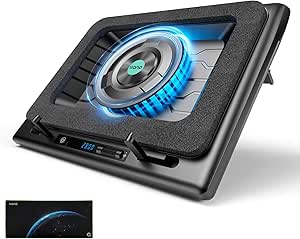
The 5.5-inch turbo fan makes the llano V12 the focused choice for buyers who want concentrated airflow for a demanding gaming laptop. Its adjustable stand also helps raise the screen, while the LED speed display and touch controls make fan adjustments easy to see. Compared with the ChillCore A21, which spreads airflow across nine smaller fans and adds RGB modes, the llano emphasizes one large fan and includes a dust filter and wide mouse pad. The tradeoff is its dedicated 36W power adapter, which takes another outlet, plus a footprint that may crowd a compact desk. The claimed temperature drop is a manufacturer figure, not a guarantee across laptops or workloads.
Pros:- Large 5.5-inch fan is designed to move substantial airflow
- LED display and touch controls make speed adjustments visible
- Adjustable stand can improve screen height and typing posture
- Includes a dust filter and a large mouse pad
Cons:- Needs the included 36W power adapter and a separate outlet
- Large footprint can take up substantial desk space
Best for: Gaming laptop owners with 15–21-inch machines who want a large fan, adjustable positioning, and visible speed controls.
Not ideal for: Desk users short on space or people who want a cooler powered only by a laptop USB port.
- Brand:llano
- Model:V12
- Fan size:5.5 inches (14 cm)
- Laptop compatibility:15–21 inches
- Cooling method:Air
- Material:ABS
- Included power adapter:36W
- Warranty:One year
Our verdict“Choose the llano V12 if your large gaming laptop needs focused airflow and you have room for its adapter and broad stand.”
ChillCore A21 Laptop Cooling Pad with 9 Fans and RGB Lights
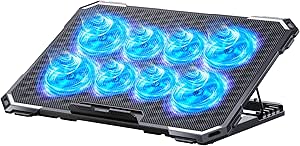
The nine-fan layout gives the ChillCore A21 a broader airflow approach than the llano V12’s single large turbo fan. It fits laptops from 15.6 to 19.3 inches and pairs its fan array with eight height settings, so it suits a gaming setup where cooling coverage and screen position both matter. Its LCD shows fan speed, and the ten RGB modes let buyers tune the lighting to their desk. The tradeoff is a metal-and-plastic build whose plastic parts may feel less solid than a more metal-heavy pad. RGB can also be distracting in a quiet workspace, and the listed compatibility range excludes smaller laptops. Compared with the simpler Targus dual-fan pad, the A21 offers more adjustment and lighting but takes a more feature-packed approach.
Pros:- Nine fans provide a multi-fan airflow layout
- Eight height settings offer flexible screen positioning
- LCD displays fan speed
- Ten RGB modes allow lighting customization
Cons:- Plastic components may feel less premium than metal-focused alternatives
- RGB lighting may distract in work or low-light settings
- Compatibility starts at 15.6 inches
Best for: Gamers with 15.6–19.3-inch laptops who want multiple fans, substantial height adjustment, and customizable lighting.
Not ideal for: Owners of smaller laptops or anyone who prefers a restrained, low-distraction desk setup.
- Brand:ChillCore
- Model:A21
- Number of fans:9
- Laptop compatibility:15.6–19.3 inches
- Height adjustment:8 levels
- USB ports:2
- Materials:Metal and plastic
- Dimensions:16.1 × 11.9 × 1.8 inches
Our verdict“Pick the ChillCore A21 if your mid-to-large laptop setup benefits from broad fan coverage, adjustable height, and RGB controls.”
Targus 17-Inch Dual-Fan Laptop Cooling Pad
The Targus takes a more portable, comfort-minded approach than the desk-oriented ChillCore A21. Its soft neoprene underside cushions the pad on a lap, while the tilted mesh surface and rubber stops help with typing and laptop stability. Two USB-A-powered fans provide a straightforward way to move heat away from laptops up to 17 inches. That simpler layout means fewer controls and less airflow hardware than the ICE COOREL K23’s eight fans, but it also avoids the lighting and adjustment-heavy setup of larger gaming pads. The main constraints are its 17-inch size limit and reliance on USB-A, which may not suit a larger laptop or a newer device without that port. It is best for casual use where lap comfort matters more than extensive cooling adjustments.
Pros:- Neoprene underside adds cushioning for lap use
- Tilted surface supports a more comfortable typing angle
- Rubber stops help keep the laptop from sliding
- USB-A powers the two fans
Cons:- Designed for laptops up to 17 inches
- Requires a USB-A connection
- Two fans provide a simpler setup than multi-fan pads
Best for: Students and mobile workers with laptops up to 17 inches who use a cooling pad on their lap and want a cushioned underside.
Not ideal for: Owners of laptops larger than 17 inches or users seeking adjustable fan controls and broad cooling coverage.
- Brand:Targus
- Model:AWE55US
- Laptop compatibility:Up to 17 inches
- Number of fans:2
- Power connection:USB-A
- Materials:Neoprene underside and open mesh top
- Weight:2 pounds
- Dimensions:15 × 11.75 × 1 inches
Our verdict“Choose the Targus if lap comfort and a stable typing surface matter more than extra fans or gaming-focused controls.”
Razer Laptop Cooling Pad with Adaptive Fan Control
Razer’s pad stands apart from the manual fan arrays of the ChillCore A21 and ICE COOREL K23 by adjusting fan speed to system temperature. Its airtight pressure chamber and foam seals direct airflow toward the laptop, while three magnetic frames help fit a range of 14–18-inch machines. Custom fan curves, remappable controls, Chroma lighting, and a three-port USB-A hub make it the most control-rich option in this group. Those features come with a software dependency: advanced settings use Razer Synapse. The HyperBoost performance benefits are also limited to compatible Blade laptops, so buyers with other brands should focus on the adaptive cooling and airflow design rather than expecting that specific benefit. It is a more integrated choice than the basic Targus, but less plug-and-play.
Pros:- Fan speed adjusts in response to system temperature
- Pressure chamber and foam seals direct airflow
- Three magnetic frames accommodate a range of laptop sizes
- Three-port USB-A hub and configurable controls add desk utility
Cons:- Advanced fan control and customization require Razer Synapse
- HyperBoost benefits apply to compatible Blade laptops
- Compatibility is limited to most 14–18-inch laptops
Best for: Laptop owners with 14–18-inch systems who want temperature-responsive fan control, airflow seals, and a built-in USB hub.
Not ideal for: Buyers who avoid companion software or expect HyperBoost benefits on a non-compatible laptop.
- Brand:Razer
- Model:RC21-02300100-R3UC
- Fan:1 × 140 mm brushless fan
- Maximum fan speed:Up to 3000 RPM
- Laptop compatibility:Most laptops and MacBooks, 14–18 inches
- Connectivity:3-port USB-A hub
- Lighting:Razer Chroma RGB
- Warranty:2 years
Our verdict“Choose the Razer if you want software-managed airflow and a USB hub, and are comfortable configuring the pad through Synapse.”
ICE COOREL Laptop Cooling Pad with 8 Fans and Adjustable Stand
For buyers who want multiple fans and height adjustment without the ChillCore A21’s RGB focus, the ICE COOREL K23 is a practical alternative. Its eight adjustable-speed fans sit under a metal mesh surface, and five height settings let users raise the display or change the typing angle. Anti-slip baffles help hold laptops up to 17 inches in place; two USB 2.0 ports add connection options, though the pad itself draws power from a laptop USB port. Compared with the llano V12, the K23 spreads airflow across an array rather than using one large turbo fan and a dedicated adapter. Its materials mix metal mesh with plastic, and the product description gives conflicting fan counts for the height settings, so buyers get less clarity about the configuration.
Pros:- Eight fans have adjustable speed
- Metal mesh surface supports airflow through the pad
- Five height settings allow changes to screen and typing angle
- Anti-slip baffles help keep the laptop in place
Cons:- Requires a laptop USB port for power
- Product details give conflicting fan counts for the height settings
- Plastic components accompany the metal mesh
Best for: Owners of laptops up to 17 inches who want a multi-fan pad with adjustable speed, height settings, and anti-slip support.
Not ideal for: People who need a standalone power adapter or want a clearly documented fan and control configuration.
- Brand:ICE COOREL
- Model:K23
- Number of fans:8
- Fan speed:2400–2600 RPM
- Height settings:5
- USB ports:2 USB 2.0 ports
- Laptop compatibility:Most laptops up to 17 inches
- Materials:Metal mesh and plastic
Our verdict“Pick the ICE COOREL K23 if you want adjustable multi-fan cooling and stand height for a laptop up to 17 inches.”
llano V12 Ultra Laptop Cooling Pad with Smart Software Control
The 5.5-inch turbo fan and memory-foam seal make this the most focused pick here for a large gaming laptop with compatible air intakes: the seal directs airflow instead of spreading it across the whole underside. It supports laptops up to 19 inches, while the Trullypine F12 tops out at 17.3 inches and uses 12 smaller fans for broader coverage. The llano also gives you software or scroller fan control, three height settings, a removable dust filter, and a USB 3.0 hub. That targeted cooling setup comes with practical costs: it needs the included wall adapter, so it is less convenient to move between desks than USB-powered pads. Product details also name both V12 Ultra and V16, which makes the exact model identity less clear.
Pros:- Turbo fan and foam seal direct airflow toward compatible laptop intakes.
- Supports large laptops up to 19 inches.
- Three height settings and a removable dust filter add practical adjustability and upkeep.
- USB 3.0 hub and software or scroller fan control provide useful desk features.
Cons:- Requires a wall outlet and the separate power adapter rather than drawing power from the laptop.
- Listing uses both V12 Ultra and V16 model names, leaving model identification unclear.
- Foam-seal airflow depends on a compatible laptop shape and intake placement.
Best for: Owners of 15.6–19-inch gaming laptops whose intake layout can work with the foam seal and who have a fixed desk setup.
Not ideal for: People who want a lightweight, USB-powered pad for travel or whose laptop is smaller than 15.6 inches.
- Fan size:5.5 inches
- Fan speed:Up to 2800 RPM
- Laptop compatibility:15.6–19 inches
- Adjustable heights:3 (15°, 12°, 3°)
- USB hub:USB 3.0, 5 Gbps
- RGB lighting:4 effects and 5 colors
- Power adapter:36W included
- Warranty:1 year
Our verdict“Choose this for a large gaming laptop with compatible intakes and a desk that can accommodate its wall adapter.”
KYOLLY Laptop Cooling Pad with 13 Fans, LCD, RGB Lighting, and Adjustable Stand
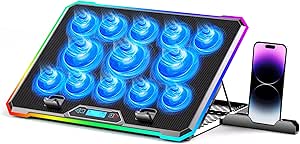
For someone who changes typing or viewing angles often, the nine tilt positions are the KYOLLY’s clearest advantage; they offer more placement choice than the TECKNET’s two settings. Its 13 fans have adjustable speed controls and an LCD screen, giving the cooling setup more visible control than the simpler KeiBn S039. The wide 15–21-inch compatibility range also accommodates larger machines than most pads in this batch. There are tradeoffs: the listing gives conflicting fan-count details, so I would verify the configuration before buying, and the pad draws power through a laptop USB port. Its 1.59 kg weight and broad size range also make it less appealing as a compact everyday carry. The phone holder and RGB modes are extras, but the stand adjustment is the stronger reason to choose it.
Pros:- Nine tilt angles provide more positioning choice than the TECKNET’s two settings.
- Adjustable fan speed and LCD screen make settings easier to manage.
- Supports laptops from 15 to 21 inches.
- Includes two USB ports and a built-in phone holder.
Cons:- Fan-count details in the listing conflict.
- Powered through a laptop USB port, drawing on the laptop’s available connectivity and power.
- At 1.59 kg, it is relatively heavy for frequent carrying.
Best for: Desk users with a 15–21-inch laptop who frequently adjust screen angle and want onboard fan controls.
Not ideal for: Travelers seeking a light, compact pad or buyers who need a separately powered cooler.
- Number of fans:13 (listing details conflict)
- RGB lighting modes:10
- Adjustable angles:9 (10°–45°)
- USB ports:2
- Compatible laptop size:15–21 inches
- Weight:1.59 kg
- Materials:Metal and plastic
- Warranty:1 year
Our verdict“Pick the KYOLLY if you want extensive angle adjustment and onboard controls for a large laptop at a desk.”
KeiBn Laptop Cooling Pad with Two Fans for 10–15.6-Inch Laptops
The KeiBn S039 is the compact, straightforward choice for laptops up to 15.6 inches. Its 0.8 kg weight makes it easier to move than the 1.59 kg KYOLLY, while five height settings give it more desk-position flexibility than the TECKNET’s two. Two fans and a metal mesh surface provide basic airflow support, and the retractable phone holder and two USB 2.0 ports keep small conveniences within reach. The simpler cooling layout is a tradeoff: it lacks the llano V12 Ultra’s large turbo fan and targeted foam seal, so buyers of heat-intensive gaming laptops may prefer that more specialized design. Its USB 2.0 ports also offer slower data transfer than the llano’s USB 3.0 hub. The 15.6-inch size ceiling rules it out for larger laptops.
Pros:- Light 0.8 kg design is easier to carry than the KYOLLY.
- Five height settings offer more adjustment than the TECKNET’s two.
- Metal mesh surface and two fans support airflow beneath the laptop.
- Retractable phone holder and two USB ports add desk convenience.
Cons:- Compatibility stops at 15.6 inches.
- USB 2.0 ports are slower than the llano V12 Ultra’s USB 3.0 hub.
- Two-fan layout is less specialized for heat-intensive gaming laptops than the llano’s turbo fan and foam seal.
Best for: Students and home-office users with laptops up to 15.6 inches who want a light stand with basic airflow and angle adjustment.
Not ideal for: Owners of larger gaming laptops or anyone who needs USB 3.0 connectivity or a high-airflow specialized cooler.
- Model:S039
- Number of fans:2
- Laptop compatibility:Up to 15.6 inches
- Height settings:5
- USB ports:2 USB 2.0
- Weight:0.8 kg
- Dimensions:15.35 × 9.65 × 1.18 inches
- Warranty:Lifetime
Our verdict“Choose the KeiBn for a smaller laptop and a portable, adjustable stand with modest cooling support.”
TECKNET Laptop Cooling Pad for 12–17-Inch Laptops
The TECKNET keeps the setup uncomplicated: three 110 mm fans circulate air beneath laptops from 12 to 17 inches, and a dedicated switch lets you turn the fans off without unplugging the pad. Its slim 1.1-inch profile and 1.4-pound weight suit a desk where a bulky stand would get in the way. Compared with the KeiBn S039, it fits larger laptops but offers only two height settings instead of five. It also has fewer angle options than the KYOLLY, which is better for users who frequently reposition their screen. The second USB port helps preserve a connection for a peripheral, though the pad still draws power from the laptop. Its included USB-A to USB-A cable may also be inconvenient for setups lacking that port arrangement.
Pros:- Three 110 mm fans circulate air beneath the laptop.
- Dedicated on/off switch makes fan control simple.
- Slim profile and 1.4-pound weight suit space-conscious desks.
- Second USB port supports a peripheral while the pad is connected.
Cons:- Only two height settings, fewer than the KeiBn’s five or KYOLLY’s nine angles.
- Draws power from a laptop USB port.
- Included USB-A to USB-A cable may not suit every laptop setup.
Best for: People with 12–17-inch laptops who want a slim, switchable cooling pad for a regular desk.
Not ideal for: Buyers who need several ergonomic positions, standalone power, or a cable suited to a laptop without USB-A ports.
- Number of fans:3
- Fan size:110 mm
- Fan speed:1200 RPM
- Laptop compatibility:12–17 inches
- USB ports:2
- Height settings:2
- Weight:1.4 pounds
- Dimensions:15 × 1.1 × 11 inches
Our verdict“Choose the TECKNET if you want straightforward, low-profile airflow and a simple fan switch for a 12–17-inch laptop.”
Trullypine F12 Laptop Cooling Pad with 12 Quiet Fans, 5-Level Height Adjustment, LED Lights, Dual USB Ports, and Phone Holder (12-17.3 Inch)
The Trullypine F12 spreads cooling across a large metal mesh surface with 12 fans, giving it a different approach from the llano V12 Ultra’s single 5.5-inch turbo fan and foam seal. That broad layout suits buyers who want airflow distributed beneath a laptop rather than directed at compatible intake openings. Five height levels and anti-slip baffles also offer more positioning choices than the TECKNET’s two settings, and its dual USB 2.0 ports leave room for a peripheral. The tradeoff is a larger footprint that may crowd a small desk or look oversized under a compact laptop. Its plastic construction may also feel less substantial than a metal-bodied pad. Compatibility reaches 17.3 inches, but stops short of the llano’s 19-inch limit.
Pros:- Twelve fans distribute airflow across a large mesh surface.
- Five height levels and anti-slip baffles support varied desk positions.
- Dual USB 2.0 ports allow another device to connect.
- Phone holder and three RGB modes add convenience and visual customization.
Cons:- Large footprint can be awkward on a small desk or beneath a compact laptop.
- Plastic construction may feel less substantial than metal alternatives.
- USB 2.0 ports offer slower data transfer than the llano V12 Ultra’s USB 3.0 hub.
Best for: Desk users with 12–17.3-inch laptops who want broad under-laptop airflow and several stand positions.
Not ideal for: Owners of laptops larger than 17.3 inches, people with tight desk space, or buyers seeking a more substantial metal build.
- Model number:Gear
- Number of fans:12
- Compatibility:12–17.3-inch laptops, tablets, and routers
- Height adjustment:5 levels
- USB ports:2 USB 2.0
- Lighting:RGB LED with 3 modes
- Warranty:1 year
Our verdict“Choose the Trullypine F12 if you want distributed fan coverage and adjustable height for a mid-to-large laptop on a roomy desk.”
havit HV-F2056 Laptop Cooling Pad for 15.6–17-Inch Laptops, Black
The havit HV-F2056 suits buyers who want a simple cooling pad that is easy to move between desks. Its three USB-powered fans circulate air beneath 15.6–17-inch laptops, while the slim 697.3 g body takes up less room than feature-heavy options such as the ICE COOREL K10. Two height settings offer a basic ergonomic adjustment, though the K10 provides six positions and more control over airflow. The extra USB port helps preserve a connection for another device, but USB-C accessories need a separate adapter. This is a straightforward fit for everyday desk use; buyers seeking extensive tilt adjustment, lighting, or detailed fan controls should look at more elaborate pads.
Pros:- Three fans circulate air beneath compatible laptops
- Lightweight 697.3 g design is easier to carry than larger feature-heavy pads
- Two height settings provide a basic change in viewing and typing angle
- Extra USB port can connect another device
Cons:- Only two height settings offer less positioning flexibility than the Kootek pad’s six
- USB-C devices need a separate Type-C-to-USB adapter
Best for: Students and mobile workers with a 15.6–17-inch laptop who want a light pad for everyday desk use
Not ideal for: Buyers who need several stand angles, adjustable fan speeds, or native USB-C connectivity
- Compatible laptop size:15.6–17 inches
- Number of fans:3
- Fan power:USB
- Height settings:2
- Extra USB port:Yes
- Weight:697.3 g
- Dimensions:14.96 × 11.02 × 1.18 inches
- Enclosure material:ABS
Our verdict“Choose the havit if portability and uncomplicated cooling matter more than extensive adjustments or controls.”
Kootek Laptop Cooling Pad with 5 Quiet Fans
Among the multi-fan pads here, the Kootek LCP04 stands out for letting buyers choose from six height settings and switch fan and lighting settings separately. Its five fans and front stoppers make it a flexible option for 12–17-inch laptops, including smaller machines that exceed the havit HV-F2056’s stated minimum size. Compared with the six-fan ICE COOREL pad, it offers fewer fans but specifies two switches for control and includes a dual USB hub. The tradeoff is that the fan and LED controls are tied to the same switches, so lighting choices are not fully independent. USB-C devices also need an adapter. This makes sense for buyers who value positioning and connectivity more than fine-grained controls.
Pros:- Six height settings provide more positioning choice than the havit pad
- Five fans with selectable settings
- Dual USB hub provides two ports
- Front stoppers help keep compatible laptops in place
Cons:- Fan and LED settings share the same switches
- USB-C devices require a separate Type-C-to-USB adapter
Best for: Laptop owners who change their desk posture often and want multiple height options plus extra USB connections
Not ideal for: Buyers who want independent lighting control, native USB-C support, or speed settings specified for each fan
- Model:LCP04
- Number of fans:5
- Fan sizes:1 × 4.72 inches; 4 × 2.76 inches
- Laptop compatibility:12–17 inches
- Fan and LED controls:2 switches
- Height settings:6
- USB ports:2-port USB hub
- Warranty:1 year
Our verdict“Pick the Kootek if adjustable positioning and a built-in USB hub are higher priorities than independent lighting controls.”
ICE COOREL Laptop Cooling Pad with 6 Fans, Adjustable Stand, and Two USB Ports
The six 70 mm adjustable-speed fans make this ICE COOREL a practical choice for buyers who want airflow spread across a mesh surface. It offers five height settings and retaining baffles, giving it a more adjustable, laptop-securing setup than the lighter havit HV-F2056. Compared with the Kootek LCP04, it adds a sixth fan and lists a fan-speed range of 2400–2600 RPM, while Kootek specifies a wider compatibility range down to 12-inch laptops. Two USB 2.0 ports provide connections for peripherals or data transfer. The product data does not list dimensions or weight, making it harder to judge desk fit or portability before purchase. Its USB-powered operation also requires a connection while in use.
Pros:- Six adjustable-speed fans distribute airflow across the pad
- Five height settings allow varied laptop positioning
- Metal mesh surface supports heat dissipation
- Two USB 2.0 ports and retaining baffles add practical desk utility
Cons:- Requires a USB connection to operate
- Product data does not specify dimensions or weight
Best for: Desk users with laptops up to 17 inches who want multiple adjustable-speed fans and several stand positions
Not ideal for: Buyers who need published size and weight details to check a compact desk setup or plan regular travel
- Cooling fans:6 × 70 mm
- Fan speed:2400–2600 RPM
- Height settings:5
- USB ports:2 × USB 2.0
- Compatibility:Most laptops up to 17 inches
- Surface material:Metal mesh
Our verdict“Choose this ICE COOREL if you want six adjustable-speed fans and a stand with more positioning options than the havit.”
ICE COOREL K10 Laptop Cooling Pad with 8 Fans and RGB Lighting
The ICE COOREL K10 combines eight adjustable-speed fans with an LCD fan-speed display, RGB lighting, and a phone stand. That feature set makes it a more elaborate desk accessory than the havit HV-F2056, which keeps to three fans and two height settings. It also gives buyers six height positions, one more than the six-fan ICE COOREL model’s five, and supports laptops up to 17.3 inches. The added equipment comes with a larger, heavier footprint: at 1.12 kg and 16 × 12 × 8.46 inches, it is less suited to frequent carrying than the havit. Maximum fan speed may also be noisy. This is a better match for a stationary gaming or work setup than a quiet, compact workspace.
Pros:- Eight adjustable-speed fans offer extensive airflow hardware
- Six height settings provide flexible positioning
- LCD display shows fan speed
- Two USB ports and a phone stand add desk functionality
Cons:- Maximum fan speed may be noticeably noisy
- Its 1.12 kg weight and listed dimensions make it less convenient to carry than the havit
Best for: Desk-based gamers with 15–17.3-inch laptops who want adjustable cooling, a speed display, and a phone stand
Not ideal for: Frequent travelers or people who need quiet operation at maximum fan speed
- Model:K10
- Number of fans:8
- Compatible laptop size:15–17.3 inches
- Height settings:6
- Lighting:RGB, 10 modes
- Display:LCD fan speed display
- USB ports:2
- Weight and dimensions:1.12 kg; 16 × 12 × 8.46 inches
- Warranty:1 year
Our verdict“Choose the K10 for a feature-rich stationary setup if its larger footprint and high-speed fan noise suit your space.”
llano V12 Gaming Laptop Cooling Pad with RGB
For larger gaming laptops, the llano V12 takes a different approach from the multi-fan pads in this group: one 5.5-inch turbo fan works with a sealed foam chamber and adjustable airflow. Its stated compatibility reaches 19 inches, beyond the Kootek and ICE COOREL models, which top out at 17 or 17.3 inches. The removable dust filter and three tilt angles add practical features for a dedicated desk setup, while three USB 2.0 ports provide peripheral connections. The tradeoff is noise: the listed level can reach 70 dB, and its USB ports do not charge devices. Compared with the havit, this is a larger-laptop specialist with more connectivity and airflow control, but less appeal for quiet shared spaces.
Pros:- 5.5-inch turbo fan and sealed foam chamber target airflow beneath larger laptops
- Compatibility extends to laptops up to 19 inches
- Removable dust filter helps limit debris entering the cooling pad
- Three USB 2.0 ports support peripheral connections
Cons:- Listed noise level reaches up to 70 dB
- USB ports are for peripherals and do not charge devices
Best for: Owners of 15.6–19-inch gaming laptops who want adjustable airflow, a dust filter, and multiple peripheral ports
Not ideal for: People who need a quiet cooling pad for a shared room or expect its USB ports to charge devices
- Model:V12 Black (Hub+RGB)
- Fan:1 × 5.5-inch turbo fan
- Laptop compatibility:15.6–19 inches
- USB ports:3 USB 2.0 ports
- Tilt angles:3°, 12°, 15°
- Power output:36 W
- Noise level:≤70 dB
- Lighting:RGB, 10 modes and 4 colors
- Warranty:One year
Our verdict“Pick the llano V12 for a large gaming laptop when adjustable airflow and peripheral ports matter more than quiet operation.”

How We Picked
I ranked these pads around the job a buyer is trying to solve: help move air around a laptop while keeping the setup practical to use. I weighed the stated fan design and controls alongside supported laptop sizes, stand adjustment, USB features, lighting, and the likely day-to-day footprint. I gave more weight to useful differentiation—such as a large turbo fan or adaptive control—than to feature counts that do not explain how the pad will fit a particular laptop.
The order reflects how broadly useful each design appears, then how specifically it serves a narrower need. The llano V12 turbo model leads for buyers seeking focused cooling; Razer follows for control, while simpler dual-fan and multi-fan pads rank according to fit, adjustability, and extra features. Product names and specifications provide the basis for this comparison; actual cooling and noise can vary with laptop vent placement, workload, and room conditions.
Factors to Consider When Choosing Laptop Cooling Pads
I’d start with the laptop and the way you use it, then compare cooling features. A pad that fits your vents and stays comfortable at your desk can be a better match than one with more fans or lighting.
Match the airflow to your laptop’s vent layout
Check where your laptop draws in and exhausts air before choosing a pad. A broad fan array may cover more of the base, but that does not guarantee useful airflow where your machine needs it. A large central fan can suit a laptop with a central intake, while separate fans may be more practical for a wider base. Avoid assuming a pad will help just because its listed screen-size range includes your laptop. Compare the pad’s fan positions with the laptop’s underside, and leave space around the setup for unobstructed intake and exhaust.
Treat fan count as a clue, not a performance score
Fan count describes the layout, but it does not tell you how much air reaches the laptop or how loud the pad will be. A smaller number of larger fans can create a different airflow pattern from many small fans, so the right choice depends on vent placement and your tolerance for noise. If a product listing gives a fan count without useful operating details, avoid reading that number as proof of stronger cooling. Also account for dust: more fan openings may mean more surfaces to clean. Choose a design you can maintain comfortably, especially if the laptop sits on the pad every day.
Choose a stand height you’ll actually use
An adjustable stand can raise the screen and change your typing angle, which may matter as much as the cooling feature during long desk sessions. More adjustment levels help only if the hinge stays stable and the laptop’s size works safely on the raised surface. For a fixed workstation, prioritize a comfortable viewing height and room for an external keyboard. If you often type directly on the laptop, a steep angle can feel awkward even if it improves posture for viewing. Test your preferred setup position before deciding that more height settings are automatically better.
Decide whether controls and lighting earn their place
Software control, displays, and RGB lighting can make a pad easier to tune or better suited to a particular desk, but each adds another feature to manage. Adaptive controls may appeal if you want fan behavior to respond without frequent manual changes. A basic switch or limited controls can be a better fit when you want a plug-in accessory with little setup. Consider whether lighting will be visible in your workspace and whether a screen or software interface solves a real problem for you. Paying for extras makes more sense when you will use them regularly, not simply because they make a specification list longer.
Check size, connection needs, and desk space together
A listed laptop-size range is a starting point; check the actual pad dimensions and the location of its retaining lip or stops. Oversized pads can take up valuable desk space, while a compact model may leave a larger laptop less supported. USB ports can help replace a port used by the pad, but confirm the connection arrangement and what devices you plan to attach. A phone holder or extra ports are useful only if they fit your existing setup. For travel or a shared workspace, include the pad’s footprint and cable clutter in your decision.
Frequently Asked Questions
Will a cooling pad help if my laptop already has loud fans?
It may help by moving air around the laptop’s base, but it cannot repair blocked vents, dust buildup, or a failing internal fan. First check that the laptop’s own intake and exhaust are clear, since restricted airflow can limit the benefit of any pad. A pad with adjustable control may suit someone who wants to tune its fan behavior, while a simpler model avoids extra settings. Expect results to vary with the laptop’s design and workload. If the machine overheats even during light use, address the laptop itself rather than relying on an accessory alone.
Should I choose one large fan or a pad with many smaller fans?
Choose based on where your laptop pulls air in, not the fan count by itself. A large central fan may be a sensible match for a central intake, while a multi-fan layout can cover more of a wide base. Neither arrangement guarantees a quieter setup or better cooling across every laptop. Check the fan placement against your model’s underside and look for controls that fit your preferences. If the vent layout is unclear, a broad-coverage pad may be a safer starting point than buying solely by a single large fan.
Is an adjustable stand useful if I mainly want better cooling?
It can be, since raising the laptop may improve desk comfort and give air more room to circulate beneath the base. But a stand’s ergonomic benefit depends on how you work: direct typing on a sharply angled laptop can feel uncomfortable. If you use an external keyboard, a higher screen position may be easier to take advantage of. Check that the stops hold your laptop securely at the heights you expect to use. Cooling and posture are separate benefits, so decide which one matters more for your setup.
Do I need RGB lighting or software controls on a laptop cooling pad?
No; those features are preferences rather than requirements for moving air. Software or adaptive control may help if you want more say over fan behavior, while lighting can suit a gaming desk. Each extra can add setup steps or visual clutter, so consider how often you will use it. If you want a straightforward desk accessory, a simpler pad may be easier to live with. Put fit, stability, and airflow placement ahead of lighting when cooling is your main goal.
How can I tell whether a cooling pad will fit my laptop?
Compare the pad’s stated size range with your laptop’s dimensions, then check the pad’s surface dimensions and retaining features. Screen size alone can mislead because laptops with the same diagonal may have different body widths and depths. Look at the location of your laptop’s vents as well as the pad’s fans, since coverage matters to how the airflow can help. If you use the laptop at an angle, check that it remains stable and that ports stay accessible. A fit check is more useful than choosing by fan count or screen-size label alone.
Conclusion
For a broad recommendation, I’d choose the llano V12 with 5.5-inch Turbo Fan as best overall for buyers focused on airflow. The TECKNET 12–17-inch pad is my best value direction for someone who wants a wide stated fit range and a simpler setup, while the Razer pad is the premium-style pick for buyers drawn to adaptive fan control. Beginners who want a straightforward starting point can compare the Targus dual-fan pad with the havit HV-F2056 and choose by laptop fit and desk space. For compact setups, consider the KeiBn two-fan pad; for adjustable positioning or extra features, look at the ICE COOREL, KYOLLY, and Trullypine options. Match the pad’s footprint and airflow layout to your laptop before making the final call.
Halloween Picks
halloween
As an affiliate, we earn on qualifying purchases.