For a balanced wired gaming setup, I’d start with the ASUS ROG Strix Scope II X; the Womier SK80 and AULA F75 Pro stand out for compact layouts and a more customizable feel. These keyboards differ most in layout, switch character, connectivity, and how much room they leave for upgrades. A full-size board keeps the number pad close, while a smaller one gives your mouse more space. Hot-swappable models make switch changes easier, but can add choices and setup work. Read on for my full comparison and help matching a keyboard to your play style.

Get home appliances delivered free with Prime
- Fast, free delivery on millions of items
- Prime Video, Amazon Music and more included
- Member-only deals all year
Complete the kit

![[Genuine] Waterdrop PF-01A Water Filter Replacement for W...](https://m.media-amazon.com/images/I/41+5tl9EiKL._SX342_SY445_QL70_FMwebp_.jpg)

Key Takeaways
- The ASUS ROG Strix Scope II X is my best overall pick for players who want a full-size wired gaming keyboard without moving to a compact layout.
- The Redragon K552 and K671 keep the focus on straightforward wired play. The K552 has a tenkeyless layout; the K671 retains a more traditional footprint.
- The Womier SK80 and AULA F75 Pro suit compact setups and offer hot-swappable switches, giving them more room for personalization than the Logitech G413 SE models.
- The Razer BlackWidow V4 X and SteelSeries Apex 5 take different switch paths. Razer uses linear yellow switches, while the Apex 5’s hybrid blue switches are aimed at players who prefer audible, tactile feedback.
- Wireless freedom and gaming simplicity pull in different directions. The AULA F75 Pro offers wireless connectivity, while wired choices such as the Logitech G413 TKL SE avoid battery management.
| Redragon K671 Wired Mechanical Gaming Keyboard |  | Best for Switch Experimenters | Connectivity: Wired | Switches: Hot-swappable linear red | Key count: 104 | VIEW ON AMAZON | See Our Full Breakdown |
| Razer BlackWidow V4 X Mechanical Gaming Keyboard with Yellow Switches, Black |  | Best for Quiet, Fast Inputs | Switch type: Yellow mechanical linear | Actuation distance: 1.2 mm | Actuation force: 45 g | VIEW ON AMAZON | See Our Full Breakdown |
| Womier SK80 75% Gasket-Mounted Mechanical Gaming Keyboard |  | Best Compact Customizable Pick | Layout: 75% | Mounting: Gasket-mounted | Switches: Pre-lubed linear; hot-swappable PCB | VIEW ON AMAZON | See Our Full Breakdown |
| MageGee MK-Box 68-Key Compact Mechanical Keyboard with Red Switches, Blue LED Backlighting, and USB Cable |  | Best Compact Simplicity | Layout: 68-key compact | Switch type: Linear red mechanical | Backlighting: Blue LED with approximately 16 modes | VIEW ON AMAZON | See Our Full Breakdown |
| Logitech G316 X 98 Mechanical Gaming Keyboard, Linear Switches, Black |  | Best Compact Layout with a Numpad | Connectivity: Wired USB-A/USB-C | Switch type: Hot-swappable linear | Layout: 98% QWERTY | VIEW ON AMAZON | See Our Full Breakdown |
| Redragon K668 108-Key Hot-Swappable Wired RGB Gaming Keyboard |  | Best for Switch Customization | Layout: Full-size QWERTY, 108 keys | Switches: Linear red; hot-swappable with compatible 3-pin or 5-pin switches | Connectivity: Wired USB-C | VIEW ON AMAZON | See Our Full Breakdown |
| ASUS ROG Strix Scope II X Full-Size Wired Mechanical Gaming Keyboard |  | Best Premium Full-Size Pick | Layout: Full-size QWERTY, 104 keys | Switches: Pre-lubed, hot-swappable ROG NX Snow V2 linear | Connectivity: Wired USB 2.0, USB-C to USB-A cable | VIEW ON AMAZON | See Our Full Breakdown |
| Redragon K580 Wired RGB Mechanical Gaming Keyboard with Hot-Swappable Blue Switches |  | Best for Onboard Macros | Layout: QWERTY, 104 keys | Switches: Clicky Outemu Blue; hot-swappable | Connectivity: Wired USB-C | VIEW ON AMAZON | See Our Full Breakdown |
| Logitech G413 TKL SE Mechanical Gaming Keyboard, Black |  | Best TKL Build for Cross-Platform Play | Layout: Tenkeyless QWERTY | Switches: Tactile mechanical | Connectivity: Wired USB | VIEW ON AMAZON | See Our Full Breakdown |
| Redragon K552 87-Key Mechanical Gaming Keyboard with Linear Red Switches | 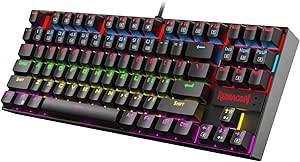 | Best Compact Linear Pick | Layout: Tenkeyless, 87 keys | Switches: Linear red mechanical | Connectivity: USB with braided cable | VIEW ON AMAZON | See Our Full Breakdown |
| SteelSeries Apex 5 Hybrid Mechanical Gaming Keyboard with Hybrid Blue Switches |  | Best for Clicky Feedback and On-Keyboard Controls | Switch type: Hybrid Blue, tactile and clicky | Keys: 104 | Connectivity: USB | VIEW ON AMAZON | See Our Full Breakdown |
| AULA F75 Pro 75% Wireless Hot-Swappable Mechanical Keyboard |  | Best Compact Wireless Pick | Layout: 75%, 81 keys, QWERTZ | Connectivity: Bluetooth 5.0, 2.4GHz wireless, USB-C wired | Multi-device support: Up to 5 devices | VIEW ON AMAZON | See Our Full Breakdown |
| Logitech G413 SE Full-Size Mechanical Gaming Keyboard |  | Best for a Simple Full-Size Setup | Layout: Full-size QWERTY | Keys: 108 | Connectivity: Wired USB 2.0 | VIEW ON AMAZON | See Our Full Breakdown |
| mechanical keyboards for gaming | Connectivity | Layout | Backlighting | Switches |
|---|---|---|---|---|
| Redragon K671 Wired Mechanical | Wired | QWERTY | 11 modes; adjustable brightness and speed | Hot-swappable linear red |
| Razer BlackWidow V4 X Mechanic | — | — | — | — |
| Womier SK80 75% Gasket-Mounted | Detachable Type-C | 75% | 19 effects and 9 colors; adjustable brightness and speed | Pre-lubed linear; hot-swappable PCB |
| MageGee MK-Box 68-Key Compact | USB 2.0, detachable cable | 68-key compact | Blue LED with approximately 16 modes | — |
| Logitech G316 X 98 Mechanical | Wired USB-A/USB-C | 98% QWERTY | RGB LIGHTSYNC | — |
| Redragon K668 108-Key Hot-Swap | Wired USB-C | Full-size QWERTY, 108 keys | Customizable RGB | Linear red; hot-swappable with compatible 3-pin or 5-pin switches |
| ASUS ROG Strix Scope II X Full | Wired USB 2.0, USB-C to USB-A cable | Full-size QWERTY, 104 keys | — | Pre-lubed, hot-swappable ROG NX Snow V2 linear |
| Redragon K580 Wired RGB Mechan | Wired USB-C | QWERTY, 104 keys | RGB | Clicky Outemu Blue; hot-swappable |
| Logitech G413 TKL SE Mechanica | Wired USB | Tenkeyless QWERTY | Single-color white LED | Tactile mechanical |
| Redragon K552 87-Key Mechanica | USB with braided cable | Tenkeyless, 87 keys | Rainbow LED with six modes | Linear red mechanical |
| SteelSeries Apex 5 Hybrid Mech | USB | — | Per-key RGB | — |
| AULA F75 Pro 75% Wireless Hot- | Bluetooth 5.0, 2.4GHz wireless, USB-C wired | 75%, 81 keys, QWERTZ | RGB with 16 preset effects | Pre-lubricated linear Reaper switches |
| Logitech G413 SE Full-Size Mec | Wired USB 2.0 | Full-size QWERTY | Single-color white LED | — |
More Details on Our Top Picks
Redragon K671 Wired Mechanical Gaming Keyboard
The Redragon K671 makes sense for gamers who want a full-size layout and the option to replace its linear red switches without changing keyboards. Its hot-swappable sockets and four included spare switches make basic repairs or small switch experiments more accessible than on the MageGee MK-Box, which is also wired but has a smaller 68-key layout. Full-key anti-ghosting supports busy multi-key inputs, while macro editing and 12 media shortcuts add useful controls for play and desktop use.
The tradeoff is a fixed backlight color: its 11 modes change effects, brightness, and speed, but not the hue. It also stays tethered by its wired connection. I’d choose it for practical customization and a number pad, while gamers who want per-key color control should look at the Razer BlackWidow V4 X.
Pros:- Hot-swappable linear switches allow replacement without changing the whole keyboard.
- Full-key anti-ghosting supports simultaneous key presses during play.
- Macro editing and 12 multimedia shortcuts provide extra control.
- Four spare switches and two replacement keycaps are included.
Cons:- Backlighting effects are adjustable, but the color cannot be changed.
- Wired-only connectivity limits placement flexibility.
Best for: PC gamers who want a full-size keyboard with replaceable linear switches, macro editing, and dedicated media shortcuts.
Not ideal for: Players who want per-key RGB color customization or the flexibility to position a wireless keyboard.
- Connectivity:Wired
- Switches:Hot-swappable linear red
- Key count:104
- Layout:QWERTY
- Anti-ghosting:Full-key
- Backlighting:11 modes; adjustable brightness and speed
- Multimedia shortcuts:12
- Included replacements:4 spare switches and 2 red keycaps
Our verdict“Choose the K671 if you want a full-size wired gaming keyboard that lets you replace its switches and edit macros.”
Razer BlackWidow V4 X Mechanical Gaming Keyboard with Yellow Switches, Black
The Razer BlackWidow V4 X suits players who want quick linear key response with less switch noise. Its Yellow switches actuate at 1.2 mm with 45 g of force, and built-in dampeners, under-board foam, and lubricated stabilizers address sound from other parts of the keyboard too. That gives it a quieter-focused profile than the Redragon K671, whose switch type is also linear but whose description makes no comparable acoustic claims.
Six programmable macro keys and onboard media controls make the Razer a better fit for players who want frequent commands close at hand. Per-key Chroma RGB offers more lighting control than the K671’s fixed-color backlight. The tradeoff is that this model does not list hot-swappable switches, and its doubleshot ABS keycaps may be a weaker fit for buyers seeking PBT keycaps. Choose it for its quiet linear setup and controls; skip it if switch swapping is a priority.
Pros:- Quiet linear switches have a 1.2 mm actuation distance and 45 g actuation force.
- Six programmable macro keys put custom commands within reach.
- Per-key Chroma RGB supports extensive lighting customization.
- Sound dampeners, under-board foam, and lubricated stabilizers target keyboard noise.
Cons:- Doubleshot ABS keycaps may not suit buyers seeking PBT keycaps.
- Hot-swappable switches are not listed.
Best for: Players in shared rooms who want quiet linear switches, programmable macro keys, and per-key lighting control.
Not ideal for: Keyboard hobbyists who want hot-swappable switches or buyers set on PBT keycaps.
- Switch type:Yellow mechanical linear
- Actuation distance:1.2 mm
- Actuation force:45 g
- Macro keys:6 programmable keys
- Lighting:Per-key Chroma RGB
- Keycaps:Doubleshot ABS
- Media controls:Multi-function roller and secondary media keys
- Acoustic features:Switch dampeners, under-board foam, and lubricated stabilizers
Our verdict“Pick the BlackWidow V4 X if quiet, quick linear inputs and dedicated macro controls matter more than switch swapping.”
Womier SK80 75% Gasket-Mounted Mechanical Gaming Keyboard
The Womier SK80 keeps a compact 75% layout while adding a customizable color screen for system, lighting, volume, and connection information. That display gives it a distinct desk-friendly focus compared with the MageGee MK-Box: both save space, but the Womier adds a screen and a gasket-mounted build aimed at a softer typing feel. Its hot-swappable PCB accepts 3-pin and 5-pin switches, giving players a route to change the feel later, and the pre-lubed linear switches are ready for gaming out of the box.
The compact layout means fewer keys than a full-size board such as the Redragon K671, and the listed connectivity is detachable Type-C rather than wireless. Display and lighting customization also depends on the keyboard driver. I’d favor it for a compact setup where customization and a cushioned typing feel matter more than a numpad or software-free controls.
Pros:- 75% layout saves desk space while retaining a compact set of gaming keys.
- Customizable color display can show system and keyboard information.
- Hot-swappable PCB supports both 3-pin and 5-pin switches.
- Gasket mount and internal filling are designed for a softer typing feel.
Cons:- Wireless connectivity is not listed.
- Screen and lighting customization require the keyboard driver.
Best for: Gamers with limited desk space who want a compact layout, a customizable screen, and room to try different switches.
Not ideal for: Players who rely on a numpad, want wireless connectivity, or prefer to customize without installing a driver.
- Layout:75%
- Mounting:Gasket-mounted
- Switches:Pre-lubed linear; hot-swappable PCB
- Switch compatibility:3-pin and 5-pin
- Display:Customizable color multimedia screen
- Backlighting:19 effects and 9 colors; adjustable brightness and speed
- Connectivity:Detachable Type-C
- Compatibility:Mac and Windows
Our verdict“Choose the SK80 for a compact gaming setup where its customizable display and switch options outweigh the missing numpad.”
MageGee MK-Box 68-Key Compact Mechanical Keyboard with Red Switches, Blue LED Backlighting, and USB Cable
The MageGee MK-Box is a straightforward choice for gamers who want to reclaim desk space without giving up separate arrow keys or function keys. Its 68-key layout is smaller than the Womier SK80 at 75%, while still keeping those navigation keys available. All-key anti-ghosting supports simultaneous inputs, and the linear red switches offer an uncomplicated gaming feel. Plug-and-play USB compatibility across Windows, Linux, and Mac also makes it a simple fit for a shared setup.
Its blue LED backlighting has multiple modes, but it does not offer the per-key color range of the Razer BlackWidow V4 X or the customizable screen found on the Womier. The detachable USB cable is useful for packing or replacement, though the board remains wired. I’d pick this for compactness and simple controls, and skip it if tactile feedback, wireless play, or extensive lighting customization matters more.
Pros:- Compact 68-key layout retains separate arrow and function keys.
- Anti-ghosting covers all 68 keys.
- Blue LED backlighting offers about 16 modes.
- Plug-and-play USB compatibility includes Windows, Linux, and Mac.
Cons:- Wired USB connection limits placement flexibility.
- Linear red switches have no tactile bump.
- Blue-only LED backlighting offers less color customization than per-key RGB.
Best for: Gamers with tight desk space who want dedicated arrow and function keys and a simple wired setup.
Not ideal for: Players who want wireless freedom, tactile switches, or per-key RGB customization.
- Layout:68-key compact
- Switch type:Linear red mechanical
- Backlighting:Blue LED with approximately 16 modes
- Anti-ghosting:All 68 keys
- Connectivity:USB 2.0, detachable cable
- Compatibility:Windows, Linux, and Mac
- Color:Black, grey, and red
Our verdict“Choose the MK-Box if you need a small, simple gaming keyboard that keeps arrow and function keys within reach.”
Logitech G316 X 98 Mechanical Gaming Keyboard, Linear Switches, Black
The Logitech G316 X 98 is for gamers who want a numpad without giving a full-size keyboard all the desk space. Its 96-key, 98% layout pairs that denser footprint with hot-swappable linear switches and double-shot PBT keycaps. Against the smaller Womier SK80, it keeps more number-entry keys and adds an onboard dial and dot-matrix display for media and settings controls. The listed 8 kHz report rate is a headline gaming feature for players focused on fast signal transmission.
Those extras come with a wired-only setup, and the 8 kHz figure alone does not determine how responsive a game feels. LIGHTSYNC customization relies on G HUB software, so it is less self-contained than the plug-and-play MageGee MK-Box. I’d choose the Logitech for a numpad, PBT keycaps, and onboard controls in a compact footprint; skip it if wireless placement or software-free customization is a priority.
Pros:- 98% layout retains a numpad in a compact footprint.
- Hot-swappable linear switches allow replacement or customization.
- Double-shot PBT keycaps offer a durable keycap option.
- Onboard dial, display, and customizable LIGHTSYNC RGB add accessible controls.
Cons:- Wired connection limits placement flexibility.
- LIGHTSYNC customization relies on G HUB software.
Best for: PC gamers who use a numpad and want hot-swappable switches in a smaller footprint than a traditional full-size board.
Not ideal for: Players who want wireless connectivity or prefer to manage lighting and settings without G HUB software.
- Connectivity:Wired USB-A/USB-C
- Switch type:Hot-swappable linear
- Layout:98% QWERTY
- Key count:96
- Backlighting:RGB LIGHTSYNC
- Report rate:8 kHz
- Keycaps:Double-shot PBT
- Dimensions:15.12 × 5.51 × 1.57 in
Our verdict“Pick the G316 X 98 if you want a compact gaming keyboard that keeps the numpad and adds onboard controls.”
Redragon K668 108-Key Hot-Swappable Wired RGB Gaming Keyboard
The Redragon K668 suits players who want a full-size layout they can adjust over time. Its hot-swappable sockets accept compatible 3-pin or 5-pin switches, so changing the linear red feel does not require soldering. Four programmable shortcuts and macro support add flexibility for games with repeated commands. Compared with the Redragon K580, the K668 trades dedicated media controls and onboard macro keys for switch compatibility and two included keycap sets. RGB effects and adjustable feet round out a practical setup, but the software is listed for Windows, which limits its appeal for macOS or Linux users. Its water resistance is also described without a protection rating, so I would not treat it as spill-proof. Choose it for customization; skip it if you want compact dimensions or clearly documented liquid protection.
Pros:- Hot-swappable sockets support compatible 3-pin and 5-pin switches without soldering
- Four programmable shortcut keys and macro support allow command customization
- Includes two keycap sets and adjustable feet
- Customizable RGB lighting offers multiple modes
Cons:- Software compatibility is listed for Windows
- Full-size layout occupies substantial desk space
- Water resistance is listed without a specific protection rating
Best for: Windows gamers who want a full-size keyboard and plan to experiment with compatible switches or keycap styles
Not ideal for: Mac or Linux players who need the keyboard software, or anyone seeking a compact setup or a clearly rated spill-resistant board
- Layout:Full-size QWERTY, 108 keys
- Switches:Linear red; hot-swappable with compatible 3-pin or 5-pin switches
- Connectivity:Wired USB-C
- Backlighting:Customizable RGB
- Programmable controls:Four shortcut keys; macro support
- Included keycaps:Two sets
- Compatibility:PC and laptop; Windows software
- Weight:880 g
- Warranty:1 year
Our verdict“Choose the K668 if you want a full-size gaming board you can customize with compatible switches and keycaps.”
ASUS ROG Strix Scope II X Full-Size Wired Mechanical Gaming Keyboard
The ASUS ROG Strix Scope II X is the more refined full-size choice for players who want a quieter, more feature-rich desk setup. Its pre-lubed ROG NX Snow V2 linear switches, sound-dampening materials, PBT keycaps, and aluminum top plate give it a more considered build than the more customization-focused Redragon K668. A multifunction wheel, streaming hotkeys, programmable keys, and a detachable wrist rest make it especially suited to gaming alongside media or streaming tasks. The tradeoff is that it remains a wired, full-size board, so it uses more desk space and cannot be repositioned freely. Its listed operating system support is Windows 10 or later, a narrower fit than the cross-platform Redragon K580. Pick it for premium materials and useful controls; skip it if compactness or wireless use matters more.
Pros:- Pre-lubed hot-swappable linear switches and sound-dampening materials
- PBT doubleshot keycaps and an aluminum top plate
- Multifunction control wheel, programmable keys, and streaming hotkeys
- Detachable wrist rest and three tilt angles support varied desk setups
Cons:- Wired-only connection limits placement flexibility
- Full-size layout takes up more desk space than TKL options
- Listed operating system compatibility is limited to Windows 10 or later
Best for: Windows gamers and streamers who want a full-size board with sound-dampening, a control wheel, and a wrist rest
Not ideal for: Players with limited desk space, those who need wireless connectivity, or users outside the listed Windows 10-or-later support
- Layout:Full-size QWERTY, 104 keys
- Switches:Pre-lubed, hot-swappable ROG NX Snow V2 linear
- Connectivity:Wired USB 2.0, USB-C to USB-A cable
- Keycaps:PBT doubleshot
- Top plate:Aluminum
- Lighting:RGB backlighting
- Controls:Programmable keys, streaming hotkeys, multifunction wheel
- Included accessories:Detachable wrist rest, keycap and switch puller, themed spacebar keycap
- Compatibility:Windows 10 or later
Our verdict“Pick the Scope II X if you want a premium wired full-size keyboard with quieter acoustics and dedicated streaming controls.”
Redragon K580 Wired RGB Mechanical Gaming Keyboard with Hot-Swappable Blue Switches
If you want quick access to macros and media without opening software, the Redragon K580 puts those controls right on the board. Its five onboard macro keys can be programmed without software, while full anti-ghosting helps register simultaneous inputs during busy gameplay. The dedicated media controls and volume roller are more direct than the shortcut-focused controls on the Redragon K668. Its clicky Outemu Blue switches suit players who like audible, tactile feedback, but that sound can distract housemates or teammates on voice chat. The switches are hot-swappable, and double-shot keycaps plus an aluminum plate give it a sturdy feature set. Advanced RGB effects and macro profiles still need companion software, so the K580 is best for simple onboard setup rather than deep profile management.
Pros:- Five onboard macro keys can be programmed without software
- Full anti-ghosting supports simultaneous key presses
- Dedicated media controls and a volume roller
- Hot-swappable switches, double-shot keycaps, and an aluminum plate
Cons:- Outemu Blue switches are loud and clicky
- Advanced RGB effects and macro profiles require companion software
- Wired connection limits placement flexibility
Best for: Players who want dedicated onboard macro and media controls, and prefer loud, clicky feedback at their desk
Not ideal for: Shared-room gamers or voice chat users who need quiet keystrokes, and players who want advanced effects without companion software
- Layout:QWERTY, 104 keys
- Switches:Clicky Outemu Blue; hot-swappable
- Connectivity:Wired USB-C
- Backlighting:RGB
- Macro controls:Five dedicated onboard keys
- Anti-ghosting:Full anti-ghosting
- Keycaps and plate:Double-shot keycaps; aluminum plate
- Operating systems:Linux, macOS, Windows
- Weight:1200 g
Our verdict“Choose the K580 if onboard macros and direct media controls matter more than quiet switches.”
Logitech G413 TKL SE Mechanical Gaming Keyboard, Black
The Logitech G413 TKL SE is a straightforward tenkeyless option for players who want a sturdy frame and tactile switches without a full-size footprint. Its PBT keycaps and brushed aluminum-magnesium top case give it a durable feel, while six-key rollover covers common simultaneous inputs. Compared with the Redragon K552, it has tactile rather than linear switches and a single-color white backlight rather than fixed-color rainbow modes. That makes the G413 TKL SE a better fit if restrained lighting and Windows or macOS compatibility matter more than lighting variety. The tradeoffs are a wired connection, no number pad, and limited anti-ghosting compared with the K552’s N-key rollover. Its 12 function-key media controls add convenience without dedicated buttons.
Pros:- PBT keycaps resist heat and wear
- Aluminum-magnesium top case provides a sturdy frame
- Tactile mechanical switches offer a defined keystroke feel
- Windows and macOS compatibility with 12 function-key media controls
Cons:- Tenkeyless layout omits the number pad
- Wired connection limits placement flexibility
- White LED lighting offers no listed RGB customization
Best for: Windows or macOS gamers who want a durable TKL board with tactile switches and understated white lighting
Not ideal for: Players who rely on a number pad, want RGB lighting, or need N-key rollover for multiple simultaneous inputs
- Layout:Tenkeyless QWERTY
- Switches:Tactile mechanical
- Connectivity:Wired USB
- Keycaps:PBT
- Backlighting:Single-color white LED
- Anti-ghosting:6-key rollover
- Media controls:12 function-key controls
- Materials:Aluminum-magnesium alloy top case
- Compatibility:Windows, macOS, gaming consoles
Our verdict“Pick the G413 TKL SE for a durable, cross-platform TKL board with tactile switches and simple white lighting.”
Redragon K552 87-Key Mechanical Gaming Keyboard with Linear Red Switches
The Redragon K552 keeps the essentials for gaming in a compact tenkeyless frame. Its linear red switches offer smooth keystrokes, while anti-ghosting and N-key rollover support simultaneous commands. Compared with the Logitech G413 TKL SE, the K552 uses linear switches and offers six lighting modes, but its rainbow colors are fixed and cannot be customized through software. A metal top plate and braided USB cable add a solid, practical feel for a wired setup. The main compromise is the missing number pad, which can be inconvenient for data entry or games that use numpad bindings. It also lacks the hot-swappable switches of the Redragon K668, so changing its switch feel is less flexible. This is a simple fit for players who prioritize space and smooth input over customization.
Pros:- Compact 87-key layout saves desk space
- Linear red switches provide smooth keystrokes
- Anti-ghosting and N-key rollover support simultaneous inputs
- Metal top plate and braided USB cable
Cons:- Rainbow lighting uses fixed color patterns with no software customization
- Tenkeyless layout omits the number pad
- Switches are not listed as hot-swappable
Best for: PC gamers with limited desk space who want linear switches and N-key rollover in a wired TKL layout
Not ideal for: Players who need a number pad, want software-customizable lighting, or plan to swap switches later
- Layout:Tenkeyless, 87 keys
- Switches:Linear red mechanical
- Connectivity:USB with braided cable
- Backlighting:Rainbow LED with six modes
- Anti-ghosting:N-key rollover
- Frame:Metal top plate
- Dimensions:13.94 × 4.86 × 1.46 in
- Compatibility:Windows, macOS, Linux
- Warranty:1 year
Our verdict“Choose the K552 if you want a compact wired board with linear switches and N-key rollover, and can do without a number pad.”
SteelSeries Apex 5 Hybrid Mechanical Gaming Keyboard with Hybrid Blue Switches
The SteelSeries Apex 5 suits players who want an audible, tactile keystroke and extra controls at their fingertips. Its hybrid blue switches, customizable OLED display, and per-key RGB give it more on-keyboard personalization than the straightforward Logitech G413 SE, whose lighting is white and whose controls rely on function keys. The aluminum frame and included magnetic wrist rest add useful support for long sessions. The tradeoff is noise: the clicky switches can be distracting in shared rooms or voice chat, while the AULA F75 Pro offers quieter linear switches and wireless connections. IP32 protection provides limited resistance to spills, not full waterproofing, and the 104-key layout takes up more desk space than compact options.
Pros:- Tactile, clicky hybrid switches provide clear keystroke feedback
- Customizable OLED display and per-key RGB add on-keyboard controls and personalization
- Aluminum frame and magnetic wrist rest support extended play
- IP32 protection offers limited defense against small spills
Cons:- Clicky switches can be loud in shared spaces and on voice chat
- USB-only connection lacks the wireless flexibility of the AULA F75 Pro
- Limited IP32 protection does not make the keyboard waterproof
Best for: Players who prefer distinct clicky feedback, want an OLED display for customization, and have a dedicated gaming space.
Not ideal for: People gaming in shared or quiet rooms, or anyone who wants wireless connectivity and a smaller desk footprint.
- Switch type:Hybrid Blue, tactile and clicky
- Keys:104
- Connectivity:USB
- Backlighting:Per-key RGB
- Display:Customizable OLED
- Frame:Aluminum alloy
- Water resistance:IP32
- Switch durability:Rated for 20 million keypresses
Our verdict“Choose the Apex 5 if you want clicky feedback and an OLED display for a dedicated gaming setup and can live with the noise.”
AULA F75 Pro 75% Wireless Hot-Swappable Mechanical Keyboard
The AULA F75 Pro is the flexible choice for players who need a compact board that can move between a gaming PC and other devices. Its 75% layout keeps arrow keys while freeing desk space, and three connection modes include 2.4GHz wireless for gaming, Bluetooth for paired devices, and USB-C wired use. Compared with the full-size SteelSeries Apex 5, it gives up the number pad and adds wireless convenience; its hot-swap sockets also make it easier to change the feel later. The pre-lubricated linear switches suit fast, smooth presses, though they lack the clicky feedback of the Apex 5. Side-printed legends may take some adjustment, and some lighting controls require driver software.
Pros:- 75% layout retains arrow keys while saving desk space
- 2.4GHz, Bluetooth, and USB-C support multiple ways to connect
- Hot-swap sockets accept 3-pin and 5-pin switches
- 4000mAh battery and support for up to five devices suit multi-device setups
Cons:- Compact layout omits the number pad and has fewer keys than full-size options
- Some lighting features require driver software
- Linear Reaper switches provide less tactile and audible feedback than the SteelSeries Apex 5
Best for: Players with limited desk space who want one keyboard for a gaming PC, laptop, and mobile devices, with the option to replace switches.
Not ideal for: Gamers who need a full-size number pad, prefer loud tactile feedback, or want every lighting control accessible without software.
- Layout:75%, 81 keys, QWERTZ
- Connectivity:Bluetooth 5.0, 2.4GHz wireless, USB-C wired
- Multi-device support:Up to 5 devices
- Switches:Pre-lubricated linear Reaper switches
- Hot-swappable:Supports 3-pin and 5-pin switches
- Keycaps:Side-printed PBT
- Battery:4000mAh rechargeable
- Backlighting:RGB with 16 preset effects
Our verdict“Pick the F75 Pro if you want a compact gaming board with wireless flexibility and switch customization.”
Logitech G413 SE Full-Size Mechanical Gaming Keyboard
The Logitech G413 SE makes sense for players who want a conventional full-size mechanical keyboard with tactile switches and durable PBT keycaps, without extra displays or wireless modes. Its brushed aluminum-magnesium top case gives it a sturdy feel, while six-key rollover supports simultaneous presses for common gaming inputs. Compared with the SteelSeries Apex 5, it has simpler lighting and fewer customization features, but its single-color LEDs and wired USB connection keep the setup straightforward. The tradeoffs are clear: white backlighting offers no color choice, and the wired-only design keeps the keyboard tethered to one position. Players who want a smaller board can also reclaim desk space with the AULA F75 Pro, though that means giving up the number pad.
Pros:- Full-size layout includes a number pad
- PBT keycaps resist heat and wear
- Tactile mechanical switches provide discernible feedback
- Brushed aluminum-magnesium top case and six-key rollover suit gaming use
Cons:- Wired USB connection limits placement flexibility
- Single-color white LED backlighting lacks per-key color customization
- Six-key rollover is less extensive than full N-key rollover
Best for: Players who want a full-size board with tactile switches, a number pad, and durable keycaps for a fixed desktop setup.
Not ideal for: People who want RGB customization, wireless play, or a compact layout that leaves more room for mouse movement.
- Layout:Full-size QWERTY
- Keys:108
- Connectivity:Wired USB 2.0
- Switch type:Tactile mechanical
- Keycaps:PBT
- Anti-ghosting:6-key rollover
- Backlighting:Single-color white LED
- Top case:Brushed aluminum-magnesium alloy
Our verdict“Choose the G413 SE if you want a sturdy, full-size wired board with tactile switches and can do without RGB or wireless features.”

How We Picked
I compared the keyboards by how well their layouts, switches, and connections fit common gaming setups. I gave weight to practical play factors: whether the layout leaves room for mouse movement, whether the switch type fits a player’s preferred feedback, and whether wired or wireless use suits the desk. Build and maintenance also mattered, including hot-swappable switches and the convenience of a familiar full-size arrangement.
The ranking favors versatility for gaming first, then separates options by their strongest use case. The ASUS ROG Strix Scope II X leads as a full-size wired option; compact boards earn their place when mouse space or customization matters more. Simpler Redragon and Logitech models make sense for buyers who want a direct setup, while boards with distinct switch styles or wireless operation rank for narrower preferences. I treat listed features as buying evidence, not proof of a particular response time or durability.
Factors to Consider When Choosing Mechanical Keyboards For Gaming
I’d choose a gaming keyboard by starting with the desk and games I actually play, then narrowing down by switch feel and connection. Those decisions often matter more day to day than decorative lighting or a long feature list.
Choose a layout around your mouse space
A full-size board keeps the number pad and navigation cluster within reach, which can help if the keyboard also serves work or data-entry tasks. The tradeoff is a wider footprint that can push the mouse farther from your body. Tenkeyless and smaller layouts free up room for broad mouse movements, a useful fit for players who lower their mouse sensitivity. Compact boards may move or omit keys you use outside games, so check the layout before buying. I’d measure the usable desk width with the mouse in its normal position instead of assuming a smaller keyboard is automatically more comfortable. If you switch often between gaming and office work, weigh the missing keys against the space gained.
Match switch feel to your play and your room
Linear switches move without a pronounced tactile bump, while clicky switches add audible feedback and a more distinct press. Neither type makes a player better by itself; preference, typing habits, and the surrounding room all matter. Loud feedback can be disruptive in a shared space or over a microphone, even if it feels satisfying at the desk. A keyboard’s switch label also does not tell the whole story, since sound and feel depend on the board and key construction. If possible, try the switch type before settling on it, or pick a model that lets you change switches. Avoid choosing solely by color names, which can vary between manufacturers.
Decide whether hot-swapping is worth the flexibility
Hot-swappable sockets let you replace compatible switches without soldering, which can make a board easier to personalize or repair. That flexibility helps if you are unsure whether you want linear or tactile feedback, or if a switch eventually develops a fault. It does not mean every switch will fit: socket type and pin compatibility still matter. Replacement switches and the time needed to change them are part of the ownership tradeoff. A fixed-switch board can be a simpler choice when you already know what feel you like. I’d pay attention to hot-swap support when customization is a real plan, rather than treating it as a feature every player needs.
Pick wired or wireless based on how you use the setup
A wired connection keeps charging out of the routine and gives the keyboard a direct connection to the computer. Wireless models can reduce cable clutter and make a desk easier to rearrange, though they add battery upkeep. Before choosing wireless for competitive play, check the connection modes and the maker’s specifications for your intended use; the word wireless alone does not describe performance. Also think about whether you want one keyboard to move between devices or stay at a dedicated gaming PC. A detachable or well-routed cable can make a wired board easier to manage. The right choice depends on the whole setup, not just the desire to avoid a cable.
Prioritize useful features over lighting
RGB and backlighting can improve visibility in a dim room and help personalize a setup, but they do not determine switch feel or layout comfort. Decide which practical features you will use during play, such as a number pad, dedicated media controls, or easy key replacement. Extra controls can be handy, yet they also take space and may be irrelevant if you manage audio elsewhere. Check whether lighting and control settings need software running in the background if you prefer a minimal setup. A plain board can be a better fit than a feature-heavy one when it matches your hands and desk. I’d rank comfort and layout ahead of visual effects.
Spend more for a specific benefit
A higher-end keyboard makes sense when it adds something you will use, such as a layout that fits your desk, wireless operation, or switch customization. Paying more for features that do not address a real need can leave the main decision—how the board feels under your hands—unresolved. For a first gaming keyboard, a straightforward wired model may be easier to set up and maintain. If you already know your preferred switch feel, a fixed-switch board can also avoid paying for flexibility you will not use. Before buying, compare the connection, layout, and switch details rather than relying on a premium label. I’d spend for a clear fit with your play habits, not a vague promise of better gaming.
Frequently Asked Questions
Is a full-size keyboard a disadvantage for gaming?
Not by itself. A full-size keyboard keeps the number pad and navigation keys available, which may matter if you use one board for gaming and everyday work. Its wider footprint can leave less room for mouse movement, especially on a compact desk. Tenkeyless and smaller boards address that space issue, but may require you to adjust to missing or relocated keys. I’d choose based on your desk layout and the keys you actually use, rather than assuming one size is better for every game.
Should I choose linear or clicky switches for gaming?
Choose by feel, sound, and where you play. Linear switches offer a smooth press, while clicky switches give audible and tactile feedback that some players prefer. That extra sound may bother people nearby or get picked up by a microphone. Switch labels do not describe every aspect of how a keyboard sounds or feels, so trying a sample can help. If you are uncertain, a hot-swappable model may give you a route to change compatible switches later.
Does a wireless gaming keyboard need to be avoided?
No; wireless can suit a clean desk or a setup where the keyboard moves between devices. The tradeoff is charging and the need to check the keyboard’s connection details for your intended play. A wired model avoids battery management and is a straightforward choice for a fixed gaming station. Compare the specific connectivity information from the maker instead of treating every wireless keyboard as interchangeable. In this lineup, the AULA F75 Pro is the wireless-oriented option, while most alternatives use a wired connection.
Is hot-swapping useful if I have never changed keyboard switches?
It can be useful, but it is not a requirement for a first gaming keyboard. Hot-swapping makes compatible switches replaceable without soldering, which can help if your preference changes or a switch needs replacing. You still need to check socket compatibility and choose suitable replacement switches. If you want a simple setup and already like the included switch feel, a fixed-switch board may be easier. Treat hot-swap support as room to experiment, not a promise that upgrades will be effortless.
Which keyboard should I pick if I share a room or use voice chat?
I’d pay close attention to switch sound before choosing. Clicky switches have audible feedback that can carry across a room or enter a microphone, while linear switches tend to avoid that distinct click. The keyboard’s overall sound also depends on its construction and keycaps, so switch type alone cannot guarantee a quiet board. The Razer BlackWidow V4 X uses linear yellow switches, while the SteelSeries Apex 5 uses hybrid blue switches with a more tactile, audible character. If quiet matters, seek a chance to hear the specific model or check its switch details before buying.
Conclusion
For the broadest fit, I’d choose the ASUS ROG Strix Scope II X as best overall, especially if you want a full-size wired board. The Redragon K552 is my best value style of pick for a buyer who wants a compact, straightforward wired setup, while the Womier SK80 is a stronger fit when hot-swappable customization matters. For beginners, I’d start with the Logitech G413 SE if a familiar full-size layout suits the desk, or the G413 TKL SE when mouse room matters more. Choose the AULA F75 Pro for wireless compact use, the Razer BlackWidow V4 X for linear switches, or the SteelSeries Apex 5 if you favor hybrid blue feedback. Match the board to your layout, room, and switch preference, and the choice becomes much clearer.
Fall yard work Picks

Halloween Inflatable Haunted House Maze – 20×20 ft with Removable Roof and Blower
As an affiliate, we earn on qualifying purchases.