
Among these premium smart dimmer switches, I’d name the Lutron Caseta Smart Dimmer best overall for homes where a neutral wire is unavailable, while the Leviton D26HD stands out for Matter compatibility and the Kasa KS230 v2 for three-way control. The main tradeoffs are wiring requirements, the number of switches included, smart home support, and whether a model fits single-pole or multiway circuits. A higher-end feature set only helps if it matches your wall wiring and lighting setup. Read on for how each pick compares, who it suits, and what to check before choosing.

Get home appliances delivered free with Prime
- Fast, free delivery on millions of items
- Prime Video, Amazon Music and more included
- Member-only deals all year
Complete the kit


Key Takeaways
- Lutron Caseta is the standout for installations without a neutral wire, a fit that can matter more than adding another smart home feature.
- Kasa KS230 v2 serves a different need from the single-pole picks: it is a kit for three-way lighting circuits.
- Leviton D26HD adds Matter compatibility, while the lineup also includes a separate D36HD model whose exact capabilities should be checked before purchase.
- The Tapo S505D two-pack and Tapo four-pack make multi-switch coverage part of the decision, but quantity does not replace checking circuit compatibility.
- Several picks are single-pole models, so a multiway installation can rule them out even when their dimming range or app features look appealing.
| Kasa Smart 3-Way Dimmer Switch Kit KS230 v2 |  | Best for 3-Way Circuits | Model: KS230 KIT v2 | Switch type: 3-way smart dimmer | Dimming range: 1%–100% | VIEW ON AMAZON | See Our Full Breakdown |
| Lutron Caseta Smart Dimmer Switch, No Neutral Required |  | Best for Homes Without Neutral Wiring | Neutral wire: Not required | Hub: Lutron Smart Hub required for smart features | LED/CFL capacity: Up to 150 W | VIEW ON AMAZON | See Our Full Breakdown |
| GHome Smart Dimmer Light Switch, Single Pole, 1%–100% Dimming, 3-Pack |  | Best Three-Switch Bundle | Switch type: Single pole | Dimming range: 1%–100% | Wi-Fi: 2.4 GHz | VIEW ON AMAZON | See Our Full Breakdown |
| Kasa Smart Dimmer Switch HS220P3, Single-Pole |  | Best Hub-Free Single-Pole Pick | Model: HS220P3 | Circuit: Single-pole (1-way) | Dimming range: 0%–100% | VIEW ON AMAZON | See Our Full Breakdown |
| Tapo Matter Smart Dimmer Switch, S505D, 2-Pack, Single Pole | 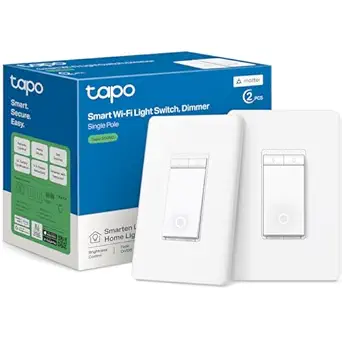 | Best for Matter Smart Homes | Model: S505D | Pack size: 2 | Switch type: Single pole | VIEW ON AMAZON | See Our Full Breakdown |
| Leviton Decora Smart Wi-Fi Dimmer Switch, 2nd Gen, Matter Compatible, White (D26HD-1RW) |  | Best for Flexible Smart Home Integration | Model: D26HD-1RW | Color: White | Connectivity: 2.4 GHz Wi-Fi | VIEW ON AMAZON | See Our Full Breakdown |
| Leviton Decora Smart Wi-Fi Dimmer Switch, D36HD-1RW, White |  | Best for Fine-Tuning LED Dimming | Model: D36HD-1RW | Product line: Leviton Decora Smart | Type: Wi-Fi dimmer switch | VIEW ON AMAZON | See Our Full Breakdown |
| Tapo Smart Dimmer Switch, Single Pole, Requires Neutral Wire, 4-Pack |  | Best for Coordinated Single-Pole Replacements | Pack size: 4 | Switch type: Single-pole | Neutral wire: Required | VIEW ON AMAZON | See Our Full Breakdown |
| TREATLIFE Smart Dimmer Switch, 4 Pack | 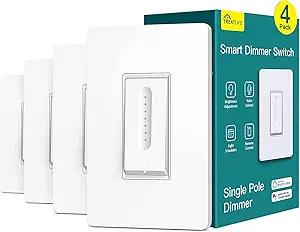 | Best for Budget-Minded Multi-Room Control | Pack size: 4 | Wiring: Neutral wire required; single-pole only | Wi-Fi: 2.4 GHz; 5 GHz not supported | VIEW ON AMAZON | See Our Full Breakdown |
| Feit Electric Smart Wi-Fi Dimmer Switch, White | 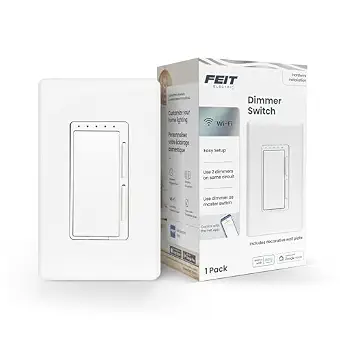 | Best for Multi-Way Circuit Flexibility | Model: DIM/WiFi | Color: White | Wi-Fi: 2.4 GHz | VIEW ON AMAZON | See Our Full Breakdown |
| premium smart dimmer switch | Model | Dimming range | Wi-Fi | Neutral wire |
|---|---|---|---|---|
| Kasa Smart 3-Way Dimmer Switch | KS230 KIT v2 | 1%–100% | 2.4 GHz required | — |
| Lutron Caseta Smart Dimmer Swi | — | — | — | Not required |
| GHome Smart Dimmer Light Switc | — | 1%–100% | 2.4 GHz | Required |
| Kasa Smart Dimmer Switch HS220 | HS220P3 | 0%–100% | 2.4 GHz | — |
| Tapo Matter Smart Dimmer Switc | S505D | 0%–100% | — | — |
| Leviton Decora Smart Wi-Fi Dim | D26HD-1RW | — | — | Required |
| Leviton Decora Smart Wi-Fi Dim | D36HD-1RW | — | — | — |
| Tapo Smart Dimmer Switch | — | 1%–100% | 2.4 GHz | Required |
| TREATLIFE Smart Dimmer Switch | — | 1%–100% | 2.4 GHz; 5 GHz not supported | — |
| Feit Electric Smart Wi-Fi Dimm | DIM/WiFi | — | 2.4 GHz | Required |
More Details on Our Top Picks
Kasa Smart 3-Way Dimmer Switch Kit KS230 v2
The Kasa KS230 v2 is the clearest fit here for a light controlled from two wall locations: its kit is built for a 3-way circuit, while the single-pole Kasa HS220P3 cannot fill that role. App and voice control, scheduling, and a 1%–100% dimming range add flexibility without a separate hub. Its load limits cover up to 150 W of dimmable LED lighting or 300 W of incandescent lighting, so check the connected bulbs before choosing it. The tradeoff is installation: this model needs a neutral wire, 2.4 GHz Wi-Fi, and hands-on electrical wiring. Compared with Lutron Caseta, it avoids a required smart hub, but Caseta is the better candidate when neutral wiring is unavailable.
Pros:- Designed for controlling one light from two switch locations
- Adjusts brightness from 1% to 100% and supports schedules
- Works with Alexa and Google Assistant without a separate hub
- Supports dimmable LED and incandescent loads
Cons:- Requires a neutral wire and 2.4 GHz Wi-Fi
- Installation involves electrical wiring
- Maximum supported load is 150 W for dimmable LEDs
Best for: Homeowners replacing both switches on a neutral-wired 3-way lighting circuit who want app and voice control without a hub
Not ideal for: Renters or anyone with a 3-way circuit lacking neutral wiring, or who does not want to handle electrical installation
- Model:KS230 KIT v2
- Switch type:3-way smart dimmer
- Dimming range:1%–100%
- Wiring:Neutral wire required
- Wi-Fi:2.4 GHz required
- Maximum dimmable LED load:150 W
- Maximum incandescent load:300 W
- Voice assistants:Amazon Alexa, Google Assistant
- Certification and warranty:ETL certified; 2 years
Our verdict“Choose the KS230 v2 when you need smart dimming on a neutral-wired 3-way circuit and want to skip a separate hub.”
Lutron Caseta Smart Dimmer Switch, No Neutral Required
The Lutron Caseta stands apart for a specific retrofit problem: it does not require a neutral wire. That can make it a stronger fit than the Kasa KS230 v2 or HS220P3 in older homes where neutral wiring is absent at the switch box. It also supports up to 600 W of incandescent or halogen lighting, compared with the Kasa KS230’s 300 W incandescent limit. Smart control comes with a condition, though: a Lutron Smart Hub is required for app and smart home features, and the Pico remote and coordinating wall plate are separate purchases. Buyers who want a straightforward Wi-Fi dimmer without a hub may prefer the Kasa HS220P3. Caseta makes more sense when wiring flexibility and broad platform compatibility outweigh the extra system pieces.
Pros:- Operates without a neutral wire
- Supports up to 150 W of dimmable LED or CFL lighting
- Supports up to 600 W of incandescent or halogen lighting
- Compatible with Alexa, Apple HomeKit, Google Home, Ring, and Sonos through a Lutron Smart Hub
Cons:- A Lutron Smart Hub is required for app and smart home control
- Pico remote and coordinating wall plate are sold separately
Best for: Owners of older homes without neutral wires at the switch who want smart control through a Lutron hub
Not ideal for: Buyers who want hub-free setup or expect a Pico remote and coordinating wall plate in the box
- Neutral wire:Not required
- Hub:Lutron Smart Hub required for smart features
- LED/CFL capacity:Up to 150 W
- Incandescent/halogen capacity:Up to 600 W
- Included:1 dimmer switch
- Pico remote:Sold separately
- Coordinating wall plate:Sold separately
- Smart home compatibility:Alexa, Apple HomeKit, Google Home, Ring, Sonos
Our verdict“Pick Caseta if neutral wiring is missing and you are comfortable building around the required Lutron Smart Hub.”
GHome Smart Dimmer Light Switch, Single Pole, 1%–100% Dimming, 3-Pack
The GHome 3-pack suits buyers updating several single-pole rooms at once: each switch offers 1%–100% dimming, app control, timers, schedules, and group control without a hub. That gives it a bundle advantage over the Kasa HS220P3, which is also a hub-free single-pole dimmer but is listed as a 3-pack model with a 0% starting point. GHome’s fit is narrower than its feature list suggests: it requires neutral wiring and 2.4 GHz Wi-Fi, and it is not compatible with smart bulbs. Its 150 W limit for LED or CFL loads also calls for checking each circuit. Choose the Tapo S505D instead if Matter and Apple HomeKit support matter more than getting three switches in one pack.
Pros:- Three switches for updating multiple single-pole circuits
- Offers 1%–100% dimming through touch controls or the app
- Supports remote control, schedules, timers, and group control
- Works with Alexa and Google Assistant without a separate hub
Cons:- Requires neutral wiring and 2.4 GHz Wi-Fi
- Not compatible with smart bulbs
- Maximum load is 150 W for LED or CFL lighting
Best for: Homeowners replacing three separate single-pole switches with compatible, non-smart dimmable bulbs
Not ideal for: People with smart bulbs, 3-way circuits, no neutral wiring, or a preference for Matter and Apple HomeKit support
- Switch type:Single pole
- Dimming range:1%–100%
- Wi-Fi:2.4 GHz
- Hub:Not required
- Neutral wire:Required
- Input/output:120 V, 60 Hz
- Maximum current:4 A
- Maximum load:150 W LED, 150 W CFL, 450 W incandescent
- Pack and compatibility:3 switches; not compatible with smart bulbs
Our verdict“Choose the GHome pack to update several compatible single-pole circuits at once, provided none uses smart bulbs.”
Kasa Smart Dimmer Switch HS220P3, Single-Pole
The Kasa HS220P3 is a practical choice for a single-pole circuit when you want scheduling and remote control but do not need Matter or three-way wiring. It adjusts from 0% to 100%, includes fade-off controls, and works through the Kasa app, push button, Alexa, or Google Assistant without a separate hub. The Tapo S505D covers more smart home platforms, including Apple HomeKit and Samsung SmartThings, but the HS220P3 keeps the setup within Kasa’s app and offers a straightforward single-pole option. Its main limits are installation compatibility: it needs a neutral wire and 2.4 GHz Wi-Fi, and its maximum wattage is 150 W. Like the other Wi-Fi dimmers here, it is not a fit for a circuit controlled from two wall locations.
Pros:- Dims from 0% to 100% and supports fade-off controls
- Offers app, push-button, and voice control
- Works with Alexa and Google Assistant without a hub
- Supports schedules and remote app control
Cons:- Requires neutral wiring and 2.4 GHz Wi-Fi
- Limited to single-pole circuits
- Maximum wattage is 150 W
Best for: Homeowners with a neutral-wired, single-pole circuit who use Alexa or Google Assistant and want app scheduling
Not ideal for: Buyers with 3-way circuits, no neutral wire, or a need for broad Matter-based platform compatibility
- Model:HS220P3
- Circuit:Single-pole (1-way)
- Dimming range:0%–100%
- Wiring:Neutral wire required
- Wi-Fi:2.4 GHz
- Hub:Not required
- Operating voltage:120 V AC
- Maximum wattage:150 W
- Dimensions with panel:5.06 × 3.33 × 1.74 in
Our verdict“Choose the HS220P3 for hub-free app and voice dimming on a compatible single-pole circuit.”
Tapo Matter Smart Dimmer Switch, S505D, 2-Pack, Single Pole
The Tapo S505D is the strongest match in this group for buyers who want a dimmer to fit a Matter-compatible home. It supports Alexa, Apple HomeKit, Google Home, and Samsung SmartThings, while the Kasa HS220P3 is focused on Alexa and Google Assistant. Its 2-pack also makes it useful for a small retrofit project, and the listed functions include full-range dimming, schedules, fade on/off, and away mode. That platform flexibility comes with setup requirements: neutral wiring, 2.4 GHz Wi-Fi, and the Tapo app are all part of installation. Compared with Lutron Caseta, the Tapo avoids a required dedicated hub but cannot solve a missing-neutral wiring problem. Choose it for platform choice and paired-room updates, not for 3-way circuits.
Pros:- Matter-certified with support for major smart home platforms
- Works with Alexa, Apple HomeKit, Google Home, and Samsung SmartThings
- Includes two switches for a small multi-room project
- Supports schedules, away mode, and fade on/off
Cons:- Requires neutral wiring and 2.4 GHz Wi-Fi
- Setup requires the Tapo app
- Designed for single-pole circuits
Best for: Smart home owners using Matter-compatible platforms who are updating two neutral-wired, single-pole lighting circuits
Not ideal for: Buyers without neutral wiring, those needing 3-way control, or anyone unwilling to use the Tapo app during setup
- Model:S505D
- Pack size:2
- Switch type:Single pole
- Dimming range:0%–100%
- Connectivity:2.4 GHz Wi-Fi
- Wiring:Neutral wire required
- Setup app:Tapo
- Smart home compatibility:Amazon Alexa, Apple HomeKit, Google Home, Samsung SmartThings
Our verdict“Pick the S505D if you want Matter platform flexibility across two compatible single-pole circuits.”
Leviton Decora Smart Wi-Fi Dimmer Switch, 2nd Gen, Matter Compatible, White (D26HD-1RW)
The 2nd Gen Leviton Decora earns this spot for buyers who want a wall dimmer that can fit into several smart home ecosystems. It supports Alexa, Google Assistant, Apple Siri, SmartThings, Sonos, and Resideo, with Matter support available through a firmware update. That gives it broader integration potential than the TREATLIFE Smart Dimmer, which is limited to Alexa and Google Assistant. Custom fade rates and preset levels also let you shape how lights behave day to day, while optional wireless 3-way control can help when a wired multi-location setup is inconvenient. The tradeoffs are a required neutral wire and 2.4 GHz Wi-Fi; Matter also takes an update rather than being ready out of the box. Choose it for ecosystem flexibility, not for the simplest installation.
Pros:- Supports a wide range of smart home platforms, including Apple Home and SmartThings
- Customizable fade rates and preset brightness levels
- Optional wireless companion control for 3-way use
- Schedules and scenes are available through the app
Cons:- Requires a neutral wire and 2.4 GHz Wi-Fi
- Matter support requires a firmware update
- Wireless 3-way control requires an optional companion device
Best for: Smart home owners who use multiple platforms and want adjustable fade behavior plus optional wireless 3-way control.
Not ideal for: Homes without neutral wiring or buyers who want Matter support without a firmware update.
- Model:D26HD-1RW
- Color:White
- Connectivity:2.4 GHz Wi-Fi
- Hub required:No
- Neutral wire:Required
- Matter:Enabled via firmware update
- Maximum LED/CFL load:300 W
- Maximum incandescent/MLV load:600 W
- Warranty:2-year limited
Our verdict“Pick this Leviton if broad platform support and configurable lighting behavior matter more than out-of-box Matter setup.”
Leviton Decora Smart Wi-Fi Dimmer Switch, D36HD-1RW, White
The D36HD-1RW is the lineup’s adjustment-focused pick: it lets owners set bulb type, minimum dim level, maximum brightness, fade rates, and preset levels. Those controls can help address flicker or an abrupt jump between off and low brightness when a compatible LED bulb does not dim smoothly at default settings. Compared with the Feit Electric Smart Wi-Fi Dimmer, whose supplied details emphasize bulb variety and grouped control, this Leviton gives more attention to calibrating the dimming range. That makes it a better fit for someone willing to tune a particular bulb and fixture combination. Its key limitation is that those adjustments cannot overcome incompatibility, and the supplied product data does not specify a load rating, neutral-wire requirement, or supported voice platforms.
Pros:- Adjustable bulb type and dimming limits
- Customizable fade rates and preset light levels
- Smartphone app provides remote control
- Night settings can automatically soften lighting
Cons:- Dimming performance depends on bulb and fixture compatibility
- Supplied product data does not state load limits or wiring requirements
- Voice assistant compatibility is not specified in the supplied data
Best for: Homeowners with compatible LED fixtures who want to adjust minimum and maximum brightness to suit their lighting.
Not ideal for: Buyers who need confirmed load limits, multi-way compatibility, or specific voice assistant support before choosing a switch.
- Model:D36HD-1RW
- Product line:Leviton Decora Smart
- Type:Wi-Fi dimmer switch
- Color:White
- Connectivity:Wi-Fi
- Fade and preset controls:Customizable fade rates and preset light levels
- Dimming adjustments:Bulb type, minimum dim, and maximum brightness
- Night setting:Automatic softer lighting
Our verdict“Choose the D36HD-1RW when LED dimming adjustment is your priority and you can confirm its wiring and load fit separately.”
Tapo Smart Dimmer Switch, Single Pole, Requires Neutral Wire, 4-Pack
This four-pack of Tapo dimmers suits a project replacing several single-pole switches at once. Each dimmer offers a 1%–100% range, app control, schedules, timers, and Away Mode, so lights can be managed remotely or set to follow a routine. Alexa and Google Assistant support cover common voice setups. Compared with the Feit Electric Smart Wi-Fi Dimmer, Tapo’s stated fit is narrower: it is single-pole only, while Feit supports single-pole, 3-way, and 4-way wiring. That distinction matters if any target light is controlled from multiple locations. Tapo also requires a neutral wire and 2.4 GHz Wi-Fi, and the supplied details list no Apple Home or Matter support. It is a sensible multi-room choice when the wiring matches and those ecosystems are not needed.
Pros:- Four switches support a multi-room replacement project
- Dimming range runs from 1% to 100%
- App offers remote control, schedules, timers, and Away Mode
- Works with Alexa and Google Assistant
Cons:- Requires neutral wiring and 2.4 GHz Wi-Fi
- Single-pole use only
- Supplied data does not list Apple Home or Matter support
Best for: Homeowners updating several neutral-wired, single-pole rooms who use Alexa or Google Assistant.
Not ideal for: Buyers with 3-way or 4-way circuits, no neutral wire, or a need for Apple Home or Matter support.
- Pack size:4
- Switch type:Single-pole
- Neutral wire:Required
- Wi-Fi:2.4 GHz
- Dimming range:1%–100%
- Voice assistants:Amazon Alexa and Google Assistant
- App:Tapo
- App features:Remote control, schedules, timers, and Away Mode
Our verdict“Choose this Tapo pack for several matching single-pole circuits that need app routines and familiar voice control.”
TREATLIFE Smart Dimmer Switch, 4 Pack
The TREATLIFE four-pack is geared toward buyers who want app and voice dimming across several straightforward circuits. It handles compatible, non-smart dimmable LED, CFL, and incandescent bulbs, remembers the last brightness setting, and needs no hub. Compared with the Tapo Smart Dimmer 4-Pack, it adds a stated incandescent load ceiling and last-level memory, while Tapo specifies Away Mode and a full 1%–100% range. TREATLIFE is limited to single-pole wiring and Alexa or Google Assistant; there is no Apple HomeKit or 3-way support. Neutral wiring and 2.4 GHz Wi-Fi are also required. Its broad bulb-type list helps with mixed existing fixtures, but smart bulbs are outside its stated compatibility, so this is best for conventional lamps on uncomplicated circuits.
Pros:- Four switches support updates across several rooms
- Works with dimmable LED, CFL, and incandescent bulbs
- Remembers the last brightness setting
- No hub required; app supports schedules and group control
Cons:- Requires neutral wiring and supports single-pole setups only
- Does not support 5 GHz Wi-Fi or Apple HomeKit
- Works with dimmable non-smart bulbs, not smart bulbs
Best for: Homeowners replacing multiple single-pole switches for conventional dimmable bulbs in Alexa or Google homes.
Not ideal for: Buyers with smart bulbs, multi-location circuits, no neutral wire, or Apple HomeKit setups.
- Pack size:4
- Wiring:Neutral wire required; single-pole only
- Wi-Fi:2.4 GHz; 5 GHz not supported
- Bulb compatibility:Dimmable, non-smart LED, CFL, and incandescent bulbs
- Maximum LED/CFL load:150 W
- Maximum incandescent load:400 W
- Dimming range:1%–100%
- Voice assistants:Amazon Alexa and Google Assistant
- Dimensions:4.14 × 1.73 × 1.34 in
Our verdict“Pick TREATLIFE for multi-room control of conventional dimmable bulbs when your circuits are single-pole and your voice platform is Alexa or Google.”
Feit Electric Smart Wi-Fi Dimmer Switch, White
Among these five, the Feit Electric Smart Wi-Fi Dimmer has the broadest stated circuit compatibility: it supports single-pole, 3-way, and 4-way installations. That makes it a stronger candidate for hallways and larger rooms with multiple control points than the TREATLIFE Smart Dimmer, which is single-pole only. Feit also works with dimmable LED, CFL, incandescent, and halogen bulbs, and its app can group up to 20 dimmers with schedules and timers. Those features suit coordinated lighting across a home. The tradeoffs are a required neutral wire and 2.4 GHz Wi-Fi for smart functions, plus a recommendation for professional installation. Only one 1-gang wall plate is included, so buyers planning several locations may need to account for the supplied hardware.
Pros:- Supports single-pole, 3-way, and 4-way circuits
- Compatible with dimmable LED, CFL, incandescent, and halogen bulbs
- Can group and control up to 20 dimmers
- Includes a decorative wall plate and mounting hardware
Cons:- Requires a neutral wire and 2.4 GHz Wi-Fi for smart features
- Professional installation is recommended
- Only one 1-gang wall plate is included
Best for: Homeowners with multi-way circuits who want app schedules and grouped control across several Feit dimmers.
Not ideal for: Buyers without neutral wiring or those seeking a simple installation without professional help.
- Model:DIM/WiFi
- Color:White
- Wi-Fi:2.4 GHz
- Neutral wire:Required
- Voltage and frequency:120 V, 60 Hz
- Maximum current:15 A
- Load capacity:LED/CFL up to 150 W; incandescent/halogen up to 450 W
- Circuit compatibility:Single-pole, 3-way, and 4-way
- Voice assistants:Amazon Alexa and Google Assistant
Our verdict“Choose Feit when multi-way wiring and grouped control matter more than a simpler DIY installation.”

How We Picked
I ranked these switches by how well their stated capabilities solve real installation and control needs: wiring fit, single-pole versus three-way use, smart home compatibility, dimming control, and the number of switches in each package. A switch that addresses a difficult wiring constraint or a specific multiway setup earned a distinct role because those factors can determine whether an installation works at all. Matter support and app-based control add flexibility, but they do not outweigh a mismatch with the circuit.
The order also reflects how clearly each product’s listed features support a buyer decision. I put the no-neutral Lutron and three-way Kasa near the top for their distinct installation strengths, then considered Leviton and Tapo options for compatibility and multipack coverage. The remaining models offer alternatives for single-pole projects, but buyers should verify neutral-wire requirements, bulb compatibility, and the exact model number before choosing; package size alone does not establish better performance.
| premium smart dimmer switch | Model | Neutral wire |
|---|---|---|
| Kasa Smart 3-Way Dimmer Switch | KS230 KIT v2 | — |
| Lutron Caseta Smart Dimmer Swi | — | Not required |
| GHome Smart Dimmer Light Switc | — | Required |
| Kasa Smart Dimmer Switch HS220 | HS220P3 | — |
| Tapo Matter Smart Dimmer Switc | S505D | — |
| Leviton Decora Smart Wi-Fi Dim | D26HD-1RW | Required |
| Leviton Decora Smart Wi-Fi Dim | D36HD-1RW | — |
| Tapo Smart Dimmer Switch | — | Required |
| TREATLIFE Smart Dimmer Switch | — | — |
| Feit Electric Smart Wi-Fi Dimm | DIM/WiFi | Required |
Factors to Consider When Choosing Premium Smart Dimmer Switches
Before comparing apps or dimming percentages, I’d start with the electrical circuit and the lights attached to it. Those details narrow the field quickly and help prevent buying a switch that cannot control the intended fixture. Then weigh ecosystem flexibility, installation effort, and how many locations need smart control.
Check the Circuit Before the Feature List
Identify whether the light is controlled from one wall location or from two or more, since single-pole and three-way switches are not interchangeable by default. For multiway circuits, check the product’s wiring diagram and whether the kit expects one smart switch plus a companion control. Also check for a neutral wire in the wall box, especially in older homes where wiring practices vary. Do not rely only on the switch’s appearance or the number of wires you can see; circuit layouts can be confusing. If the wiring is unclear, have a qualified electrician identify the circuit before ordering. This quick check can eliminate more unsuitable options than comparing app features.
Match the Dimmer to the Bulbs
A dimmer’s percentage range does not guarantee smooth operation with every LED bulb. Bulbs can flicker, buzz, or drop out at low brightness when their electronics do not work well with a particular dimmer. Check the bulb maker’s compatibility guidance and the switch maker’s supported load types before replacing a wall control. Mixed bulb types on one circuit can make dimming behavior less predictable. If low-level lighting matters, look for setup options that let you adjust the minimum brightness. Keeping compatible bulbs on the same circuit can make the result more consistent.
Choose Smart Home Support for Your Household
Start with the voice assistant, hub, or automation platform already used at home, then confirm the exact switch model works with it. Matter can simplify cross-platform setup, but its presence does not tell you whether every dimming function or advanced automation is exposed in each app. A Wi-Fi model may avoid a separate hub, while a hub-based system can suit buyers who want a broader connected lighting setup. Think about who will control the lights day to day: several household members may value familiar voice controls more than extra app settings. If you plan to change platforms later, prioritize standards support and verify which features carry over.
Decide How Much Setup You Want
Installation effort depends on the wall box, circuit, and household wiring, not just on whether the product is marketed as smart. Some switches need a neutral wire, while a no-neutral model can fit certain older installations that would otherwise require different wiring work. Three-way kits add another layer because both control locations must be handled correctly. Before buying, read the wiring instructions and check whether the package includes all controls needed for the intended circuit. Consider the space in the wall box too, since smart switches can be bulkier than basic toggles. If any step is unfamiliar, arrange qualified help rather than guessing at live wiring.
Treat Multipacks as a Coverage Decision
A two-pack or four-pack can simplify a project when several compatible rooms need the same kind of switch. It can also leave you with extras if the circuits differ or some locations use multiway control. Map each light to its circuit and record which boxes have neutral wires before choosing a package quantity. Keep in mind that a multipack does not mean every included switch can be used in a three-way setup. Buying the right mix for each circuit may be more useful than standardizing on one pack. This is especially relevant when comparing the Tapo and GHome packages with single-switch options.
Pay More for a Constraint You Actually Have
Premium features are most valuable when they solve a specific problem, such as missing neutral wiring, cross-platform control, or lighting operated from multiple locations. If a basic single-pole circuit and your existing smart home platform are already well served, extra compatibility features may add little to daily use. Conversely, choosing a lower-feature switch that cannot fit the circuit can mean returning it or changing the installation plan. Compare the cost of the whole setup, including any required companion controls or hub, rather than judging one switch alone. A clear need is a better reason to pay more than a longer feature list.
Frequently Asked Questions
Can I install one of these switches if my wall box has no neutral wire?
Among these picks, the Lutron Caseta is specifically identified as requiring no neutral wire, making it the clearest candidate for that situation. Many other smart dimmers do require a neutral, so check the instructions for the exact model before buying. Wire colors and box layouts can vary, and a neutral wire may not be obvious at first glance. If you cannot identify the conductors safely, ask an electrician to inspect the box. A no-neutral design still needs to match the circuit and lighting load.
Which switch should I choose for a light controlled from two wall locations?
First confirm that the circuit is wired as a three-way setup; two switches controlling one light often indicates this, but the wiring should be verified. The Kasa KS230 v2 is the lineup’s explicitly identified three-way kit, so it is the most direct starting point. Several other listed models are described as single-pole, which may not suit that circuit without an approved configuration. Check whether the kit includes the controls and wiring guidance for both locations. When in doubt, have an electrician identify the circuit before ordering.
Does Matter compatibility mean a dimmer will work with every smart home platform?
Matter is intended to support device control across compatible platforms, but it does not guarantee that every app exposes every feature. Confirm support for the exact switch model, your platform, and the dimming functions you need. Also check whether setup requires a compatible hub or controller in your home. The Leviton D26HD is listed as Matter compatible, while buyers comparing it with the D36HD should verify the latter’s exact specifications. Platform support can change, so use current manufacturer documentation for the final check.
Will a smart dimmer work with the LED bulbs already installed?
Not automatically: LED compatibility depends on the dimmer, the bulb electronics, and sometimes the number of bulbs on the circuit. An incompatible pairing can cause flicker, buzzing, a limited dimming range, or lights that fail to turn off cleanly. Check both manufacturers’ compatibility information and the dimmer’s supported load type before installation. If you plan to replace bulbs, choose dimmable LEDs that are listed for the switch. Testing one fixture first can help identify problems before you outfit several rooms.
Should I buy a multipack or separate switches for several rooms?
A multipack makes sense when the rooms have compatible circuits and you want the same control setup throughout. It can be a poor fit when some locations are single-pole and others are three-way, or when neutral wiring differs between wall boxes. The Tapo two-pack and four-pack, along with the GHome three-pack, offer different quantities, but quantity alone does not confirm circuit fit. List each room’s circuit type and wiring before selecting a package. Separate purchases can reduce unused switches when the installation requirements vary.
Conclusion
For the best overall fit in a home without a neutral wire, I’d start with the Lutron Caseta. Choose the Kasa KS230 v2 when you need a three-way kit, and look to the Leviton D26HD if Matter compatibility is a priority. For broader single-pole coverage, compare the Tapo multipacks with the Kasa HS220P3 and other single-pole options after checking wiring and bulb support. Beginners should first identify their circuit and neutral-wire situation, then select the simplest model that fits; buyers with several rooms should map each location before choosing a multipack. That matching step matters more than picking the switch with the longest feature list.
Fall yard work Picks
leaf blowers
As an affiliate, we earn on qualifying purchases.