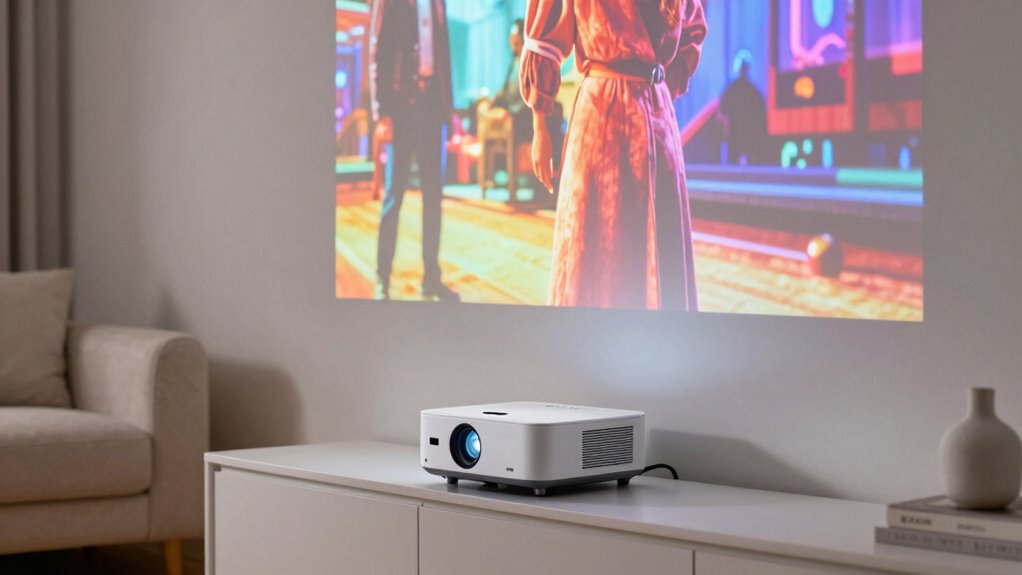
For most small rooms, my best overall pick is the BenQ TH671ST, whose 1080p resolution and short throw design suit movie nights and gaming without demanding a long projection distance. The Optoma Photon Go stands out for buyers who want an ultra short throw setup, while the ViewSonic PS502W is aimed at rooms where a bright presentation matters more than Full HD detail. The main tradeoffs are how close the projector can sit to the wall, how much image detail you need, and whether smart features or portability matter more than room-filling brightness. Compact models can simplify placement, but their broad streaming and 4K support claims do not necessarily mean native 4K resolution. Read on for the full comparison and guidance on matching a projector to your room.

Get home appliances delivered free with Prime
- Fast, free delivery on millions of items
- Prime Video, Amazon Music and more included
- Member-only deals all year
Complete the kit



Key Takeaways
- BenQ TH671ST is the strongest general-purpose fit in this lineup for buyers who want native 1080p and a short throw for films or games.
- Optoma Photon Go is the ultra short throw specialist, suited to rooms where placing a projector farther back is difficult.
- ViewSonic PS502W favors brightness for presentations, but its WXGA resolution gives up detail compared with the Full HD home entertainment picks.
- Several compact models advertise 4K support or decoding; that describes accepted input, not native 4K image resolution.
- Smart features and portability separate many of the newer options, while exact throw distance and usable brightness remain central to whether they will work in a small room.
| Optoma Photon Go ML1080UST 1080p Ultra Short Throw Triple Laser Projector |  | Best for the Tightest Spaces | Native resolution: 1920 × 1080 | Brightness: 650 lumens | Light source: RGB triple laser | VIEW ON AMAZON | See Our Full Breakdown |
| ViewSonic PS502W WXGA Short Throw Projector | 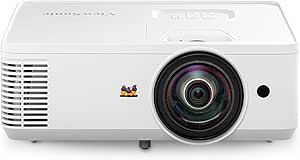 | Best for Bright, Shared Rooms | Native resolution: 1280 × 800 | Display type: DLP | Brightness: 4,000 ANSI lumens | VIEW ON AMAZON | See Our Full Breakdown |
| BenQ TH671ST 1080p Short-Throw Home Entertainment Projector |  | Best for Gaming | Native resolution: 1920 × 1080 | Brightness: 3,000 ANSI lumens | Throw ratio: 0.69–0.83 | VIEW ON AMAZON | See Our Full Breakdown |
| Smart 4K Support Projector with Google TV 14.0, WiFi 6, Bluetooth 5.4, HDR10, and 360° Stand |  | Best for Flexible Placement | Native resolution: 1080p | Video support: 4K decoding, HDR10 | Brightness: 500 ISO ANSI lumens | VIEW ON AMAZON | See Our Full Breakdown |
| iSinbox Short-Throw Smart Projector with 4K HDR10+ Support |  | Best for Easy Setup | Native resolution: 1080p | Video support: 4K HDR10+ | Throw ratio: 1.1:1 | VIEW ON AMAZON | See Our Full Breakdown |
| TOPTRO A2 4K-Decoding Smart Projector with VIDAA, Dolby Audio, Wi-Fi 6, and Voice Control |  | Best for Built-In Audio | Native resolution: 1080p; supports 4K decoding | Brightness: 650 ANSI lumens | Throw ratio: 1.0:1 | VIEW ON AMAZON | See Our Full Breakdown |
| Outdoor 4K Projector with WiFi, Bluetooth, AI Auto Focus & Keystone, HDR10+, All-in-One Streaming, Upgraded GO2 White Short Throw with 360° Stand |  | Best for Bright, Flexible Use | Resolution: 4K support; native resolution not specified | Brightness: Up to 5,000 ANSI lumens | Throw ratio: 1:1 | VIEW ON AMAZON | See Our Full Breakdown |
| iSinbox Short-Throw 4K HDR10+ Smart Projector |  | Best for Flexible Placement | Native resolution: 1080p | Input support: 4K HDR10+ | Throw ratio: 1.1:1 | VIEW ON AMAZON | See Our Full Breakdown |
| HP MC425 Portable Full HD Projector with WiFi, Bluetooth, Short Throw Lens and PD Power Bank Compatibility |  | Best for the Tightest Throw Distance | Native resolution: Full HD 1920×1080; supports 4K input | Brightness: 200 ISO lumens | Throw ratio: 0.8:1 | VIEW ON AMAZON | See Our Full Breakdown |
| Portable Smart Projector with Google TV, Native 1080p and 4K Decoding Support |  | Best for Short-Throw Streaming | Operating system: Android 14.0 with Google TV | Memory and storage: 1GB RAM; 32GB storage | Native resolution: 1080p; supports 4K decoding | VIEW ON AMAZON | See Our Full Breakdown |
| GO2 4K Short-Throw Smart Projector with VIDAA, 5000 ANSI Lumens, and 65W Audio |  | Best for Built-In Entertainment | Resolution: 4K support; native resolution not specified | Brightness: 5000 ANSI lumens | Throw distance: 100-inch image from 8 feet | VIEW ON AMAZON | See Our Full Breakdown |
| Portable Mini Projector with 4K Input Support and Short Throw |  | Best for Very Tight Setups | Native resolution: 1080p | Maximum supported input: 4K | Minimum throw distance: 2.5 feet | VIEW ON AMAZON | See Our Full Breakdown |
| short throw projectors for small room | Native resolution | Throw ratio | Brightness | Connectivity |
|---|---|---|---|---|
| Optoma Photon Go ML1080UST 108 | 1920 × 1080 | — | 650 lumens | HDMI, RCA, Wi-Fi, Bluetooth |
| ViewSonic PS502W WXGA Short Th | 1280 × 800 | 0.52 | 4,000 ANSI lumens | Dual HDMI, USB-A, VGA, 3.5 mm audio |
| BenQ TH671ST 1080p Short-Throw | 1920 × 1080 | 0.69–0.83 | 3,000 ANSI lumens | 2 HDMI, VGA, USB Type-A, USB mini-B, 3.5 mm audio, RS-232 |
| Smart 4K Support Projector wit | 1080p | 1.17:1 | 500 ISO ANSI lumens | Wi-Fi 6, Bluetooth 5.4, HDMI ARC/CEC, USB |
| iSinbox Short-Throw Smart Proj | 1080p | 1.1:1 | — | — |
| TOPTRO A2 4K-Decoding Smart Pr | 1080p; supports 4K decoding | 1.0:1 | 650 ANSI lumens | — |
| Outdoor 4K Projector with WiFi | — | 1:1 | Up to 5,000 ANSI lumens | — |
| iSinbox Short-Throw 4K HDR10+ | 1080p | 1.1:1 | — | — |
| HP MC425 Portable Full HD Proj | Full HD 1920×1080; supports 4K input | 0.8:1 | 200 ISO lumens | — |
| Portable Smart Projector with | 1080p; supports 4K decoding | 0.8:1 | — | — |
| GO2 4K Short-Throw Smart Proje | — | — | 5000 ANSI lumens | 2 HDMI 2.1, 2 USB, AV, 3.5 mm headphone jack |
| Portable Mini Projector with 4 | 1080p | — | — | HDMI, USB, 3.5 mm AUX |
More Details on Our Top Picks
Optoma Photon Go ML1080UST 1080p Ultra Short Throw Triple Laser Projector
Its ultra short throw lens is the main reason I’d rank the Photon Go ahead of the BenQ TH671ST for a very small room: it can sit just inches from the wall while producing a 60–100-inch image. That placement leaves more room to move around and keeps people from crossing the beam. Google TV, automatic focus, and keystone correction also make it easier to set up as a self-contained movie option. The tradeoff is 650 lumens, which suits a dim room better than daytime viewing, and the built-in battery lasts only 1.5 hours. It’s more portable than the classroom-oriented ViewSonic PS502W, but its image range is smaller and it isn’t the pick for a bright multipurpose room.
Pros:- Ultra short throw placement works with very little space between projector and wall
- Google TV includes access to streaming apps such as Netflix and Disney+
- Automatic focus and keystone correction simplify setup
- Built-in battery and 6.9-pound weight support portable use
Cons:- 650 lumens is better suited to dim viewing than rooms with substantial ambient light
- The 1.5-hour battery rating may not cover a full-length film
- Image size tops out at 100 inches, below the larger formats supported by the ViewSonic PS502W
Best for: Apartment dwellers who need a projector close to the wall and want streaming built in for evening viewing
Not ideal for: People who watch in a bright room or need a battery to last through longer films without recharging
- Native resolution:1920 × 1080
- Brightness:650 lumens
- Light source:RGB triple laser
- Throw distance:0.34–0.81 ft
- Image size:60–100 inches
- Battery life:1.5 hours
- Weight:6.9 lbs
- Connectivity:HDMI, RCA, Wi-Fi, Bluetooth
Our verdict“Choose the Photon Go for a close-to-wall setup in a dim small room where built-in streaming and portability matter more than brightness or long battery runtime.”
ViewSonic PS502W WXGA Short Throw Projector
With 4,000 ANSI lumens, the PS502W is the lineup’s practical choice when a small room also serves as a classroom or meeting space and the lights can’t always go off. Its 0.52 throw ratio lets it create a large image from relatively close by, while dual HDMI inputs make it convenient to leave more than one source connected. That makes it a different kind of small-room pick from the Optoma Photon Go, which is more portable and includes streaming but is rated at much lower brightness. The ViewSonic gives up detail: 1280 × 800 WXGA falls short of the BenQ TH671ST’s native 1080p, and its listed light source life is 4,000 hours. I’d choose it for presentations and shared use, not a home theater where Full HD matters.
Pros:- 4,000 ANSI lumens support use in moderately lit rooms
- 0.52 throw ratio suits compact projection spaces
- Dual HDMI inputs accommodate multiple connected devices
- Vertical auto-keystone correction helps with setup alignment
Cons:- 1280 × 800 resolution is lower than the Full HD BenQ TH671ST
- The listed light source operating life is 4,000 hours
- Its classroom and meeting-room feature set lacks the Photon Go’s built-in streaming and battery
Best for: Teachers and presenters who need a bright short-throw image in a compact room with multiple connected sources
Not ideal for: Movie and gaming viewers who prioritize Full HD detail or want built-in streaming and battery-powered portability
- Native resolution:1280 × 800
- Display type:DLP
- Brightness:4,000 ANSI lumens
- Throw ratio:0.52
- Image size:60–300 inches
- Contrast ratio:15,000:1
- Connectivity:Dual HDMI, USB-A, VGA, 3.5 mm audio
- Light source operating life:4,000 hours
Our verdict“Pick the PS502W for a small shared room where brightness and connected presentation sources matter more than Full HD resolution.”
BenQ TH671ST 1080p Short-Throw Home Entertainment Projector
Native 1080p and low input lag make the TH671ST my gaming pick for a small room: its short-throw lens can fill a 100-inch screen from about five feet away, so a compact layout doesn’t have to mean a small image. Compared with the ViewSonic PS502W, it trades brightness and WXGA resolution for Full HD detail and gaming-oriented responsiveness. The Photon Go can sit much closer to the wall, though, and adds streaming and a battery; the BenQ needs a more conventional placement and an external source for content. At 3,000 ANSI lumens, it has more headroom than the Photon Go for some ambient light, but I’d still plan viewing around room lighting. Its single 5 W speaker is modest, and lamp life depends on operating mode.
Pros:- Native 1920 × 1080 resolution gives games and films Full HD detail
- Short throw can produce a 100-inch image from about five feet away
- Low input lag and high refresh rate support responsive gaming
- 3,000 ANSI lumens provide more brightness than the Optoma Photon Go’s 650 lumens
Cons:- The lens needs more distance from the screen than the ultra short throw Optoma Photon Go
- Its 5 W built-in speaker is limited for room-filling sound
- Lamp life can be as low as 4,000 hours in normal mode
Best for: Console and PC gamers who want a large Full HD image from a short seating-room distance
Not ideal for: Buyers who need an ultra short throw unit that sits inches from the wall, built-in streaming, or substantial onboard audio
- Native resolution:1920 × 1080
- Brightness:3,000 ANSI lumens
- Throw ratio:0.69–0.83
- Image size:30–300 inches
- Color coverage:>92% Rec. 709
- Speaker:5 W × 1
- Connectivity:2 HDMI, VGA, USB Type-A, USB mini-B, 3.5 mm audio, RS-232
- Weight:5.95 lb
Our verdict“Choose the TH671ST if gaming responsiveness and native Full HD matter more than an inches-from-the-wall setup or built-in streaming.”
Smart 4K Support Projector with Google TV 14.0, WiFi 6, Bluetooth 5.4, HDR10, and 360° Stand
The 360° rotatable stand gives this projector a placement advantage when a small room has awkward walls or a ceiling that doubles as the screen. Built-in Google TV and a 30 W speaker system also reduce the extra devices and audio gear a compact setup can require. Against the Optoma Photon Go, it offers more flexible aiming and stronger listed audio; the Optoma’s much shorter stated throw distance is the clearer fit when the projector must sit extremely close to the wall. This model’s 500 ANSI lumens make a dim room the sensible setting, and “4K support” means decoding rather than native 4K: its native resolution is 1080p. I’d favor it for casual streaming and flexible placement, not bright-room viewing or buyers seeking a crisp native 4K image.
Pros:- 360° rotatable stand supports wall and ceiling projection
- Google TV 14.0 provides built-in access to streaming apps
- 30 W stereo speakers reduce reliance on separate audio equipment
- AI autofocus and auto keystone help adjust the picture after repositioning
Cons:- 500 ANSI lumens are best suited to dim rooms
- Native resolution is 1080p, with 4K decoding support rather than native 4K
- Its 1.17:1 throw ratio does not place it as close to the wall as the Optoma Photon Go’s stated throw distance
Best for: Streamers in small rooms with limited shelf options who want to aim the picture at a wall or ceiling
Not ideal for: Viewers who need strong performance with lights on, native 4K resolution, or the shortest possible projector-to-wall distance
- Native resolution:1080p
- Video support:4K decoding, HDR10
- Brightness:500 ISO ANSI lumens
- Throw ratio:1.17:1
- Operating system:Google TV 14.0
- Audio:30 W stereo speakers
- Connectivity:Wi-Fi 6, Bluetooth 5.4, HDMI ARC/CEC, USB
- Stand:360° rotatable
Our verdict“Choose this model for a dim small room where flexible wall or ceiling aiming and built-in streaming and audio are the priority.”
iSinbox Short-Throw Smart Projector with 4K HDR10+ Support
Automatic focus, 6D keystone correction, and obstacle avoidance make the iSinbox a useful choice for small rooms where the projector may need frequent repositioning. Its 1.1:1 throw ratio produces a 100-inch image from about 7.9 feet, so it needs more room than the Optoma Photon Go, whose ultra short throw design works from inches away. In return, the iSinbox brings built-in streaming apps, Wi-Fi 6, Bluetooth 5.4, and eARC in a portable design with a 360° stand and handle. Like the BenQ TH671ST, it uses native 1080p rather than native 4K; 4K HDR10+ support describes accepted video formats, not panel resolution. Its supplied information doesn’t state brightness, so I can’t rank it against brighter models for lit-room use.
Pros:- AI autofocus and 6D keystone correction help simplify repositioning
- Obstacle avoidance can adjust around objects in the projected area
- Built-in streaming apps reduce the need for a separate streaming device
- Portable body with 360° stand and handle supports flexible placement
Cons:- A 100-inch image requires about 7.9 feet, farther than the Optoma Photon Go’s ultra short throw setup
- Native resolution is 1080p despite 4K HDR10+ support
- No brightness figure is supplied in the product data
Best for: People who move a projector between compact rooms and want automatic image adjustment with streaming built in
Not ideal for: Buyers with only a few feet of throw distance or those who need a stated brightness rating to plan daytime use
- Native resolution:1080p
- Video support:4K HDR10+
- Throw ratio:1.1:1
- Projection distance:About 7.9 ft for a 100-inch image
- Focus and image adjustment:AI autofocus, 6D keystone correction, obstacle avoidance
- Audio:Dolby-certified stereo speakers, DTS decoding, eARC
- Wireless connectivity:Wi-Fi 6, Bluetooth 5.4
- Mount:Universal M4 mount
Our verdict“Pick the iSinbox for a small room with enough throw distance where easy repositioning and built-in streaming matter most.”
TOPTRO A2 4K-Decoding Smart Projector with VIDAA, Dolby Audio, Wi-Fi 6, and Voice Control
The TOPTRO A2 is a practical fit for a small room where adding speakers and a separate streaming device would take up more space. Its 1.0:1 throw ratio gives you more placement flexibility than a standard projector, while the rotating stand helps aim the picture without rearranging the room. The dual 18W Dolby Audio speakers are its clearest advantage over the HP MC425, whose 3W speaker is better treated as a basic backup. VIDAA, live TV, and casting also reduce the need for extra boxes. The tradeoff is picture brightness: at 650 ANSI lumens, this model suits a dim room, and its 4K decoding still displays at native 1080p. Choose it for a self-contained setup; skip it if you need bright daytime viewing or true 4K projection.
Pros:- 1.0:1 throw ratio supports flexible placement in a compact room
- Dual 18W Dolby Audio speakers reduce the need for separate speakers
- VIDAA includes streaming apps and more than 1,000 live TV channels
- Wi-Fi 6, Bluetooth 5.2, AirPlay 2, and Miracast offer varied connections
Cons:- 650 ANSI lumens calls for a dim viewing environment
- 4K decoding is displayed at native 1080p resolution
- Its roughly 7.32 × 8.03 × 9.72-inch body takes more shelf space than a pocket-size projector
Best for: Small-room viewers who want streaming, live TV, and room-filling built-in sound in one device
Not ideal for: Viewers who watch with lights on or want native 4K image detail
- Native resolution:1080p; supports 4K decoding
- Brightness:650 ANSI lumens
- Throw ratio:1.0:1
- Audio:36W Dolby Audio; dual 18W speakers
- Smart platform:VIDAA Smart OS; 1,000+ live TV channels
- Wireless:Wi-Fi 6; Bluetooth 5.2
- Casting:AirPlay 2; Miracast
- Stand:Rotates 200°
Our verdict“Choose the TOPTRO A2 if you want a short-throw projector with strong built-in audio and streaming for a dim small room.”
Outdoor 4K Projector with WiFi, Bluetooth, AI Auto Focus & Keystone, HDR10+, All-in-One Streaming, Upgraded GO2 White Short Throw with 360° Stand
Among these five picks, the GO2 is the one to shortlist when a small room is only part of the plan. Its stated 5,000 ANSI lumens, 4K support, and 65W speakers set it apart from the dim-room-focused HP MC425 and the TOPTRO A2, which displays 4K input at 1080p. A 1:1 throw ratio keeps it relevant for shorter setups, and automatic focus and keystone correction can ease repositioning between rooms or outdoors. That range comes with a space-planning caveat: the recommended image is 100 inches, and its advertised range extends to 500 inches, far beyond what most small rooms can accommodate comfortably. Its many apps and automatic features may also be more interface than a straightforward bedroom setup needs. I’d pick it for varied settings, not for the simplest compact-room installation.
Pros:- 1:1 throw ratio supports relatively close placement
- Advertised 5,000 ANSI lumens targets brighter viewing conditions than the other picks here
- 4K support and HDR10+ offer higher-resolution input and HDR compatibility
- Automatic focus, keystone correction, and obstacle avoidance assist with flexible placement
Cons:- Its 50- to 500-inch image range can be excessive for a small room
- Feature-heavy streaming and setup interface may be a lot for buyers seeking a simple projector
- Product data gives no native resolution, so native 4K display capability is unclear
Best for: Households that want one projector for a small room, larger shared spaces, and occasional outdoor viewing
Not ideal for: Buyers with a fixed, very small projection area who prefer a simple interface and modest setup
- Resolution:4K support; native resolution not specified
- Brightness:Up to 5,000 ANSI lumens
- Throw ratio:1:1
- HDR:HDR10+
- Image size:50–500 inches; 100 inches recommended
- Audio:65W SRS HiFi with Dolby Audio
- Wireless:Wi-Fi 6; Bluetooth 5.4
- Streaming:Chromecast, AirPlay 2, 10,000+ licensed apps, and live TV
Our verdict“Pick the GO2 if you need a bright, feature-rich projector that can move between a small room and larger or outdoor spaces.”
iSinbox Short-Throw 4K HDR10+ Smart Projector
The iSinbox makes the most sense for a small room where the projector may need to move or point in more than one direction. Its 360° stand and ergonomic handle make repositioning easier than the TOPTRO A2’s 200° stand, while autofocus and keystone correction help after a move. For a conventional front-facing setup, the HP MC425 offers a shorter stated throw ratio at 0.8:1; the iSinbox’s 1.1:1 ratio means it needs more distance for a comparable image. Its stated 100-inch projection from 7.9 feet gives a useful planning reference, but that may be too far back in a truly cramped room. Native resolution is 1080p, so HDR10+ and 4K input support do not make it a native 4K projector. Choose it for flexible positioning and streaming, not minimum throw distance.
Pros:- 360° stand and handle make repositioning and angled projection more convenient
- Autofocus and keystone correction simplify setup after moving it
- Built-in streaming apps reduce the need for an external streaming device
- Wi-Fi 6, Bluetooth 5.4, and eARC provide flexible wireless and audio connections
Cons:- 1.1:1 throw ratio needs more distance than the HP MC425’s stated 0.8:1 ratio
- Native resolution is 1080p despite 4K HDR10+ input support
- 100-inch image is specified at 7.9 feet, which may not fit the shortest rooms
Best for: Renters or multipurpose-room users who want to reposition a projector and sometimes project toward a wall or ceiling
Not ideal for: Buyers with very little throw distance or those seeking native 4K resolution
- Native resolution:1080p
- Input support:4K HDR10+
- Throw ratio:1.1:1
- Projection distance:100 inches from 7.9 feet
- Color gamut:98% NTSC
- Audio:Dolby-certified stereo speakers; DTS decoding; eARC
- Wireless:Wi-Fi 6; Bluetooth 5.4
- Stand:360° stand with ergonomic handle
Our verdict“Choose the iSinbox if you value portable, adjustable placement and smart features more than the shortest possible throw.”
HP MC425 Portable Full HD Projector with WiFi, Bluetooth, Short Throw Lens and PD Power Bank Compatibility
The HP MC425 is the most space-conscious choice here for a buyer who needs a large picture from close range. Its 0.8 throw ratio produces an 80-inch image at 1.4 metres, a shorter stated setup than the TOPTRO A2’s 1.0:1 ratio or the iSinbox’s 1.1:1. Native Full HD is also a clearer specification than the GO2 listing, which does not state a native resolution. The tradeoff is substantial: 200 ISO lumens limits it to dark or dim rooms, and the 3W speaker is modest beside the TOPTRO’s 36W audio. USB-C PD power-bank compatibility and an 800g weight favor portability, but there is no built-in battery, so outdoor use still requires a power source. I’d choose it for close placement and portability, not as a bright, all-in-one home theater.
Pros:- 0.8 throw ratio produces an 80-inch image from 1.4 metres
- Native 1920×1080 resolution provides Full HD display
- Auto focus, vertical keystone correction, and 90° rotation support flexible setup
- 800g weight and USB-C PD power input suit portable use with a compatible power bank
Cons:- 200 ISO lumens limits viewing to dark or dim environments
- No built-in battery; portable use requires an external power bank or outlet
- 3W built-in speaker is less suited to movie sound than the TOPTRO A2’s 36W system
Best for: Apartment dwellers who need an 80-inch Full HD image from close seating distance and can darken the room
Not ideal for: Viewers who watch with ambient light, need independent battery operation, or expect strong built-in sound
- Native resolution:Full HD 1920×1080; supports 4K input
- Brightness:200 ISO lumens
- Throw ratio:0.8:1
- Image size and distance:80 inches at 1.4 metres
- Image adjustment:Autofocus; auto vertical keystone; 90° rotation
- Wireless:Dual-band Wi-Fi; Bluetooth 5.4 audio out
- Power:USB-C PD 3.0, 20V/3.25A, 65W
- Weight:800g
Our verdict“Choose the HP MC425 if close-range Full HD projection and portability matter more than brightness, battery freedom, or built-in audio.”
Portable Smart Projector with Google TV, Native 1080p and 4K Decoding Support
This Google TV model pairs a short stated throw with a compact, portable design, making it a straightforward choice for someone setting up a screen in a bedroom or small living room. Its 0.8:1 throw ratio is shared by the HP MC425, but the specified 100-inch image at 5.9 feet gives an especially useful reference for room planning. The Google TV interface and voice control make it more ready for streaming than the HP, which emphasizes portability and connections. Automatic focus, keystone correction, obstacle avoidance, and screen fit can reduce manual setup. The limits are its native 1080p display—4K is decoded, not shown at native 4K—and the note that image quality may soften at longer distances. Pick it for a smart, close-range setup; skip it if you prioritize native 4K detail.
Pros:- 0.8:1 throw ratio supports close placement in small rooms
- Google TV, voice control, and screen mirroring provide built-in smart features
- Automatic focus, keystone correction, obstacle avoidance, and screen fit simplify setup
- Lightweight 2.6-pound body and rotatable stand support portable placement
Cons:- 4K decoding displays at native 1080p resolution
- Image quality may soften at longer projection distances
- Brightness is not specified in the provided product data
Best for: Small-room streamers who want Google TV and a documented close-range setup without adding a separate streaming box
Not ideal for: Buyers seeking native 4K display or a projector primarily for longer-distance, larger images
- Operating system:Android 14.0 with Google TV
- Memory and storage:1GB RAM; 32GB storage
- Native resolution:1080p; supports 4K decoding
- HDR:HDR10
- Throw ratio:0.8:1
- Projection distances:60 inches at 3.5 feet; 80 inches at 4.6 feet; 100 inches at 5.9 feet; up to 120 inches at 6.9 feet
- Wireless:Wi-Fi 6; Bluetooth 5.3
- Weight:2.6 pounds (1.2kg)
Our verdict“Choose this model for Google TV streaming and a close-range 1080p setup; choose the HP MC425 if its stated portability and power-bank compatibility matter more.”
GO2 4K Short-Throw Smart Projector with VIDAA, 5000 ANSI Lumens, and 65W Audio
The GO2 suits a small room where you want streaming and sound built into the projector. Its VIDAA apps, live TV, and games reduce the need to connect a separate streaming box, while the 65W Dolby-supported speakers may cover everyday viewing without a soundbar. A 100-inch image from 8 feet gives it a practical placement advantage over longer-throw setups, and the rotatable stand adds flexibility when shelf or ceiling placement is awkward. Compared with the Portable Mini Projector, the GO2 offers more onboard entertainment and stronger stated audio, but the Mini specifies native 1080p and a 2.5-foot minimum throw distance. The GO2’s 4K support does not establish native resolution, and its maker recommends dim or dark rooms, so it is a weaker fit for daytime viewing.
Pros:- VIDAA includes streaming apps, live TV channels, and built-in games
- 65W Dolby-supported stereo speakers can reduce reliance on external audio
- 100-inch picture from 8 feet suits modest viewing spaces
- Rotatable stand and voice or smartphone controls offer flexible setup
Cons:- Recommended for dim or dark rooms rather than bright daytime use
- 4K support is listed, but native resolution is not specified
- An 8-foot throw for a 100-inch image may be too long for the tightest rooms
Best for: Small-room viewers who want streaming apps, live TV, games, and substantial built-in audio in one setup
Not ideal for: People who watch with daylight or bright room lights, or buyers who require confirmed native 4K resolution
- Resolution:4K support; native resolution not specified
- Brightness:5000 ANSI lumens
- Throw distance:100-inch image from 8 feet
- Projection size:50–500 inches
- Operating system:VIDAA
- Audio:65W Dolby-supported stereo speakers
- Connectivity:2 HDMI 2.1, 2 USB, AV, 3.5 mm headphone jack
- Wireless features:Wi-Fi, Bluetooth, Apple AirPlay
Our verdict“Choose the GO2 if built-in streaming and powerful onboard audio matter more than bright-room use or confirmed native 4K.”
Portable Mini Projector with 4K Input Support and Short Throw
For a room where the projector has to sit close to the wall, this model gives the clearest placement detail in this pair: it lists a 2.5-foot minimum throw and a 30-inch minimum image. Electric focus and digital keystone correction help with quick adjustments, while the 270-degree stand opens up angled or ceiling viewing. Its output is native 1080p; 4K refers to supported input, which is a more grounded resolution claim than the GO2’s unspecified native resolution. The tradeoff is a leaner setup: there are no built-in apps or Bluetooth, so streaming calls for a connected device, and iOS mirroring requires a wired USB connection. The GO2 is more self-contained for entertainment, but this Mini makes more sense when close placement and flexible aiming take priority.
Pros:- 2.5-foot minimum throw supports close placement in compact rooms
- Native 1080p output is specified, with support for 4K input
- Electric focus and digital keystone correction simplify alignment
- 270-degree stand supports angled placement and ceiling viewing
Cons:- No built-in apps or Bluetooth
- iOS mirroring requires a wired USB connection
- Built-in speaker is a simpler audio option than the GO2’s stated 65W system
Best for: Apartment dwellers and bedroom viewers who need a projector close to the wall and already use a laptop, console, or streaming device
Not ideal for: Buyers seeking wireless phone mirroring, Bluetooth audio, or streaming apps built into the projector
- Native resolution:1080p
- Maximum supported input:4K
- Minimum throw distance:2.5 feet
- Image size:30–200 inches
- Display type:LCD
- Contrast ratio:20000:1
- Connectivity:HDMI, USB, 3.5 mm AUX
- Stand rotation:270°
- Features:Electric focus, digital keystone correction, HDR
Our verdict“Pick this Mini for close placement and flexible aiming if you are comfortable supplying your own streaming device and audio connection.”

How We Picked
I ranked these projectors around the problems a small room creates: limited placement distance, constrained screen size, ambient light, and fewer convenient places to put equipment. I gave more weight to stated resolution, throw design, and use case than to broad labels such as “4K support,” since accepting a 4K signal does not establish native 4K output. I also considered setup features, streaming options, portability, connectivity, and whether a model appears better suited to home viewing, gaming, or presentations.
The order reflects how broadly useful each projector appears for a small-room buyer, with more specialized models placed according to the needs they serve. A Full HD home entertainment projector ranks ahead of a WXGA presentation model for mixed movie and gaming use, while ultra short throw earns distinction when placement is especially tight. Many of the portable smart projectors list similar features, so their position depends on the stated combination of resolution, platform, audio, and setup aids; buyers should verify throw ratio, brightness measurement, and native resolution before choosing among them.
Factors to Consider When Choosing Short Throw Projectors For Small Rooms
Small-room projector choices hinge on room geometry as much as headline specifications. I would start with the wall or screen you plan to use, then check the distance and image size the projector can produce from your available spot.
Measure the Throw Distance Before Comparing Screen Sizes
Measure from the intended lens position to the screen, then compare that distance with the manufacturer’s throw ratio or projection chart. A short throw lens can make a large image from closer range, but “short throw” covers different capabilities and is not a guarantee that a projector will fit on a particular shelf. Ultra short throw models sit much nearer the wall, which can free up floor space but may call for careful alignment. Check whether the published distance is measured from the lens or the back of the chassis. Also account for the projector’s own depth, cables, and airflow space. A projector that fits the image distance but blocks a walkway or overheats in a cabinet is a poor room fit.
Choose Native Resolution for the Content You Watch
Native resolution describes the pixels the projector can display, while input support describes the signals it can accept. Those are different claims, so a “4K support” label alone does not mean a native 4K image. For subtitles, menus, spreadsheets, or detailed animation, resolution differences can be easier to spot than they are in casual viewing. A 1080p model can be a sensible compromise for a modest screen, while presentation buyers may put brightness and text legibility ahead of fine image detail. Consider how close you sit to the projected image, since a larger image viewed nearby makes pixel structure more visible. Verify the native resolution in the full specifications before paying extra for a 4K-related label.
Match Brightness to Your Light Control
A projector’s brightness matters most when some room light remains, but a darkened room can make a less powerful unit more comfortable for film viewing. Brightness figures are not always reported using the same standard, so compare like-for-like measurements when available. Think about when the projector will be used: afternoon sports in a bright room asks more of the image than evening movies with curtains closed. A white wall, pale paint, or ambient light can also reduce perceived contrast. Avoid choosing solely by a large lumen number without checking how the maker measured it. If the room cannot be darkened, consider whether a smaller projected image or a suitable screen will improve viewing more than stepping up to a bulkier projector.
Treat Smart Features as a Convenience, Not a Picture Upgrade
Built-in streaming platforms can reduce extra boxes and cables, which helps when a small room has limited shelf space. Check that the apps and services you use are available on the named platform, and note whether voice control depends on a separate remote or account. Wi-Fi and Bluetooth are useful for flexible placement, though wireless audio can introduce delay for games or dialogue. Automatic focus and keystone correction make setup easier, but keystone processing can reduce usable image detail if the projector sits at a sharp angle. Try to place the lens square to the screen first and treat software correction as a small adjustment. If you already own a streaming stick or receiver, paying more for overlapping smart features may not improve your setup.
Decide Whether Portability Is Worth the Setup Tradeoff
A portable projector can move between a bedroom, living room, and outdoor gathering without claiming a permanent spot. That flexibility is useful in a small home, but a compact chassis may mean compromises in brightness, speaker output, or connection options. A 360-degree stand can help aim the image, yet projecting at an angle may call for keystone correction and soften the result. Check power requirements too: compatibility with a power bank can be valuable, but confirm the needed output and expected runtime rather than assuming any battery will work. For a projector that stays in one place, a stable mount and direct connections may matter more than lightweight construction. Choose portability when you will actually move it, not just because it sounds convenient.
Frequently Asked Questions
How close does a short throw projector need to be to make a large image?
There is no single distance because throw ratio and desired screen size vary by model. Use the manufacturer’s projection chart to check the image size possible from your exact lens-to-screen distance. Measure the planned spot before buying, including space for the chassis and its cables. Ultra short throw models are designed to sit particularly close to the wall, while other short throw projectors still need room on a table or shelf. If a maker does not provide a clear distance chart, treat the placement claim cautiously.
Is a projector with 4K support the same as a native 4K projector?
No. A projector may accept or decode a 4K input and then display it at a lower native resolution. That distinction matters most when you view detailed content on a large image or sit close to the screen. Check the native resolution specification rather than relying on “4K support,” “4K decoding,” or similar wording. Several compact models in this roundup use those support claims, so buyers seeking native 4K should confirm that exact specification before selecting one.
Can I use a short throw projector in a bright room?
You can, but ambient light tends to wash out contrast and make dark scenes harder to see. A presentation model such as the ViewSonic PS502W is more aligned with brightness-led use than a home cinema setup, though its WXGA resolution is a tradeoff for detailed films. For daytime viewing, reduce incoming light, keep the image size reasonable, and check brightness figures from a reliable, comparable measurement standard. If you mainly watch movies at night, a darkened room may matter more than choosing the highest brightness claim.
Should I choose ultra short throw or a portable short throw model for a small bedroom?
Choose based on where the projector can sit and whether you need to move it. An ultra short throw model can keep equipment near the wall and reduce the need for a rear shelf, while a portable unit makes it easier to change rooms or pack away. Portable models with stands may need more image correction if aimed from an angle. Compare the actual distance and screen size for the specific model; the category label alone does not tell you whether it fits. Also account for power, speaker needs, and where cables will run.
When is a Full HD model a better choice than a WXGA projector?
Full HD is usually the stronger fit when films, games, and fine text are central, especially on a larger projected image. A WXGA projector can still make sense for presentations or shared viewing where brightness and practical setup matter more than fine detail. In this roundup, the BenQ TH671ST is the Full HD home entertainment pick, while the ViewSonic PS502W takes the presentation-oriented role. Think about your most common content rather than buying around occasional use. Also check your planned image size and viewing distance, which affect how visible resolution differences will be.
Conclusion
For a flexible choice for films and games, I would start with the BenQ TH671ST as best overall. If placement close to the wall is the main constraint, the Optoma Photon Go is my best fit for an ultra short throw setup; buyers who need presentation brightness can favor the ViewSonic PS502W, with its WXGA detail tradeoff. For beginners, a portable smart model with autofocus and automatic keystone can simplify setup, provided its native resolution and throw distance match the room. The best value depends on which features you will use: skip overlapping streaming hardware if you already own it, and prioritize a verified resolution and projection distance. For premium needs, focus on the model whose confirmed image performance and placement flexibility justify its added features, rather than choosing by 4K support language alone.
Fall Picks
fall essentials
As an affiliate, we earn on qualifying purchases.