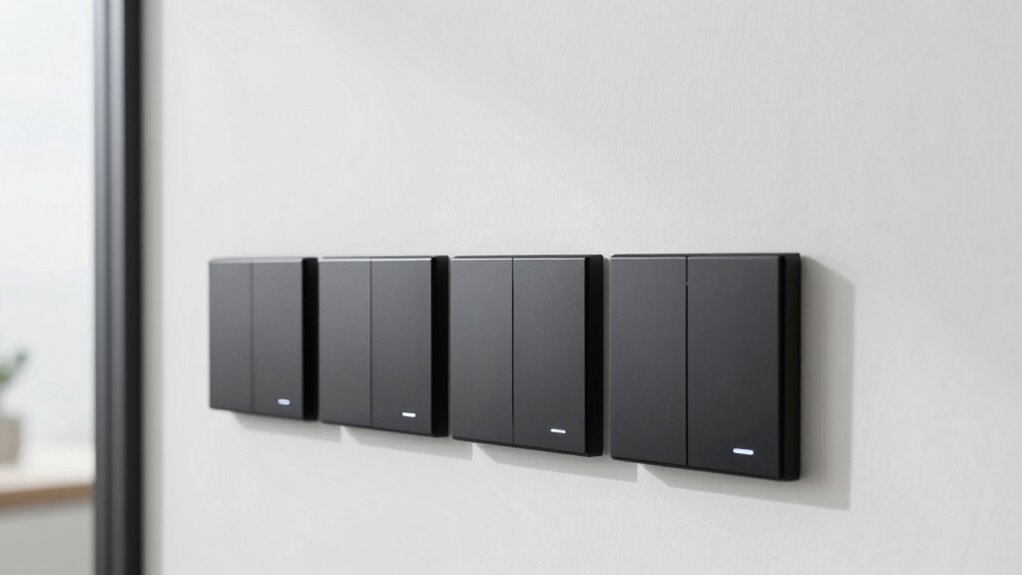

Upgrading to smart light switches no neutral wire is the most accessible way to modernize older homes without rewiring. My top recommendation is the Martin Jerry Zigbee Smart Light Switch, which offers reliable connectivity and minimal flicker issues compared to many Wi-Fi alternatives. For those seeking a premium, established brand experience, the Leviton Decora Smart No-Neutral Switch provides superior build quality and seamless integration with existing Decora faceplates. The main tradeoff in this category is between connection stability and price; Zigbee models often require a hub but offer better mesh networking, while Wi-Fi models are hub-free but can suffer from latency or bulb compatibility issues. Read on to see how these options stack up against budget competitors and specialized dimmers for every room in your house.

Get home appliances delivered free with Prime
- Fast, free delivery on millions of items
- Prime Video, Amazon Music and more included
- Member-only deals all year
Complete the kit


Key Takeaways
- Zigbee switches like the Martin Jerry and SONOFF models generally outperform Wi-Fi options in multi-switch setups due to mesh networking, though they require a compatible hub.
- Bulb compatibility is the biggest hidden cost; many no-neutral switches require a specific capacitor or a minimum wattage load to prevent LED flickering.
- Leviton and GE Cync offer the most polished mobile app experiences, but their hardware is often bulkier, which can cause fit issues in shallow electrical boxes.
- Touch-sensitive panels from MOES look modern but are less practical for households with children or pets compared to traditional rocker switches.
- 3-way switching compatibility varies wildly; not all no-neutral switches can replace existing 3-way setups without a specific companion module or bypass.
| Martin Jerry Zigbee Smart Light Switch, No Neutral Wire, Single-Pole, White |  | Best for a Built-In Night Light | Wiring: No neutral wire; single-pole only | Operation: On/off relay | Connectivity: Zigbee 3.0; compatible hub required | VIEW ON AMAZON | See Our Full Breakdown |
| MOES WiFi Double Smart Light Switch |  | Best for Two Fixtures | Switch type: Double light switch | Wiring: With or without neutral wire | No-neutral installation: Requires included capacitor | VIEW ON AMAZON | See Our Full Breakdown |
| MOES 2nd Generation Smart Touch Wall Switch, 2.4GHz Wi‑Fi Single Fire Single Pole, No Neutral Wire Required, Remote MOES App Control, Alexa & Google Home Compatible, 110V White, 1 Gang |  | Best for Alexa and Google Home | Wiring: With or without neutral wire | Circuit: 1-way, single-pole | Connectivity: 2.4 GHz Wi-Fi | VIEW ON AMAZON | See Our Full Breakdown |
| LSLIANGMEI Smart Wi-Fi Light Switch, 1-Gang, No Neutral Wire Required |  | Best for Multiple Control Methods | Gang: 1 | Neutral wire: Not required | Connectivity: Wi-Fi | VIEW ON AMAZON | See Our Full Breakdown |
| Martin Jerry Zigbee Smart Switch, 2-Pack, No Neutral Wire Required |  | Best for Matching Two Switches | Quantity: 2 switches | Wiring: No neutral wire required | Connectivity: Zigbee 3.0; compatible hub required | VIEW ON AMAZON | See Our Full Breakdown |
| MOES Smart Touch Light Switch, 3 Gang, No Neutral Wire Needed, WiFi |  | Best for Multi-Gang Aesthetics | Gang Count: 3 | Material: Tempered Glass | Connectivity: 2.4 GHz WiFi, Bluetooth, RF433 | VIEW ON AMAZON | See Our Full Breakdown |
| ALLUREMOUR Wi-Fi Smart Light Switch, No Neutral Wire Required |  | Best Compact DIN Rail Option | Switch Type: Push Button | Mounting Type: DIN Rail | Maximum Current: 10 A | VIEW ON AMAZON | See Our Full Breakdown |
| Aqara Smart Light Switch (No Neutral, Single Rocker) |  | Best for Apple HomeKit Ecosystems | Connectivity Protocol: ZigBee | Compatible Devices: Apple HomeKit, Google Assistant, Alexa | Max Load (LED): 200 W | VIEW ON AMAZON | See Our Full Breakdown |
| GE Cync Smart On/Off Light Switch, No Neutral Wire Required |  | Best for Brand Reliability | Brand: GE Cync | Warranty: 2-year limited | Circuit Type: 1-way | VIEW ON AMAZON | See Our Full Breakdown |
| RCA Smart 3-Way Wi-Fi Light Switch, No Neutral Required |  | Best for 3-Way Circuits | Circuit Type: 3-way | Warranty: 90 days | Material: ABS Plastic | VIEW ON AMAZON | See Our Full Breakdown |
| SONOFF ZBMINIL2 Zigbee Smart Light Switch, No Neutral, 2-Pack |  | Best for Home Assistant Enthusiasts | Connectivity: Zigbee 3.0 | Hub Requirement: Yes | Neutral Wire: Not required | VIEW ON AMAZON | See Our Full Breakdown |
| Leviton Decora Smart No-Neutral Switch, DN15S-1RW, White |  | Best for Apple Home Users | Brand: Leviton | Bridge Requirement: MLWSB Decora Smart Wi-Fi Bridge (sold separately) | Wiring Requirement: No neutral; line, load, ground required | VIEW ON AMAZON | See Our Full Breakdown |
| GE CYNC Smart Dimmer Light Switch, No Neutral Wire Required |  | Best Hub-Free Dimmer | Switch Type: Dimmer | Connectivity: 2.4 GHz Wi-Fi | Neutral Wire Required: No | VIEW ON AMAZON | See Our Full Breakdown |
| Leviton No-Neutral Decora Smart Dimmer Switch, DN6HD-1RW, White |  | Best for Advanced Dimming Needs | Operating Voltage: 120 V AC | Wattage Capacity: 150 W (LED/CFL), 600 W (Incandescent) | Circuit Type: 3-way capable | VIEW ON AMAZON | See Our Full Breakdown |
| smart light switches no neutral wire | Connectivity | Operating voltage |
|---|---|---|
| Martin Jerry Zigbee Smart Ligh | Zigbee 3.0; compatible hub required | — |
| MOES WiFi Double Smart Light S | 2.4 GHz Wi-Fi; no hub required | — |
| MOES 2nd Generation Smart Touc | 2.4 GHz Wi-Fi | 120 V |
| LSLIANGMEI Smart Wi-Fi Light S | Wi-Fi | 110 V |
| Martin Jerry Zigbee Smart Swit | Zigbee 3.0; compatible hub required | 120 V AC |
| MOES Smart Touch Light Switch | 2.4 GHz WiFi, Bluetooth, RF433 | — |
| ALLUREMOUR Wi-Fi Smart Light S | — | — |
| Aqara Smart Light Switch | — | 120 V AC |
| GE Cync Smart On/Off Light Swi | 2.4 GHz Wi-Fi, Bluetooth | — |
| RCA Smart 3-Way Wi-Fi Light Sw | Wi-Fi | — |
| SONOFF ZBMINIL2 Zigbee Smart L | Zigbee 3.0 | 120 V |
| Leviton Decora Smart No-Neutra | Wi-Fi via bridge | 120 V AC |
| GE CYNC Smart Dimmer Light Swi | 2.4 GHz Wi-Fi | — |
| Leviton No-Neutral Decora Smar | — | 120 V AC |
More Details on Our Top Picks
Martin Jerry Zigbee Smart Light Switch, No Neutral Wire, Single-Pole, White
The Martin Jerry pairs a no-neutral, single-pole relay with a manually adjustable night light, a useful combination for a hallway or bedroom where a switch should be easy to find after dark. It needs a compatible Zigbee hub, so it makes more sense for a home already using SmartThings or Hubitat than the MOES WiFi Double Smart Light Switch, which connects directly to Wi-Fi and controls two fixtures. The tradeoff is a narrower fit: this Martin Jerry handles on/off control only, supports neither dimming nor 3-way wiring, and needs a separate faceplate. Its 5 W minimum LED load also rules out some low-wattage circuits. Choose it for a straightforward, hub-based single-pole circuit; skip it if you want a dimmer or need to control lights from two wall locations.
Pros:- Works without a neutral wire on a single-pole circuit
- Adjustable built-in night light
- Compatible with Alexa, Google Home, SmartThings, and Hubitat
- Zigbee 3.0 connectivity
Cons:- Requires a compatible Zigbee hub
- Does not support dimming or 3-way wiring
- Faceplate is not included and the circuit needs at least a 5 W LED load
Best for: Homeowners with a compatible Zigbee hub who want an on/off switch with a built-in night light for a single-pole circuit.
Not ideal for: People with 3-way wiring, low-load LED circuits under 5 W, or a preference for Wi-Fi control without a hub.
- Wiring:No neutral wire; single-pole only
- Operation:On/off relay
- Connectivity:Zigbee 3.0; compatible hub required
- Compatible platforms:Alexa, Google Home, Samsung SmartThings, Hubitat, SmartLife
- Voltage:120 VAC, 60 Hz
- Minimum load:5 W LED
- Night light:Manually adjustable brightness
- Faceplate:Not included
Our verdict“Choose this Martin Jerry if you have a Zigbee hub and want a simple single-pole switch with a night light; look elsewhere for dimming or 3-way control.”
MOES WiFi Double Smart Light Switch
If one wall box controls two separate lights, the MOES WiFi Double can put both on app, voice, and timer control without adding a hub. That makes it a more practical pick for a two-fixture location than the Martin Jerry Zigbee Smart Light Switch, which controls one circuit and depends on a Zigbee hub. MOES also accepts wiring with or without a neutral, but no-neutral installation requires the included capacitor, adding a component to the wiring job. Its 2.4 GHz Wi-Fi connection suits homes without a hub, though it depends on a compatible network. The clear limits are on/off control only and no smart-bulb support, so it is a poor match for dimmable lighting or circuits built around smart bulbs. Pick it when two conventional fixtures share one location.
Pros:- Controls two fixtures from one wall switch
- Works with or without a neutral wire
- App, Alexa, and timer control without a hub
- Screw terminals for wall mounting
Cons:- No-neutral wiring requires the included capacitor
- Requires a 2.4 GHz Wi-Fi network
- Does not support dimming or smart bulbs
Best for: Households with two conventional light fixtures controlled from one wall location and a 2.4 GHz Wi-Fi network.
Not ideal for: Buyers who need dimming, smart-bulb compatibility, or a no-neutral installation without adding a capacitor.
- Switch type:Double light switch
- Wiring:With or without neutral wire
- No-neutral installation:Requires included capacitor
- Connectivity:2.4 GHz Wi-Fi; no hub required
- Control methods:App, remote, voice, and timers
- Voice assistant:Alexa
- Dimming:Not supported
- Terminals:Screw terminals
Our verdict“Choose the MOES Double for two on/off lighting circuits at one location; choose a different switch if you need dimming or smart bulbs.”
MOES 2nd Generation Smart Touch Wall Switch, 2.4GHz Wi‑Fi Single Fire Single Pole, No Neutral Wire Required, Remote MOES App Control, Alexa & Google Home Compatible, 110V White, 1 Gang
The MOES 2nd Generation is a single-pole, no-neutral touch switch for buyers who want app scheduling and voice control through either Alexa or Google Home without a separate hub. Compared with the LSLIANGMEI Smart Wi-Fi Light Switch, it has a stated 5 W minimum load, while LSLIANGMEI lists a 1.1 W wattage figure; check the lighting circuit before choosing either. MOES suits a standard one-way circuit and offers flexible wiring, but it only connects to 2.4 GHz Wi-Fi and does not serve multi-location 3-way installations. The touch interface also differs from the Martin Jerry rocker switch: it gives a flatter control surface, while the rocker may feel more familiar to people who prefer a physical toggle. Pick MOES for scheduled, voice-controlled on/off lighting on a compatible circuit.
Pros:- No-neutral wiring option for single-pole circuits
- Works with Alexa and Google Home
- App, touch, scheduling, and timer controls
- Fire-retardant materials
Cons:- Requires 2.4 GHz Wi-Fi
- Minimum supported load is 5 W
- Limited to single-pole installations
Best for: Alexa or Google Home households seeking app scheduling and touch control for a single-pole light circuit.
Not ideal for: People with 3-way wiring, a 5 W or lower circuit load, or a Wi-Fi network limited to 5 GHz.
- Wiring:With or without neutral wire
- Circuit:1-way, single-pole
- Connectivity:2.4 GHz Wi-Fi
- Control methods:App, touch, and voice
- Compatible assistants:Amazon Alexa and Google Assistant
- Operating voltage:120 V
- Minimum load:5 W
- Model:WS-DL-US1-RFW
Our verdict“Choose this MOES for touch and scheduled voice control on a single-pole circuit, provided the load and Wi-Fi band fit.”
LSLIANGMEI Smart Wi-Fi Light Switch, 1-Gang, No Neutral Wire Required
LSLIANGMEI stands out for giving one no-neutral, one-gang switch several ways to control a light: touch, app, voice, and an RF433 remote. That remote can help when a phone or voice assistant is inconvenient, while the MOES 2nd Generation Touch Wall Switch focuses on app, touch, and voice control. LSLIANGMEI’s tempered-glass face and LED indicators also give it a more polished wall appearance than the plastic Martin Jerry rocker. Its Wi-Fi and Smart Life or Tuya support make it a fit for app-centered homes, with Alexa and Google Home compatibility for voice routines. The main drawback is limited protection: the IP20 rating offers little defense against dust or moisture, so it is not suited to damp locations. Product data does not specify a hub requirement or minimum load, so confirm circuit fit before installation.
Pros:- Supports touch, app, voice, and RF433 remote control
- No neutral wire required
- Works with Smart Life, Tuya, Alexa, and Google Home
- Tempered-glass panel with LED indicators
Cons:- IP20 protection offers limited resistance to dust and moisture
- Product data does not state a minimum supported load
- Product data does not specify a hub requirement
Best for: Smart Life or Tuya users who want touch, voice, app, and RF remote control from a single-gang no-neutral switch.
Not ideal for: People installing in damp or dusty locations, or buyers who need clearly specified load limits before choosing a switch.
- Gang:1
- Neutral wire:Not required
- Connectivity:Wi-Fi
- RF remote:433 MHz
- Control methods:App, touch, voice, RF433 remote
- Compatible platforms:Smart Life, Tuya, Amazon Alexa, Google Home
- Operating voltage:110 V
- Material:Tempered glass, ABS, and PC
Our verdict“Choose LSLIANGMEI for varied control options and a glass touch panel in a dry, single-gang location.”
Martin Jerry Zigbee Smart Switch, 2-Pack, No Neutral Wire Required
This Martin Jerry two-pack is aimed at buyers updating two separate single-pole locations who want the same Zigbee 3.0, no-neutral setup at both. Buying a pair simplifies matching the switch style and automation platform; the single-switch Martin Jerry is a better fit if only one location needs an upgrade and adds an adjustable night light that this pack does not list. Both require a compatible Zigbee hub, so this is less convenient than the MOES WiFi Double Smart Light Switch for someone who wants direct Wi-Fi and two circuits at one wall location. The distinction matters: this pack contains two switches, while the MOES is one double switch. Martin Jerry provides on/off control for 1-way circuits, but no dimming or 3-way support is specified. Check hub compatibility and circuit type before buying the pair.
Pros:- Two switches included for separate locations
- No neutral wire required
- Zigbee 3.0 supports hub-based automation
- Works with Amazon Alexa and Google Assistant
Cons:- Requires a compatible Zigbee hub
- Supports 1-way circuits only
- On/off operation does not provide dimming
Best for: Households with two separate 1-way circuits and a compatible Zigbee hub that want matching no-neutral switches.
Not ideal for: Buyers who need dimming, 3-way wiring, direct Wi-Fi without a hub, or only one switch.
- Quantity:2 switches
- Wiring:No neutral wire required
- Connectivity:Zigbee 3.0; compatible hub required
- Operation:On/off
- Circuit type:1-way
- Operating voltage:120 V AC
- Maximum wattage:600 W
- Voice assistants:Amazon Alexa and Google Assistant
Our verdict“Choose this two-pack to equip two separate single-pole circuits with hub-based Zigbee control, if you do not need dimming.”
MOES Smart Touch Light Switch, 3 Gang, No Neutral Wire Needed, WiFi
This 3-gang switch stands out for its scratch-resistant tempered glass panel, offering a premium look that plastic alternatives like the ALLUREMOUR Wi-Fi Smart Light Switch simply cannot match. It excels in homes where multiple lights are controlled from a single location, providing independent control via the Smart Life/Tuya app. However, this aesthetic upgrade comes with functional constraints. The switch requires a capacitor for proper operation and mandates that connected lamps exceed 5W, which rules out many low-power LED setups. While it supports RF433 remotes, the remote is not included, adding hidden costs. Compared to the RCA Smart 3-Way Switch, which handles complex wiring, the MOES is strictly single-pole, limiting its use in hallway or staircase setups where two switches control one light.
Pros:- Premium tempered glass panel resists scratches and looks modern
- Supports 3 independent controls from a single faceplate
- Broad ecosystem compatibility with Alexa and Google Home
Cons:- Requires a capacitor and lamps must be over 5W
- RF433 remote control is not included in the box
- Limited to single-pole circuits, no 3-way support
Best for: Homeowners seeking a modern, glass-face multi-gang switch for single-pole circuits with standard or high-wattage bulbs.
Not ideal for: Users with low-wattage LED bulbs under 5W or those needing 3-way circuit compatibility.
- Gang Count:3
- Material:Tempered Glass
- Connectivity:2.4 GHz WiFi, Bluetooth, RF433
- Compatibility:Alexa, Google Home, Smart Life/Tuya
- Voltage:110V (100V AC)
- Dimensions:2.9 x 4.7 x 3 inches
- Neutral Wire:Not Required
Our verdict“Choose this if you want a stylish 3-gang switch for simple single-pole circuits and have bulbs that meet the minimum wattage requirement.”
ALLUREMOUR Wi-Fi Smart Light Switch, No Neutral Wire Required
This switch is designed for utility rather than decor, featuring a compact DIN rail mounting profile that fits seamlessly into electrical panels or tight junction boxes. Unlike the wall-mounted MOES Smart Touch Light Switch, this model avoids bulky faceplates entirely, making it ideal for retrofitting existing circuits without replacing wall plates. It operates without a hub or capacitor, simplifying the technical barrier for DIY enthusiasts. However, the plastic construction feels less durable than the glass or high-grade ABS found in competitors like the RCA Smart 3-Way Switch. The physical push button offers tactile feedback, but the conflicting current ratings in the documentation (10A vs 1A) raise concerns about long-term reliability for heavy loads. It is strictly a 1-way switch, so it cannot replace existing 3-way setups.
Pros:- Compact DIN rail form factor fits hidden spaces
- No hub or capacitor required for installation
- Physical push button provides reliable manual override
Cons:- Plastic housing lacks the durability of glass or metal options
- Documentation shows conflicting current ratings (10A vs 1A)
- Limited to 1-way circuits only
Best for: DIYers retrofitting hidden circuits or panel-mounted controls where wall aesthetics are irrelevant.
Not ideal for: Users needing a visible wall switch or those requiring high-current reliability for heavy appliances.
- Switch Type:Push Button
- Mounting Type:DIN Rail
- Maximum Current:10 A
- Wireless Protocol:Wi-Fi 802.11 b/g/n, 2.4 GHz
- Dimensions:106 × 45 × 35 mm
- Button Life:500,000 operations
- Neutral Wire:Not Required
Our verdict“This is the right choice for hidden installations where space is tight, but skip it if you need a visible, durable wall switch.”
Aqara Smart Light Switch (No Neutral, Single Rocker)
If your smart home runs on Apple HomeKit, this Aqara switch is a superior alternative to Wi-Fi-only options like the GE Cync Smart Switch. By using ZigBee, it reduces network congestion and offers faster, more reliable local control when paired with an Aqara Hub. The switch includes robust safety features such as flame-retardant housing and automatic high-temperature shutoff, providing peace of mind that basic plastic switches lack. However, the requirement for a separate Aqara Hub is a significant upfront cost and complexity barrier compared to hub-free models like the RCA Smart 3-Way Switch. Additionally, its load capacity for LED bulbs is capped at 200W, which may be insufficient for large multi-bulb fixtures, whereas the Aqara supports up to 600W for incandescent loads.
Pros:- Native support for Apple HomeKit and Siri
- ZigBee protocol reduces Wi-Fi network load
- Built-in safety features like automatic shutoff
Cons:- Requires a separate Aqara Hub to function
- LED load capacity limited to 200W per way
- Dependent on stable ZigBee mesh network
Best for: Apple HomeKit users who prioritize local control reliability and safety features over hub-free simplicity.
Not ideal for: Users without an Aqara Hub or those needing to control high-wattage LED fixtures exceeding 200W.
- Connectivity Protocol:ZigBee
- Compatible Devices:Apple HomeKit, Google Assistant, Alexa
- Max Load (LED):200 W
- Max Load (Incandescent):600 W
- Operating Voltage:120 V AC
- Safety Feature:Flame-retardant & Auto-shutoff
- Hub Required:Yes (Aqara Hub)
Our verdict“Buy this if you are invested in the Aqara/HomeKit ecosystem and want local control, but avoid it if you want a hub-free setup.”
GE Cync Smart On/Off Light Switch, No Neutral Wire Required
GE’s Cync switch leverages the manufacturer’s reputation for electrical safety, offering a 2-year limited warranty that exceeds the 90-day guarantee of the RCA Smart 3-Way Switch. It is a straightforward on/off solution that requires no hub, making it easier to deploy than the Aqara Smart Light Switch, which needs additional hardware. The switch integrates smoothly with the Cync app and major voice assistants, providing reliable scheduling and remote access. However, it is strictly for 1-way circuits, meaning it cannot replace existing 3-way switches without rewiring or adding bypasses. It also mandates a ground wire, which can be a hurdle in very old homes where grounding is inconsistent. The plastic housing feels standard, lacking the premium touch of the MOES Smart Touch glass panel.
Pros:- Backed by a 2-year limited warranty
- No hub required for app and voice control
- Trusted brand with strong customer support
Cons:- Requires a ground wire for installation
- Incompatible with 3-way circuits
- Standard plastic build lacks premium aesthetics
Best for: Users who prefer established brand warranties and simple, hub-free on/off control for single-pole lights.
Not ideal for: Those with ungrounded wiring or anyone needing to replace 3-way switches.
- Brand:GE Cync
- Warranty:2-year limited
- Circuit Type:1-way
- Connectivity:2.4 GHz Wi-Fi, Bluetooth
- Wiring:No neutral; Ground required
- Compatible Devices:Amazon Alexa, Google Home
- Hub Required:No
Our verdict“This is a safe, reliable choice for simple light control if you have grounded wiring and single-pole switches.”
RCA Smart 3-Way Wi-Fi Light Switch, No Neutral Required
Finding a no-neutral switch that supports 3-way circuits is difficult, and this RCA model fills that gap effectively. Unlike the single-pole limitations of the GE Cync Smart Switch or the MOES Smart Touch, this switch allows you to control a light from two different locations without rewiring. It operates via Wi-Fi without a hub, similar to the ALLUREMOUR, but offers the specific wiring versatility that most competitors lack. The tradeoff is reliability and support; the 90-day warranty is significantly shorter than GE’s 2-year term, and the ABS plastic construction feels less robust than the tempered glass of the MOES. It is a functional solution for complex wiring scenarios, but users should expect a more basic user experience compared to premium ecosystems.
Pros:- Supports 3-way circuits without a neutral wire
- Hub-free Wi-Fi connectivity for easy setup
- Compatible with Alexa and Google Assistant
Cons:- Short 90-day manufacturer warranty
- Basic ABS plastic build feels inexpensive
- Dependent on RCA app stability
Best for: Homeowners needing to upgrade existing 3-way lighting circuits to smart control without rewiring.
Not ideal for: Users who prioritize long-term durability, premium materials, or extensive warranty coverage.
- Circuit Type:3-way
- Warranty:90 days
- Material:ABS Plastic
- Connectivity:Wi-Fi
- Maximum Wattage:600 watts
- Voice Assistants:Alexa, Google Assistant
- Hub Required:No
Our verdict“This is the go-to option for 3-way smart upgrades if you can accept a shorter warranty and basic build quality.”
SONOFF ZBMINIL2 Zigbee Smart Light Switch, No Neutral, 2-Pack
This compact Zigbee 3.0 module is the go-to choice for users building a Home Assistant network. Unlike the GE CYNC Smart Dimmer, which relies on a proprietary Wi-Fi connection, the Sonoff ZBMINIL2 integrates directly into your existing Zigbee mesh, reducing latency and improving reliability. Its tiny form factor fits easily behind existing switches, allowing you to keep your current faceplates—a significant aesthetic advantage over bulkier replacements. However, it demands a compatible Zigbee hub, adding complexity for beginners. While the Leviton Decora Smart No-Neutral Switch offers a simpler plug-and-play experience, it lacks the local control depth that power users crave. This pick is ideal for those who value network efficiency and customization over ease of installation.
Pros:- Fits behind existing switches to preserve original aesthetics
- Integrates seamlessly with Home Assistant and SmartThings
- Supports two-way control via external rocker switches
Cons:- Requires a separate, compatible Zigbee hub
- Installation is more complex than direct-replacement switches
Best for: Home automation enthusiasts using Home Assistant or SmartThings who want local control and low-latency performance.
Not ideal for: Beginners or renters without a Zigbee hub who prefer a standalone, app-based solution.
- Connectivity:Zigbee 3.0
- Hub Requirement:Yes
- Neutral Wire:Not required
- Operating Voltage:120 V
- Minimum Light Wattage:3 W
- Dimensions:1.55 x 1.25 x 0.72 inches
- Compatible Platforms:Alexa, Google Home, SmartThings, Home Assistant
Our verdict“Choose this if you are building a robust, local-control smart home ecosystem and want to hide the tech behind your current wall plates.”
Leviton Decora Smart No-Neutral Switch, DN15S-1RW, White
The Leviton Decora Smart No-Neutral Switch stands out for its seamless integration with Apple HomeKit, a feature often missing in budget alternatives like the SONOFF ZBMINIL2. It connects via Wi-Fi but strictly requires the separate MLWSB Wi-Fi Bridge, which adds to the total cost and setup steps. Compared to the GE CYNC Smart Dimmer, which works without a bridge, Leviton’s architecture can feel cumbersome. However, once set up, it offers excellent stability and supports optional wire-free 3-way control via companion switches. This model is best suited for homeowners already invested in the Apple ecosystem who prioritize brand reliability and smart home certification over low-cost entry points.
Pros:- Native support for Apple HomeKit and Siri
- Optional wire-free 3-way control with companions
- Backed by a reputable electrical manufacturer
Cons:- Requires a separately sold Wi-Fi bridge for operation
- Higher total cost due to mandatory bridge purchase
Best for: Homeowners deeply integrated into the Apple HomeKit ecosystem who prioritize certified compatibility and reliability.
Not ideal for: Budget-conscious buyers or those who dislike managing extra hubs and bridges for basic switching.
- Brand:Leviton
- Bridge Requirement:MLWSB Decora Smart Wi-Fi Bridge (sold separately)
- Wiring Requirement:No neutral; line, load, ground required
- Operating Voltage:120 V AC
- Connectivity:Wi-Fi via bridge
- Compatible Platforms:Alexa, Google Assistant, Apple Home, SmartThings
- Warranty:2-year limited
Our verdict“This is the right switch for Apple-centric homes that need reliable, certified smart lighting control and don’t mind buying a bridge.”
GE CYNC Smart Dimmer Light Switch, No Neutral Wire Required
If you want dimming without buying extra hubs, the GE CYNC Smart Dimmer is a strong contender. It connects directly to your 2.4 GHz Wi-Fi network, unlike the Leviton DN15S-1RW which demands a bridge. This makes it far more accessible for casual users who just want to control lights via an app or voice commands. The tradeoff is its dependency on your router’s signal strength; if your Wi-Fi drops, your switches become dumb again. While the SONOFF ZBMINIL2 offers local control, the GE CYNC wins on simplicity for those who don’t want to manage a Zigbee network. It’s a solid choice for renters or homeowners who want basic dimming with minimal infrastructure changes.
Pros:- No hub or bridge required for basic operation
- Supports scheduling, scenes, and voice control
- Direct Wi-Fi connection simplifies initial setup
Cons:- Relies entirely on home Wi-Fi stability
- Requires a 15-watt minimum load to function correctly
Best for: Casual smart home users who want direct Wi-Fi connectivity and dimming capabilities without purchasing a hub.
Not ideal for: Users in areas with weak 2.4 GHz Wi-Fi coverage or those who require local control during internet outages.
- Switch Type:Dimmer
- Connectivity:2.4 GHz Wi-Fi
- Neutral Wire Required:No
- Maximum Wattage:600 watts
- Minimum Load:15 watts
- Voice Assistants:Amazon Alexa, Google Home
- Installation Requirements:Ground wire required
Our verdict“Pick this if you want a simple, hub-free dimmer that works with Alexa and Google without extra hardware costs.”
Leviton No-Neutral Decora Smart Dimmer Switch, DN6HD-1RW, White
The Leviton DN6HD-1RW is designed for users who need precise dimming across various bulb types, including LED and incandescent. While the GE CYNC Smart Dimmer offers broad compatibility, the Leviton model provides more robust control for complex lighting setups, especially when paired with the MLWSB Wi-Fi Bridge. It supports wire-free 3-way operation, a feature that simplifies retrofitting older homes compared to the hardwired alternatives like the SONOFF ZBMINIL2. However, the maximum dimmable load is capped at 150 W for LEDs, which is lower than some competitors. This switch is ideal for those who already own the Leviton bridge or are building a high-end smart home where dimming performance and multi-location control are priority features.
Pros:- Supports wide range of bulb types (LED, CFL, Incandescent)
- Optional wireless 3-way and multi-location control
- High-quality build from a trusted electrical brand
Cons:- Requires separate MLWSB Wi-Fi Bridge for smart features
- Lower maximum dimmable load for LEDs compared to some rivals
Best for: Users needing advanced dimming for mixed bulb types and wire-free 3-way control in a Leviton-compatible ecosystem.
Not ideal for: Those looking for a standalone Wi-Fi solution or who need to dim high-wattage LED arrays exceeding 150 W.
- Operating Voltage:120 V AC
- Wattage Capacity:150 W (LED/CFL), 600 W (Incandescent)
- Circuit Type:3-way capable
- Bridge Requirement:MLWSB Wi-Fi Bridge (optional for basic, required for smart)
- Compatible Devices:Amazon Alexa, Google Assistant, Apple Siri
- Dimensions:1.4 x 1.7 x 4.13 inches
- Mounting Type:Wall Mount
Our verdict“Choose this dimmer if you require professional-grade dimming performance and multi-location control within the Leviton smart home platform.”

How We Picked
I evaluated these switches based on installation complexity, network reliability, and hardware design. Since no-neutral switches rely on trickling current through the bulb, I prioritized models known for handling low-wattage LED loads without significant flicker or buzz. I also weighed the necessity of additional hardware, such as hubs or capacitors, as these add hidden costs and installation steps that can frustrate DIY beginners.
Ranking logic favored switches that offered a balance of ecosystem compatibility (Alexa, Google Home, Apple HomeKit) and physical durability. Products that required proprietary hubs without a clear benefit in stability were ranked lower. Additionally, I considered the availability of matching faceplates, as aesthetic consistency is a major factor for many homeowners upgrading their lighting control.
Factors to Consider When Choosing Smart Light Switches No Neutral Wire
Choosing the right no-neutral smart switch requires understanding your home’s electrical constraints and your desired smart home ecosystem. It is not just about connectivity; it is about whether the switch can physically and electrically handle your specific lighting loads.
Understanding the No-Neutral Limitations
Traditional smart switches need a neutral wire to power their electronics, but older homes often lack this wire in switch boxes. No-neutral switches solve this by using leakage current that passes through the bulb to power the switch. This method is clever but imperfect, as it can cause LED flickering or buzzing if the bulb’s driver cannot handle the small current. You often need to install a bypass capacitor at the light fixture if your bulbs are below a certain wattage (usually under 15W). Before buying, check the minimum and maximum load requirements specified by the manufacturer to avoid compatibility headaches.
Wi-Fi vs. Zigbee vs. Bluetooth Connectivity
The communication protocol dictates how your switch interacts with your network. Wi-Fi switches connect directly to your router, meaning no extra hub is needed, but they can clog your network if you have many devices. Zigbee switches require a hub (like SmartThings or Home Assistant) but create a mesh network that strengthens with each added device, offering lower latency and better reliability. Bluetooth options are rare in this niche due to range limitations. If you plan to expand your smart home beyond lighting, Zigbee is often the smarter long-term investment despite the initial hub cost.
Physical Fit and Faceplate Compatibility
Smart switches are bulkier than standard mechanical switches due to the internal radio and controller. In older homes with shallow electrical boxes, fitting a smart switch can be a physical challenge. Brands like Leviton and GE Cync offer compact designs, but you still need to ensure there is enough depth for the wires and the switch body. Furthermore, check if the switch includes a matching Decora-style faceplate. Mismatched faceplates look unprofessional, and buying them separately adds to the total cost. Ensure the switch mechanism aligns with your existing wall plate cutouts.
Ecosystem Integration and App Stability
A smart switch is only as good as its software. I looked closely at app responsiveness and cloud reliability. Some budget brands use third-party platforms like Tuya or Smart Life, which are functional but can feel cluttered with ads and slower updates. Established brands like GE Cync and Leviton offer cleaner, more stable apps with better scene creation features. If you rely heavily on voice control via Alexa or Google Assistant, test the integration latency. A half-second delay in turning off lights can be annoying, and premium brands typically optimize this better than generic imports.
Handling 3-Way Switch Configurations
Replacing a 3-way switch (where two switches control one light) is more complex than a single-pole swap. Some no-neutral switches are master-slave systems, where one smart switch controls the circuit and a smaller companion module is installed at the second location. Others require a specific bypass kit to stabilize the current between the two points. Not all switches in this roundup support 3-way configurations natively. If you have 3-way setups, verify the specific model supports them and whether additional components are included in the box or must be purchased separately.
Frequently Asked Questions
Do I really need a bypass capacitor for every LED bulb?
No, you do not need a bypass capacitor for every bulb. Most modern LED bulbs with a wattage of 15 watts or higher can handle the leakage current from a no-neutral switch without flickering. The capacitor is typically only required for low-wattage LEDs (under 10W) or if you experience visible flickering or buzzing after installation. Many smart switch manufacturers include one capacitor in the box, but if you have multiple low-wattage bulbs on a single switch, you may need to purchase extras. Always test the switch without the capacitor first to save installation time.
Can I use no-neutral smart switches with ceiling fans?
It is generally not recommended to use standard no-neutral smart light switches with ceiling fans, especially if the fan has a light kit. Fans require a constant, full-current supply to operate the motor, and the trickling current used for power can cause the fan to hum, buzz, or fail to start. If you have a fan/light combo, you need a switch specifically rated for motor loads or a dedicated smart fan controller. Using a standard lighting switch on a fan can damage the motor or the switch itself, voiding warranties and creating safety hazards.
What happens if my Wi-Fi goes down? Will I lose control of my lights?
If you use a Wi-Fi-based switch, you will likely lose remote control and voice commands when your internet is down, though local voice control via devices like Echo with local processing might still work. The physical switch will always work as a manual toggle. However, if you use a Zigbee switch with a local hub like Home Assistant or a SmartThings hub, automations can often continue to run locally even without internet access. This makes Zigbee a more resilient choice for critical lighting automations that should work regardless of your internet status.
Are no-neutral switches compatible with Apple HomeKit?
Compatibility with Apple HomeKit is rare in the no-neutral category. Most budget-friendly options rely on Tuya/Smart Life or proprietary clouds that do not support HomeKit directly. You would need a bridge or a specific brand like Aqara (which requires their hub) to get HomeKit integration. If HomeKit is a priority, verify the specific model’s support before purchasing, as many brands advertise ‘Alexa and Google’ compatibility but omit HomeKit entirely. Adding a third-party bridge can introduce latency and complexity to your setup.
Why do some switches require a hub and others do not?
Switches that require a hub typically use Zigbee, Z-Wave, or Thread protocols, which are designed for low-power, mesh networking. The hub acts as the bridge between the switch and your Wi-Fi network or cloud service. Switches that do not require a hub usually use Wi-Fi or Bluetooth, connecting directly to your router or phone. Hubs add cost and a device to manage, but they reduce network congestion and often provide faster, more reliable response times than Wi-Fi switches, especially in homes with many connected devices.
Conclusion
Selecting the right smart light switches no neutral wire depends on your technical comfort and ecosystem preferences. For the best balance of reliability and ease of use, the Martin Jerry Zigbee Smart Light Switch is my top overall pick, provided you have a compatible Zigbee hub. If you are a beginner looking to avoid hubs entirely, the GE Cync Smart On/Off Light Switch offers a straightforward Wi-Fi setup with a polished app. For those who prioritize build quality and aesthetics, the Leviton Decora Smart No-Neutral Switch is the premium choice that blends seamlessly into traditional homes. Budget-conscious buyers should look at the MOES WiFi Double Smart Light Switch, but be prepared for potential flicker issues with low-wattage bulbs. Always verify your bulb wattage and box depth before purchasing to ensure a smooth installation.