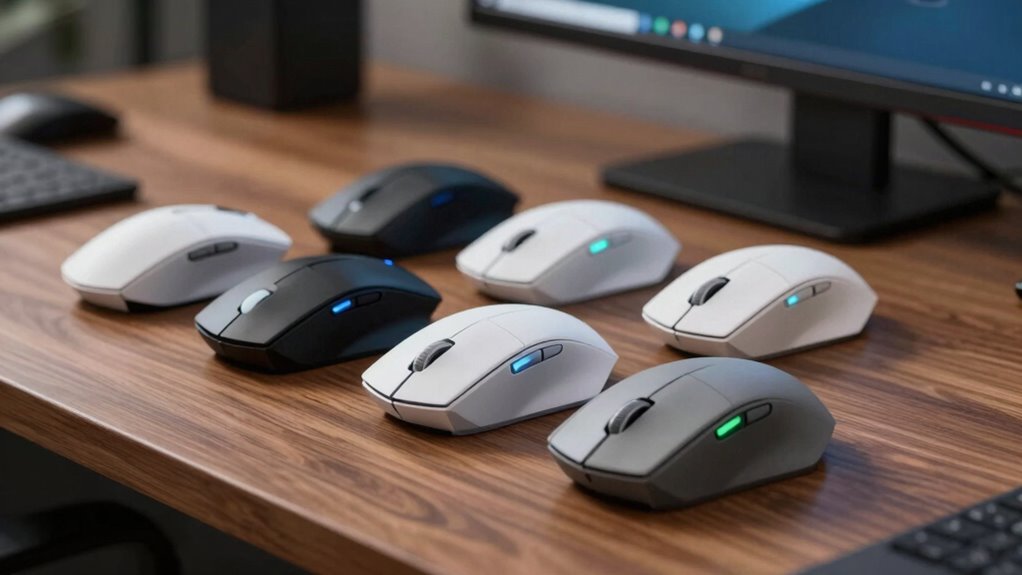

For a premium ergonomic wireless mouse, the Logitech MX Master 4 is my best overall pick for its broad productivity controls and full-size shape, while the Razer Pro Click V2 Vertical stands out for buyers who want a vertical grip with advanced features. The Logitech Lift offers a more approachable vertical design, and the MX Master 3S is a strong alternative for people who prefer a conventional palm grip. The main tradeoff is between a familiar shape with extra controls and a more upright posture that may take time to adjust to. Smaller, simpler models can suit tighter budgets or compact desks, though they give up some refinements. Read on for how the 14 options compare and which one fits your hand, habits, and workspace.

Get home appliances delivered free with Prime
- Fast, free delivery on millions of items
- Prime Video, Amazon Music and more included
- Member-only deals all year
Complete the kit

![[Genuine] Waterdrop PF-01A Water Filter Replacement for W...](https://m.media-amazon.com/images/I/41+5tl9EiKL._SX342_SY445_QL70_FMwebp_.jpg)

Key Takeaways
- The MX Master 4 leads for all-around productivity: its full-size shape and haptic feedback set it apart, while the MX Master 3S offers a more familiar alternative without that haptic feature.
- Vertical mice serve different hands and adjustment preferences: the Lift is a more approachable option, while the larger MX Vertical and feature-rich Razer Pro Click V2 Vertical suit buyers seeking a more substantial design.
- Trackball control changes the desk-space equation: the ERGO M575S can work in a compact setup because the mouse stays in place, but its thumb-operated ball is a distinct control style.
- Value picks simplify the feature set: UGREEN, TECKNET, Anker, Lekvey, and Philips offer ergonomic shapes with fewer premium productivity touches than Logitech‘s MX models.
- Hand size and grip matter as much as the ergonomic label: the Lift, M650 L, and full-size productivity mice differ in scale, so a well-equipped mouse may still be a poor fit if its shape does not suit your hand.
| Logitech Lift Vertical Ergonomic Wireless Mouse, Graphite |  | Best Overall for Smaller Hands | Hand orientation: Right-handed | Recommended hand size: Small to medium | Vertical angle: 57° | VIEW ON AMAZON | See Our Full Breakdown |
| Logitech MX Master 4 Ergonomic Wireless Mouse with Haptic Feedback, Graphite |  | Best Premium Productivity Pick | Hand orientation: Right-handed | Sensor: Optical, up to 8,000 DPI | Buttons: 7 | VIEW ON AMAZON | See Our Full Breakdown |
| UGREEN Ergonomic Wireless Mouse with Bluetooth and 2.4 GHz |  | Best Multi-Device Value | Design: Right-handed ergonomic vertical | Connectivity: Bluetooth and 2.4 GHz wireless | Device connections: Up to 3 | VIEW ON AMAZON | See Our Full Breakdown |
| Logitech MX Vertical Wireless Ergonomic Mouse, Graphite |  | Best Rechargeable Vertical Mouse | Hand orientation: Right-handed | Vertical angle: 57° | Sensor: Optical, up to 4000 DPI | VIEW ON AMAZON | See Our Full Breakdown |
| Logitech ERGO M575S Wireless Trackball Mouse, Graphite with Blue Ball | 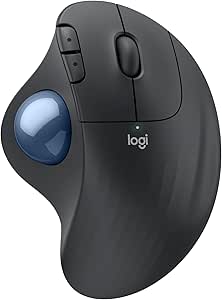 | Best for Tight Desks | Movement detection: Trackball | Hand orientation: Right-handed | Buttons: 2 | VIEW ON AMAZON | See Our Full Breakdown |
| Philips Ergonomic Rechargeable Wireless Mouse with Bluetooth and USB-A/C Receiver |  | Best for Multi-Device Work | Connectivity: Bluetooth and 2.4 GHz wireless | Receiver: USB-A and USB-C | Device capacity: Up to 3 devices | VIEW ON AMAZON | See Our Full Breakdown |
| TECKNET Wireless Ergonomic Mouse, 2.4 GHz, 2600 DPI, Black | 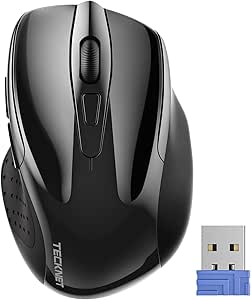 | Best Compact Pick | Connectivity: 2.4 GHz wireless via USB-A receiver | Tracking: Optical | DPI: 800, 1200, 1600, 2000, and 2600 | VIEW ON AMAZON | See Our Full Breakdown |
| Logitech Signature M650 L Wireless Mouse, Large, Black |  | Best for Larger Hands | Connectivity: Bluetooth Low Energy or Logi Bolt USB receiver | Sensor: Optical, up to 4000 DPI | Buttons: 3, with customizable side buttons | VIEW ON AMAZON | See Our Full Breakdown |
| Razer Pro Click V2 Vertical Wireless Mouse |  | Best Vertical Premium Pick | Grip design: Vertical, handshake-style with wrist-supporting base | Connectivity: 2.4 GHz HyperSpeed wireless, Bluetooth, or wired | Device capacity: Up to 5 devices; Bluetooth supports up to 3 hosts | VIEW ON AMAZON | See Our Full Breakdown |
| Logitech MX Master 3S Bluetooth Wireless Mouse, Graphite |  | Best for Precision Scrolling | Connectivity: Bluetooth; connects to up to 3 devices | Sensor: Darkfield optical, up to 8000 DPI | Buttons: 7 | VIEW ON AMAZON | See Our Full Breakdown |
| Logitech M720 Triathlon Full-Size Multi-Device Wireless Mouse | 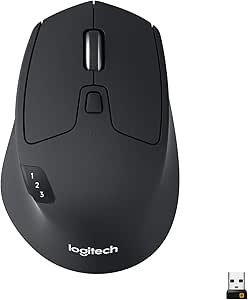 | Best for Multi-Device Work | Connectivity: Bluetooth and USB Unifying receiver | Buttons: 6 customizable buttons | Device switching: Up to 3 devices | VIEW ON AMAZON | See Our Full Breakdown |
| Lenovo Yoga Pro Rechargeable Bluetooth Mouse, 6 Buttons, Tidal Teal |  | Best Premium Rechargeable Ergonomic Pick | Connectivity: Bluetooth 5.1 | Device pairing: Up to 2 devices | Buttons: 6 | VIEW ON AMAZON | See Our Full Breakdown |
| Anker 2.4 GHz Wireless Vertical Ergonomic Mouse |  | Best Entry-Level Vertical Design | Connectivity: 2.4 GHz wireless via USB receiver | Tracking: Optical | DPI settings: 800, 1200, or 1600 | VIEW ON AMAZON | See Our Full Breakdown |
| Lekvey Rechargeable Vertical Ergonomic Wireless Mouse |  | Best Rechargeable Vertical Value | Connectivity: 2.4 GHz via nano USB receiver | Design: Right-handed vertical ergonomic | Buttons: 6 | VIEW ON AMAZON | See Our Full Breakdown |
| premium wireless mice ergonomic | Connectivity | Buttons | Battery | Hand orientation |
|---|---|---|---|---|
| Logitech Lift Vertical Ergonom | Bluetooth Low Energy or Logi Bolt USB receiver | 6 | — | Right-handed |
| Logitech MX Master 4 Ergonomic | Bluetooth, radio frequency, USB-C dongle | 7 | — | Right-handed |
| UGREEN Ergonomic Wireless Mous | Bluetooth and 2.4 GHz wireless | 5 | 1 AA battery | — |
| Logitech MX Vertical Wireless | Wireless; USB | 4 | Rechargeable Lithium Polymer | Right-handed |
| Logitech ERGO M575S Wireless T | Bluetooth or USB with included Logi Bolt receiver | 2 | 1 included AA battery | Right-handed |
| Philips Ergonomic Rechargeable | Bluetooth and 2.4 GHz wireless | — | Rechargeable 500 mAh; advertised up to 25 days at 8 hours per day | Right-handed |
| TECKNET Wireless Ergonomic Mou | 2.4 GHz wireless via USB-A receiver | 6 | AAA, not included; advertised up to 24 months | — |
| Logitech Signature M650 L Wire | Bluetooth Low Energy or Logi Bolt USB receiver | 3, with customizable side buttons | 1 included AA battery; advertised up to 24 months | — |
| Razer Pro Click V2 Vertical Wi | 2.4 GHz HyperSpeed wireless, Bluetooth, or wired | 6 | Advertised up to 6 months | — |
| Logitech MX Master 3S Bluetoot | Bluetooth; connects to up to 3 devices | 7 | Rechargeable 500 mAh Li-Po; advertised up to 70 days | — |
| Logitech M720 Triathlon Full-S | Bluetooth and USB Unifying receiver | 6 customizable buttons | 1 included AA battery | Right-handed |
| Lenovo Yoga Pro Rechargeable B | Bluetooth 5.1 | 6 | — | Right-handed |
| Anker 2.4 GHz Wireless Vertica | 2.4 GHz wireless via USB receiver | 5 | — | Right-handed |
| Lekvey Rechargeable Vertical E | 2.4 GHz via nano USB receiver | 6 | — | — |
More Details on Our Top Picks
Logitech Lift Vertical Ergonomic Wireless Mouse, Graphite
The Logitech Lift is the strongest fit here for buyers who want a vertical posture without a large, heavy mouse. Its 57-degree angle, thumb rest, and textured grip are tailored to small and medium hands, while the SmartWheel and six buttons add useful control for everyday work. Compared with the larger Logitech MX Vertical, the Lift is more compact and offers more buttons, though the MX Vertical has a rechargeable battery and a longer stated interval between charges. The Lift also switches between Bluetooth and Logi Bolt, giving it more connection flexibility than a single-mode setup. Its main compromise is fit: larger hands may find the shape cramped, and some customization depends on Logi Options+ on Windows or macOS.
Pros:- 57-degree vertical shape, thumb rest, and textured grip support a handshake-style hold
- SmartWheel and six buttons provide scrolling and customizable controls
- Bluetooth and Logi Bolt connectivity support flexible device pairing
- One AA battery is rated for up to 24 months
Cons:- The right-handed shell is designed for small to medium hands
- Some software features require Logi Options+ on Windows or macOS
Best for: Right-handed users with small to medium hands who want a compact vertical mouse for everyday work across multiple devices
Not ideal for: People with large hands or left-handed users, since this version is right-handed and sized for small to medium hands
- Hand orientation:Right-handed
- Recommended hand size:Small to medium
- Vertical angle:57°
- Weight:125 g
- Buttons:6
- Tracking sensitivity:Up to 4000 DPI, adjustable
- Connectivity:Bluetooth Low Energy or Logi Bolt USB receiver
- Battery life:Up to 24 months with one AA battery
Our verdict“Choose the Lift for a feature-rich vertical mouse sized for smaller right hands; choose the MX Vertical if you prefer a larger rechargeable model.”
Logitech MX Master 4 Ergonomic Wireless Mouse with Haptic Feedback, Graphite
The Logitech MX Master 4 suits desk workers who want ergonomic shaping paired with extensive productivity controls. Its MagSpeed wheel, programmable Actions Ring, and customizable haptic feedback offer more ways to tailor work tasks than the simpler Logitech MX Vertical, whose appeal centers on its vertical posture. The 8,000 DPI sensor tracks on glass, and quiet clicks can help in shared workspaces. This is the most control-oriented pick in this group, but its right-handed shape and software-dependent customization make it less appealing to buyers who want a straightforward, neutral mouse. It also needs recharging, and the supplied data says a charging cable is not included. Choose it for shortcuts and scrolling; skip it if a vertical handshake grip is your main priority.
Pros:- Programmable Actions Ring and customizable haptic feedback support tailored workflows
- MagSpeed scrolling is suited to moving through long documents and spreadsheets
- Up to 8,000 DPI sensor tracks on glass
- Quiet clicks and up to 70 days of battery life support focused work
Cons:- Advanced customization requires Logi Options+
- Charging cable is not included
- Right-handed design does not suit left-handed users
Best for: Right-handed professionals who want programmable shortcuts, precise scrolling, and a customizable mouse for desk-based workflows
Not ideal for: Buyers prioritizing a true vertical grip or a simple setup without app-based customization
- Hand orientation:Right-handed
- Sensor:Optical, up to 8,000 DPI
- Buttons:7
- Connectivity:Bluetooth, radio frequency, USB-C dongle
- Battery life:Up to 70 days
- Fast charging:One minute of charging provides up to 3 hours of use
- Compatible operating systems:Android, Chrome OS, Linux, Windows, iPadOS, macOS
- Material:Plastic with recycled content
Our verdict“Pick the MX Master 4 for customizable desk productivity controls, while choosing the MX Vertical if a vertical grip matters more than shortcuts.”
UGREEN Ergonomic Wireless Mouse with Bluetooth and 2.4 GHz
The UGREEN vertical mouse is a practical choice for buyers who want a handshake-style grip and connections to several devices without a crowded feature set. It pairs with up to three devices over Bluetooth or 2.4 GHz, and its four DPI settings make it easier to switch between slower, controlled movement and faster cursor travel. Compared with the Logitech Lift, UGREEN offers three-device connectivity but lists five buttons and weighs more; the Lift adds a SmartWheel and a longer stated battery life. Quiet clicks suit shared workspaces, though the UGREEN requires a separate AA battery and provides less detail on customization. Its right-handed shape also rules it out for left-handed users. This pick makes sense when device switching and basic vertical ergonomics matter more than premium controls.
Pros:- Connects to up to three devices over Bluetooth or 2.4 GHz
- Four selectable DPI settings accommodate different cursor speeds
- Quiet clicks suit shared or quiet workspaces
- Vertical design is intended to reduce wrist rotation
Cons:- Requires a separate AA battery
- Right-handed design excludes left-handed users
- At 170 g, it is heavier than the Logitech Lift
Best for: Right-handed users who switch among a computer, tablet, and phone and want a straightforward vertical mouse with multiple connection options
Not ideal for: Left-handed users or buyers seeking a lighter mouse with advanced scrolling and extensive software customization
- Design:Right-handed ergonomic vertical
- Connectivity:Bluetooth and 2.4 GHz wireless
- Device connections:Up to 3
- Buttons:5
- DPI settings:1000, 1600, 2000, or 4000
- Weight:170 g
- Wireless range:Up to 10 m
- Battery:1 AA battery
Our verdict“Choose UGREEN for simple three-device switching and a vertical grip; choose the Lift for lighter weight and more advanced scrolling controls.”
Logitech MX Vertical Wireless Ergonomic Mouse, Graphite
The Logitech MX Vertical is aimed at right-handed buyers who want a full-size vertical design and a rechargeable battery. Its 57-degree angle supports a handshake-style grip, and the adjustable cursor speed lets users change tracking response without relying only on software settings. Compared with the Logitech Lift, the MX Vertical has fewer buttons and a longer stated battery interval per charge, while the Lift is lighter and adds a SmartWheel. This makes the MX Vertical the more focused ergonomic pick, but its four-button layout offers less direct control for shortcuts. It is also limited to right-handed use. Buyers who value a rechargeable vertical mouse and a larger alternative to the Lift will find a clearer fit here than those seeking extensive programmable features.
Pros:- 57-degree vertical shape supports a handshake-style hand position
- Adjustable cursor speed switch changes tracking response
- Rechargeable battery is rated for up to four months
- Works across a broad range of listed operating systems
Cons:- Only four buttons are listed, fewer than on the Logitech Lift
- Right-handed design excludes left-handed users
- Battery life varies with use and computing conditions
Best for: Right-handed users who want a rechargeable, full-size vertical mouse with adjustable cursor speed
Not ideal for: Left-handed users or buyers who want more buttons, a lighter mouse, or the Lift’s SmartWheel
- Hand orientation:Right-handed
- Vertical angle:57°
- Sensor:Optical, up to 4000 DPI
- Buttons:4
- Connectivity:Wireless; USB
- Wireless range:10 m
- Battery:Rechargeable Lithium Polymer
- Battery life:Up to 4 months
Our verdict“Choose the MX Vertical for a rechargeable vertical shape and adjustable tracking; the Lift is a better fit if you want more buttons and a lighter body.”
Logitech ERGO M575S Wireless Trackball Mouse, Graphite with Blue Ball
The Logitech ERGO M575S takes a different route to ergonomic comfort: its thumb-operated trackball moves the cursor while the mouse stays put. That makes it a strong choice for small desks and limited movement space, where the vertical Logitech Lift and MX Vertical still need room to travel. Its sculpted right-handed shape supports the hand, and Bluetooth or the included Logi Bolt receiver gives it two connection paths. The tradeoff is a different control habit: buyers accustomed to moving a mouse may need time to adapt, and the listed two-button layout is sparse beside the Lift’s six buttons or MX Master 4’s seven. With a 2000 DPI maximum, it is also less adjustable on paper than those alternatives. Pick it for stationary cursor control, not shortcut-heavy work.
Pros:- Thumb trackball controls the cursor while the mouse remains stationary
- Requires little desk space compared with the vertical mouse options
- Bluetooth and included Logi Bolt receiver provide connection flexibility
- Included AA battery is rated for up to 18 months
Cons:- Trackball operation may take adjustment for conventional mouse users
- Only two buttons are listed
- Right-handed shape excludes left-handed users
Best for: Right-handed users with cramped desks who want cursor control without moving the mouse across the surface
Not ideal for: Left-handed users, buyers who prefer conventional mouse movement, or people who want several dedicated buttons
- Movement detection:Trackball
- Hand orientation:Right-handed
- Buttons:2
- Maximum sensitivity:2000 DPI
- Connectivity:Bluetooth or USB with included Logi Bolt receiver
- Battery:1 included AA battery
- Battery life:Up to 18 months
- Compatible operating systems:Windows, macOS
Our verdict“Choose the M575S when desk space and stationary cursor control matter most; choose the Lift for a conventional pointer with more buttons.”
Philips Ergonomic Rechargeable Wireless Mouse with Bluetooth and USB-A/C Receiver
The Philips is a practical pick for a right-handed desk setup that shifts between a computer, tablet, and phone. Three-device switching and a receiver with both USB-A and USB-C support make it easier to share one mouse across newer and older hardware than the Logitech MX Master 3S, which connects to three devices over Bluetooth but includes no receiver. Its contoured shell, thumb rest, quiet buttons, and horizontal scroll wheel suit long sessions and wide spreadsheets. The tradeoff is a less specialized feel than the MX Master 3S’s high-resolution sensor and MagSpeed wheel, and its ergonomic shape is for right-handed users. Philips advertises up to 25 days of battery life and a one-hour-use charge after five minutes; those figures are claims rather than a guarantee of everyday results.
Pros:- Connects to up to three devices
- Includes a receiver compatible with USB-A and USB-C ports
- Thumb rest and horizontal scrolling support comfortable navigation
- Quiet buttons and adjustable sensitivity suit shared workspaces
Cons:- Ergonomic shape is designed for right-handed use
- Advertised battery life and quick-charge performance may vary in everyday use
Best for: Right-handed users who switch among a work computer, tablet, and phone and want both USB-A and USB-C receiver options
Not ideal for: Left-handed users or buyers who prioritize a high-resolution sensor and advanced scroll performance over device switching
- Connectivity:Bluetooth and 2.4 GHz wireless
- Receiver:USB-A and USB-C
- Device capacity:Up to 3 devices
- DPI:800–4000 across 5 levels
- Buttons and wheels:5 buttons; main and horizontal thumb-side scroll wheels
- Battery:Rechargeable 500 mAh; advertised up to 25 days at 8 hours per day
- Hand orientation:Right-handed
- Compatibility:Android, iOS, macOS, and Windows 11
Our verdict“Choose the Philips if you want a right-handed ergonomic mouse that can move easily among several devices and connection types.”
TECKNET Wireless Ergonomic Mouse, 2.4 GHz, 2600 DPI, Black
The TECKNET brings a compact, right-handed shape and rubber side grips to a straightforward USB-A wireless setup. Its five DPI levels let users adjust pointer speed for different screens or tasks, while the advertised battery life of up to 24 months can mean fewer battery changes. That makes it a simpler travel companion than the larger Logitech Signature M650 L, which adds Bluetooth and a fast-or-precise SmartWheel but is designed for larger hands. The TECKNET’s smaller footprint is useful in a crowded bag or on a narrow desk, though buyers with larger hands may find it less comfortable for long work sessions. Its side button also does not work with Mac, and the required AAA batteries are not included.
Pros:- Compact dimensions suit travel and small work surfaces
- Rubber side grips add control to the right-handed shape
- Five DPI settings offer a choice of pointer speeds
- Advertised battery life is up to 24 months
Cons:- AAA batteries are not included
- Requires a USB-A receiver connection
- Side button is not compatible with Mac
Best for: Right-handed travelers or laptop users who want a compact mouse with adjustable pointer speed and have a USB-A port
Not ideal for: Mac users who rely on side buttons, people with larger hands seeking a full-size grip, or anyone without USB-A
- Connectivity:2.4 GHz wireless via USB-A receiver
- Tracking:Optical
- DPI:800, 1200, 1600, 2000, and 2600
- Buttons:6
- Dimensions:4.09 × 2.68 × 1.49 in (description)
- Battery:AAA, not included; advertised up to 24 months
- Wireless range:Up to 49 ft (10 m listed)
- Compatibility:Windows, Mac, Chrome OS, and Linux; side button does not work with Mac
Our verdict“Pick the TECKNET for compact, basic wireless use if its smaller right-handed fit and USB-A receiver match your setup.”
Logitech Signature M650 L Wireless Mouse, Large, Black
The Signature M650 L centers its design on a larger right-handed fit, with a soft thumb area and rubber side grips that give the hand a defined place to rest. Its SmartWheel shifts between controlled scrolling and faster movement, making long documents easier to navigate than with the simpler TECKNET. Bluetooth Low Energy and Logi Bolt provide two connection routes, and SilentTouch helps keep clicks subdued in a shared office. Compared with the more feature-rich Logitech MX Master 3S, the M650 L is less suited to buyers who want a rechargeable battery, glass tracking, and a dedicated high-speed MagSpeed wheel. It also needs an AA battery and is shaped for right-handed use, so left-handed buyers should look elsewhere.
Pros:- Large shape and soft thumb area accommodate larger hands
- SmartWheel supports both precise and faster scrolling
- SilentTouch reduces click noise
- Bluetooth and Logi Bolt offer connection flexibility
Cons:- Designed for right-handed use
- Uses an AA battery rather than a rechargeable battery
Best for: Right-handed users with larger hands who want a quiet, full-size mouse for everyday office work
Not ideal for: Left-handed buyers or users who want a rechargeable mouse with advanced sensor and scrolling controls
- Connectivity:Bluetooth Low Energy or Logi Bolt USB receiver
- Sensor:Optical, up to 4000 DPI
- Buttons:3, with customizable side buttons
- Battery:1 included AA battery; advertised up to 24 months
- Dimensions:4.65 × 2.58 in
- Weight:111.2 g
- Wireless range:30 ft
- Compatibility:Windows, macOS, Linux, ChromeOS, iPadOS, and Android
Our verdict“Choose the M650 L if a quiet, larger ergonomic fit matters more to you than the MX Master 3S’s advanced controls.”
Razer Pro Click V2 Vertical Wireless Mouse
The Pro Click V2 is the most overtly vertical option in this group: its handshake-style grip and wrist-supporting base give it a distinct fit from the conventional right-handed shells of the Logitech Signature M650 L and MX Master 3S. Its appeal goes beyond posture, with five-device connectivity across wireless, Bluetooth, and wired modes, plus a Focus Pro 30K sensor and glass tracking. A long advertised battery life and quick-charge claim may help users who keep it in a multi-device rotation. Those extras also add complexity: AI shortcuts require Razer Synapse 4, and the 18-zone RGB lighting may be less useful in a restrained office setup. Buyers should choose it for its vertical grip and broad feature set, not assume the shape will suit every hand.
Pros:- Vertical grip and wrist-supporting base distinguish its ergonomic shape
- Can connect to up to five devices across wireless, Bluetooth, and wired modes
- Focus Pro 30K sensor tracks on glass
- Advertised battery life reaches up to six months, with a fast-charge claim
Cons:- AI shortcuts require Razer Synapse 4
- Battery life is stated under standard test conditions
- Vertical shape may not suit users accustomed to a conventional mouse
Best for: Right-handed desk users seeking a vertical grip, high sensor resolution, and connections across several computers
Not ideal for: Buyers who prefer a conventional mouse shape, avoid companion software, or do not need lighting and advanced sensor features
- Grip design:Vertical, handshake-style with wrist-supporting base
- Connectivity:2.4 GHz HyperSpeed wireless, Bluetooth, or wired
- Device capacity:Up to 5 devices; Bluetooth supports up to 3 hosts
- Sensor:Focus Pro 30K optical sensor
- Buttons:6
- Battery:Advertised up to 6 months
- Switch lifecycle:Rated for 60 million clicks
- Lighting:18-zone RGB with 16.8 million colors
Our verdict“Pick the Pro Click V2 if you specifically want a vertical grip paired with multi-device connections and advanced sensor features.”
Logitech MX Master 3S Bluetooth Wireless Mouse, Graphite
The MX Master 3S suits right-handed users who want a sculpted mouse with more control over scrolling and pointer movement. Its MagSpeed wheel, quiet clicks, and 8,000 DPI Darkfield sensor make it a more capable precision-work pick than the Signature M650 L, whose SmartWheel and 4,000 DPI ceiling are aimed at simpler everyday navigation. It can also track on glass and connect to up to three devices, which helps when one workspace spans multiple screens or machines. The tradeoffs are practical: at 141 g, it is a substantial mouse, and the product data lists no USB receiver or charging cable in the box. Its right-handed shape also rules it out for left-handed users.
Pros:- Darkfield sensor tracks on a wide range of surfaces, including glass
- MagSpeed wheel supports fast and precise scrolling
- Quiet clicks suit shared workspaces
- Connects to up to three devices and has an advertised battery life of up to 70 days
Cons:- USB receiver and charging cable are not included
- At 141 g, it is heavier than many compact mice
- Designed for right-handed use
Best for: Right-handed professionals who work across multiple screens or devices and value precise scrolling and high-resolution tracking
Not ideal for: Left-handed users, people who prefer lightweight mice, or buyers who need a receiver and charging cable included
- Connectivity:Bluetooth; connects to up to 3 devices
- Sensor:Darkfield optical, up to 8000 DPI
- Buttons:7
- Battery:Rechargeable 500 mAh Li-Po; advertised up to 70 days
- Weight:141 g (4.97 oz)
- Dimensions:51 × 84.3 × 124.9 mm
- Wireless range:Up to 10 m (33 ft)
- Compatibility:Windows, macOS, Linux, Chrome OS, iPadOS, and Android
Our verdict“Choose the MX Master 3S if scrolling control and surface tracking matter more than a lightweight build or included accessories.”
Logitech M720 Triathlon Full-Size Multi-Device Wireless Mouse
The M720 suits people who move between computers and want a familiar full-size shape. Bluetooth and a Unifying USB receiver give it two connection options, while a button switches among as many as three paired devices. Its hyper-fast scroll wheel and six customizable buttons make long documents and repeated tasks easier to navigate. Compared with the Lenovo Yoga Pro, it trades higher sensor sensitivity and USB-C charging for broader listed operating-system compatibility and a much longer stated battery life from one AA cell. The sculpted rubber grip adds comfort, but the right-handed shape limits its audience, and its 1000 DPI ceiling is modest for precise cursor work on high-resolution displays. Linux users can connect it, though Logitech software features are unsupported there.
Pros:- Switches between up to three paired devices
- Offers both Bluetooth and a Unifying USB receiver
- Hyper-fast scrolling and six customizable buttons support frequent navigation
- Runs on one included AA battery for up to 24 months
Cons:- Right-handed sculpted shape does not suit left-handed users
- Maximum sensitivity is 1000 DPI
- Logitech software features are not supported on Linux
Best for: Right-handed users who regularly switch among a work computer, personal laptop, and tablet
Not ideal for: Left-handed users, Linux users who need Logitech software customization, or buyers who want high DPI tracking
- Connectivity:Bluetooth and USB Unifying receiver
- Buttons:6 customizable buttons
- Device switching:Up to 3 devices
- Maximum sensitivity:1000 DPI
- Battery:1 included AA battery
- Battery life:Up to 24 months
- Hand orientation:Right-handed
- Compatibility:Windows, macOS, Chrome OS, Linux, iPadOS, and Android
Our verdict“Choose the M720 if you want a comfortable full-size mouse for switching between several devices and value long battery life over high sensor sensitivity.”
Lenovo Yoga Pro Rechargeable Bluetooth Mouse, 6 Buttons, Tidal Teal
The Yoga Pro is for right-handed laptop users who want a more configurable pointer without relying on a USB receiver. Its Bluetooth 5.1 dual-device pairing makes it easy to move between two computers, and the USB-C battery can run for up to three months per charge. A programmable six-button layout, thumb rest, soft side grips, and configurable metal scroll wheel give it more control options than the simpler Anker vertical mouse. Its 4,000 DPI maximum also allows faster cursor movement, though extra on-the-fly DPI stages require software. That added flexibility comes with a shorter stated battery interval than the Logitech M720 and a narrower compatibility description: Lenovo lists laptop and personal computer use. Choose it for rechargeable convenience and adjustable controls, not for a proven all-day ergonomic fit across every hand size.
Pros:- Pairs with two devices over Bluetooth 5.1
- USB-C charging and up to three months of use per charge
- Six buttons, programmable controls, and a configurable metal scroll wheel
- Thumb rest and soft side grips add support
Cons:- Right-handed design excludes left-handed users
- DPI adjustments beyond three on-the-fly stages require software
- Listed compatibility is limited to laptops and personal computers
Best for: Right-handed laptop and desktop users who want Bluetooth pairing, USB-C charging, and configurable controls
Not ideal for: Left-handed users, buyers needing broad tablet or mobile compatibility, or anyone who wants to change many DPI stages without software
- Connectivity:Bluetooth 5.1
- Device pairing:Up to 2 devices
- Buttons:6
- Maximum sensitivity:4000 DPI
- Charging:USB-C rechargeable
- Battery life:Up to 3 months
- Weight:3.52 ounces
- Dimensions:5 × 2.8 inches
- Hand orientation:Right-handed
Our verdict“Pick the Yoga Pro for rechargeable Bluetooth convenience and configurable controls if you use a right-handed setup and do not need broad device compatibility.”
Anker 2.4 GHz Wireless Vertical Ergonomic Mouse
The Anker makes the most sense for a buyer curious about a vertical grip who wants a simple, receiver-based setup. Its angled right-handed shape is designed to keep the wrist and arm in a more neutral position, while three DPI choices let you trade cursor speed for control. Next and previous buttons help with browser navigation, though the five-button layout is less configurable than the Lenovo Yoga Pro’s six controls. Compared with the rechargeable Lekvey, the Anker requires two AAA batteries and lacks Bluetooth, so it is a less convenient fit for people who prefer charging or use devices without a USB port. Its power-saving mode helps when idle, but click sounds are unavoidable. Buyers should also account for the batteries, which are not included.
Pros:- Vertical shape is designed to support a neutral wrist and arm position
- Three selectable DPI settings
- Next and previous buttons support browser navigation
- Power-saving mode activates after eight minutes of inactivity
Cons:- Requires two AAA batteries, which are not included
- Uses a USB receiver and does not support Bluetooth
- Click sounds are unavoidable
Best for: Right-handed users trying a vertical mouse who primarily use a computer with a USB port
Not ideal for: Bluetooth-only device users, people who prefer rechargeable mice, and anyone sensitive to audible clicks
- Connectivity:2.4 GHz wireless via USB receiver
- Tracking:Optical
- DPI settings:800, 1200, or 1600
- Buttons:5
- Hand orientation:Right-handed
- Dimensions:120 × 62.8 × 74.8 mm
- Batteries:2 AAA batteries required; not included
- Wireless range:5 meters
Our verdict“Choose the Anker as a straightforward way to try a vertical mouse if you accept replaceable batteries, a USB receiver, and audible clicks.”
Lekvey Rechargeable Vertical Ergonomic Wireless Mouse
The Lekvey pairs a vertical grip with rechargeable convenience, making it a practical fit for medium or large right hands that want to reduce reliance on disposable batteries. Its 2.4 GHz plug-and-play receiver avoids Bluetooth pairing, and the USB-C battery is rated for up to 150 hours per charge. Three DPI settings cover basic speed adjustments, while six buttons add back and forward navigation. Compared with the Anker vertical mouse, the Lekvey recharges and offers quiet clicks, but it still depends on a USB receiver and has a shorter listed wireless range than the Lenovo Yoga Pro. Mac users should note that the forward and back buttons are not compatible with macOS. The vertical posture may also take several days to feel natural, so it is a less immediate choice than a conventional ergonomic mouse.
Pros:- Vertical shape is designed to support a neutral wrist position
- USB-C rechargeable battery is rated for up to 150 hours per charge
- Plug-and-play setup uses a USB receiver without Bluetooth pairing
- Quiet clicks, six buttons, and three DPI settings
Cons:- Forward and back buttons are not compatible with Mac OS
- Recommended for medium or large hands
- May take three to five days to adjust to the vertical grip
Best for: Medium- or large-handed right-handed users seeking a rechargeable vertical mouse with quiet clicks
Not ideal for: Mac users who rely on forward and back buttons, small-handed users, or buyers who need Bluetooth connectivity
- Connectivity:2.4 GHz via nano USB receiver
- Design:Right-handed vertical ergonomic
- Buttons:6
- DPI settings:800, 1200, or 1600
- Battery life:Up to 150 hours
- Charging:USB-C
- Wireless range:10 meters
- Dimensions:5 × 3 × 2.5 inches
- Compatibility:Windows, Linux, and Mac OS; forward/back buttons are not compatible with Mac OS
Our verdict“Choose the Lekvey if you want a quiet, rechargeable vertical mouse and have a medium or large right hand with access to a USB port.”

How We Picked
I ranked these mice by how well their shapes support distinct ergonomic preferences, then weighed usability, controls, wireless flexibility, charging or battery needs, and build features. Comfort is personal, so I treated vertical, conventional palm-grip, compact, and trackball designs as different solutions rather than assuming one shape suits everyone. A mouse earned a higher place when its feature set had a clear benefit for a particular buyer and its controls or connectivity supported everyday use.
The order reflects the balance of those factors, not a claim that the highest-ranked shape is right for every hand. Logitech’s MX Master models lead for buyers who want a full-size productivity mouse, while the Razer and Lift earn places for distinct vertical use cases. Simpler models rank lower when they offer fewer controls or refinements, though they may be the better choice for a buyer who wants basic wireless ergonomics without a more involved feature set.
Factors to Consider When Choosing Premium Wireless Mice Ergonomic
Choosing an ergonomic mouse starts with how you hold and move it, then narrows to the work you do and the space around your hand. These broader checks can help you avoid paying for features that do not improve your daily setup.
Match the shape to your natural grip
Vertical mice angle the hand more upright, while conventional ergonomic models keep a familiar palm grip and adjust the contours. A vertical shape can feel unfamiliar at first, so allow for an adjustment period before judging it by speed alone. Buyers who already like a standard mouse may find a contoured full-size model easier to adopt. Hand size also changes where your fingers rest and whether the buttons feel reachable. If possible, compare the mouse dimensions with a device you already find comfortable. Choosing by the word “ergonomic” alone can lead to a shape that does not suit your grip.
Decide whether a trackball fits your movement
A trackball moves the pointer with a ball while the body stays in place, which can help when desk space is limited or broad arm movements are inconvenient. It asks for more thumb or finger control than a standard mouse, so the technique may feel unfamiliar. Buyers who rely on quick sweeping motion may prefer a conventional sensor-based mouse. Think about where cursor movement comes from in your current setup: your fingers, wrist, or whole arm. A small desk does not automatically mean a trackball is the right choice if the control method feels awkward. Try to prioritize the motion you can sustain comfortably over the device’s footprint.
Pay for controls you will use
Extra buttons, scrolling modes, and haptic feedback can help with repetitive work, but only when they map to tasks you do often. Before choosing a feature-heavy model, identify the actions you repeat across documents, browser tabs, or creative apps. A simpler mouse can be easier to learn and may keep the controls within comfortable reach. Button placement matters as much as button count: controls that require a strained thumb are poor shortcuts. Buyers who switch between computers should also check whether the connection options match their devices. Treat customization as a practical aid rather than a measure of quality on its own.
Check device switching and receiver compatibility
Wireless mice may connect through Bluetooth, a USB receiver, or both, and that choice affects setup. Bluetooth avoids occupying a USB port, while a receiver can be useful on computers with older Bluetooth support or crowded wireless environments. Check the ports on every device you plan to use; a USB-A receiver may need an adapter on a newer laptop. Multi-device switching is useful only if you regularly move between computers or tablets. If you use one computer at a fixed desk, paying extra for switching controls may not improve your routine. Confirm compatibility before choosing based on the number of connection methods listed.
Weigh charging habits against battery convenience
Rechargeable models reduce the need to replace batteries, but they require a charging routine and access to the right cable or port. Replaceable batteries can be convenient for buyers who prefer to swap power sources and keep working. Consider whether a charging cable would interrupt your normal mouse use or whether you can charge between work sessions. Also check which cable or receiver is included and whether it fits your setup. A rechargeable label does not by itself indicate longer operation between charges. Choose the power style that you can maintain easily.
Set expectations for comfort and fit
No mouse shape can guarantee relief from discomfort, because fit depends on hand size, grip, desk height, and how long you work without breaks. A large model may support a relaxed palm for some users but feel cumbersome to someone with smaller hands. A compact mouse saves space yet can encourage a tighter grip if it is too small. Look at dimensions and weight alongside the silhouette, then consider how your forearm aligns with the desk. Changing mouse shape may help, but it cannot correct every workspace or posture issue. If discomfort persists, review the whole workstation and seek appropriate professional advice.
Frequently Asked Questions
Should I choose a vertical mouse or a conventional ergonomic mouse?
Choose based on the hand position you want and the grip you already use. A vertical model angles the hand more upright, while a conventional ergonomic mouse keeps the familiar palm-down motion. The vertical shape may take time to learn, especially if you rely on quick pointer movements. A contoured conventional model can be a simpler change for someone who likes a standard mouse. If you can handle either style before buying, compare how relaxed your fingers and wrist feel.
Is a trackball a good choice if I have very little desk space?
It can be, since the mouse body stays in one place and does not need room for broad movement. The tradeoff is that you control the pointer by rolling a ball, which may require a different thumb or finger motion. That method can suit a compact workstation, but it is not automatically easier for every user. Consider whether you are comfortable making precise movements with your thumb or fingers. If you prefer moving the whole mouse, a compact conventional model may feel more natural even if it needs more surface area.
Do I need a premium mouse with many buttons for office work?
Extra controls can save time when you repeat actions such as changing applications or navigating documents. They offer less value if you rarely use shortcuts or prefer a simpler layout. Button reach and comfort matter more than the raw number of controls. Think through your most common tasks and identify which ones a mouse button could actually shorten. For general browsing and documents, a comfortable shape and dependable connection may matter more than advanced customization.
How should I choose between Bluetooth and a USB receiver?
Bluetooth is convenient when you want to keep a USB port free and your computer supports it. A receiver may suit a desktop or a device with limited Bluetooth support, though its connector must match your ports. Some mice offer both, which gives more setup flexibility but may add features you never use. Consider every computer you plan to connect and whether you move between them often. Check whether an adapter would be needed before relying on a USB-A receiver with a newer laptop.
Can an ergonomic wireless mouse fix wrist discomfort on its own?
A different shape may make a mouse more comfortable to hold, but no design is a guaranteed fix for discomfort. Fit, desk height, arm position, and how long you work without breaks all affect how your hand feels. A mouse that is too large or too small can still encourage a tense grip. Pair a shape that suits your hand with a comfortable workstation setup and regular movement. If discomfort continues or worsens, consider getting guidance from a qualified health professional.
Conclusion
For most buyers seeking a premium all-around option, I recommend the Logitech MX Master 4 for its full-size productivity focus and haptic feedback. The UGREEN Ergonomic Wireless Mouse is my value pick for buyers who want a straightforward ergonomic design, while the Logitech Lift is the best starting point for someone curious about a vertical grip. For a more feature-rich vertical option, consider the Razer Pro Click V2 Vertical; for limited desk space and a different control style, the Logitech ERGO M575S is the specific-use pick. Choose the MX Master 3S if you prefer a familiar palm grip and want a premium productivity alternative to the MX Master 4.
Fall Picks
fall essentials
As an affiliate, we earn on qualifying purchases.