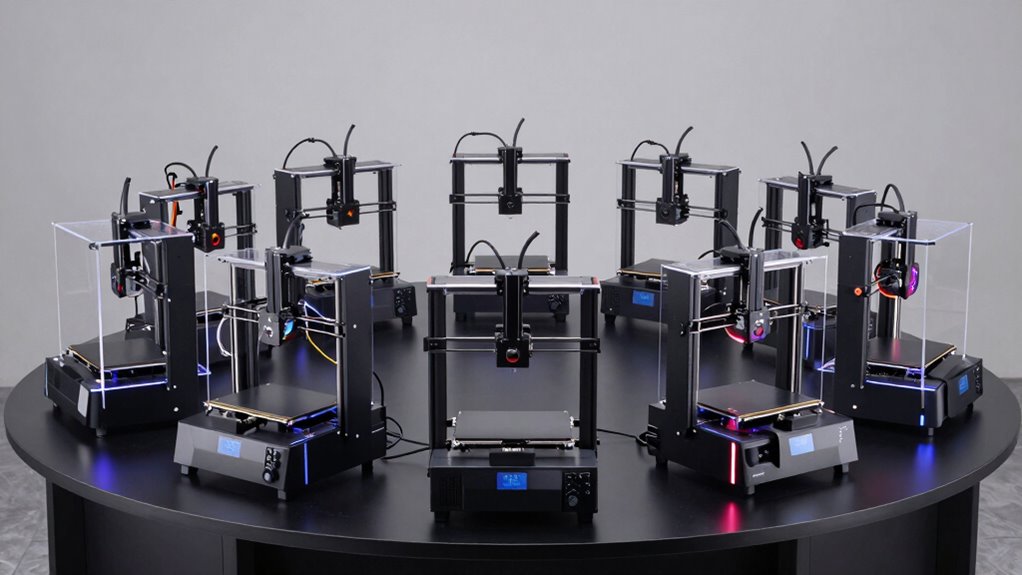

For professional 3D printing at home, I’d start with the FLASHFORGE Adventurer 5M Pro for its enclosed design and practical balance of speed and convenience. The Snapmaker U1 stands out for projects that need multiple materials or colors, while the Bambu Lab A1 mini suits buyers who want a compact, approachable machine. The main tradeoffs are workspace, maintenance, material flexibility, and how much complexity you’re willing to manage. A larger or more specialized printer can handle more ambitious work, but may demand more room and setup. Read on for how all eight options compare and which one fits your home workshop.

Get home appliances delivered free with Prime
- Fast, free delivery on millions of items
- Prime Video, Amazon Music and more included
- Member-only deals all year
Complete the kit


Key Takeaways
- The Adventurer 5M Pro is the strongest all-round fit here for home users seeking an enclosed printer with speed-focused features.
- The Snapmaker U1’s four toolheads make it the lineup’s specialist for multi-material and multicolor jobs, though that capability may be unnecessary for routine single-material prints.
- The A1 mini is the compact, approachable option, while its smaller format makes it a less natural fit for large parts.
- The Adventurer 5M and Neptune 3 Pro offer simpler alternatives for buyers who do not need an enclosure or advanced multi-tool printing.
- The AD5X and the several Flashforge enclosed models show that choosing a printer by brand alone is less useful than matching enclosure, color, and workflow features to actual projects.
| ELEGOO Neptune 3 Pro 3D Printer with Auto Bed Leveling |  | Best for Hands-On Material Range | Build volume: 225 × 225 × 280 mm | Extruder: Dual-gear direct drive, 3:1 gear ratio | Supported filaments: PLA, TPU, PETG, ABS | VIEW ON AMAZON | See Our Full Breakdown |
| FLASHFORGE Adventurer 5M Pro Enclosed 3D Printer with Camera and Light |  | Best Enclosed Home Workhorse | Printer type: Enclosed CoreXY FDM | Maximum print speed: 600 mm/s | Maximum acceleration: 20,000 mm/s² | VIEW ON AMAZON | See Our Full Breakdown |
| FLASHFORGE Adventurer 5M 3D Printer |  | Best Fast Open-Frame Pick | Print volume: 220 × 220 × 220 mm | Print speed: Up to 600 mm/s | Acceleration: 20,000 mm/s² | VIEW ON AMAZON | See Our Full Breakdown |
| Flashforge AD5M Pro Enclosed High-Speed 3D Printer |  | Best for Quiet Shared Spaces | Maximum print speed: 600 mm/s | Extruder temperature: Up to 280°C | Nozzle diameters: 0.25, 0.4, 0.6, 0.8 mm | VIEW ON AMAZON | See Our Full Breakdown |
| FLASHFORGE AD5X Multi-Color 3D Printer |  | Best for Multi-Color Home Projects | Colors: Up to 4 | Filament system: Intelligent Filament System (IFS) | Maximum printing speed: 600 mm/s | VIEW ON AMAZON | See Our Full Breakdown |
| Bambu Lab A1 mini 3D Printer with LED Lamp Kit |  | Best Compact Pick for Beginners | Dimensions: 15.21 × 16.77 × 17.94 inches | Item weight: 12.1 pounds | Model number: PF002-M-EU | VIEW ON AMAZON | See Our Full Breakdown |
| Snapmaker U1 3D Printer with Four Toolheads and 5-Second Tool Changing |  | Best for Multi-Color and Multi-Material Home Printing | Toolheads: 4 independent toolheads | Tool change time: About 5 seconds | Maximum print speed: 500 mm/s | VIEW ON AMAZON | See Our Full Breakdown |
| FLASHFORGE Adventurer 5M Pro 3D Printer |  | Best Enclosed High-Speed Home Pick | Printer type: CoreXY 3D printer | Maximum speed: 600 mm/s | Acceleration: 20,000 mm/s² | VIEW ON AMAZON | See Our Full Breakdown |
| professional 3d printers for home use | Noise level |
|---|---|
| ELEGOO Neptune 3 Pro 3D Printe | As low as 47 dB |
| FLASHFORGE Adventurer 5M Pro E | ≤50 dB |
| FLASHFORGE Adventurer 5M 3D Pr | — |
| Flashforge AD5M Pro Enclosed H | 50 dB in standard mode |
| FLASHFORGE AD5X Multi-Color 3D | — |
| Bambu Lab A1 mini 3D Printer w | ≤48 dB |
| Snapmaker U1 3D Printer with F | — |
| FLASHFORGE Adventurer 5M Pro 3 | Under 50 dB |
More Details on Our Top Picks
ELEGOO Neptune 3 Pro 3D Printer with Auto Bed Leveling
The Neptune 3 Pro is a practical home choice for makers who want to work with PLA, TPU, PETG, and ABS without moving to an enclosed machine. Its dual-gear direct-drive extruder gives flexible TPU a more controlled feed path, while the 36-point bed leveling and pre-assembled main parts reduce setup work. Compared with the FLASHFORGE Adventurer 5M, it prints more slowly based on the supplied specifications, but its 225 × 225 × 280 mm build area is taller than that model’s 220 mm cube. The open frame is easier to access, though less suited to containing heat and emissions from ABS than either enclosed Adventurer 5M Pro. Its manageable size and recovery features fit routine home projects; the modest footprint and nozzle upkeep still limit larger or low-maintenance ambitions.
Pros:- 36-point automatic bed leveling reduces manual setup.
- Dual-gear direct drive supports flexible TPU feeding.
- Supports PLA, TPU, PETG, and ABS.
- Filament runout sensing and power-loss recovery can save interrupted prints.
Cons:- Its 225 × 225 mm footprint limits wide parts compared with larger-format machines.
- The open frame offers less thermal and emissions containment than the enclosed Adventurer 5M Pro.
- The nozzle system needs maintenance to help prevent clogs.
Best for: Home makers who want direct-drive TPU capability, a taller-than-cube build area, and broad filament support in an open-frame printer.
Not ideal for: People planning frequent ABS prints in shared living spaces or projects wider than its 225 mm build area.
- Build volume:225 × 225 × 280 mm
- Extruder:Dual-gear direct drive, 3:1 gear ratio
- Supported filaments:PLA, TPU, PETG, ABS
- Auto bed leveling:36-point
- Noise level:As low as 47 dB
- Z-axis:Dual lead screws with dual motors
- Print recovery:Filament runout sensor and power-loss resume
Our verdict“Choose the Neptune 3 Pro if you value accessible TPU printing and a taller build area over enclosure and high-speed operation.”
FLASHFORGE Adventurer 5M Pro Enclosed 3D Printer with Camera and Light
For home users who want a fast machine with an enclosure, the Adventurer 5M Pro combines CoreXY motion up to 600 mm/s with HEPA13 and activated carbon filtration. That package makes it a more contained option for a shared workspace than the open-frame ELEGOO Neptune 3 Pro, and its listed material range extends to ASA, PC, and carbon-fiber blends. Automatic leveling, a quick-swap nozzle, and a remote camera help reduce routine interruptions and let you check prints from elsewhere. The tradeoff is that speed and advanced materials call for careful temperature management; filtration does not remove the need to think about placement and ventilation. The supplied details also omit build volume, so I can’t compare its project capacity directly with the Adventurer 5M’s stated 220 mm cube.
Pros:- Enclosed CoreXY design supports higher-speed printing.
- HEPA13 and activated carbon filtration are included.
- Remote camera monitoring and power-off resume help track long jobs.
- Supports materials including ASA, PC, TPU, and carbon-fiber blends.
Cons:- Build volume is not specified in the supplied details.
- Advanced materials require careful temperature management.
- Its feature set may be more than needed for occasional basic PLA printing.
Best for: Home workshop owners who need an enclosed, remotely monitored printer for faster jobs and a broad range of materials.
Not ideal for: Buyers who need a confirmed build volume before choosing or who prefer a simple open-frame setup for basic PLA projects.
- Printer type:Enclosed CoreXY FDM
- Maximum print speed:600 mm/s
- Maximum acceleration:20,000 mm/s²
- Extruder temperature:280°C
- Hotend flow rate:32 mm³/s
- Supported materials:PLA, ABS, PETG, ASA, TPU, PC, PLA-CF, PETG-CF
- Filtration:HEPA13 and activated carbon
- Noise level:≤50 dB
Our verdict“Pick the Adventurer 5M Pro if enclosure, filtration, and remote monitoring matter more than a confirmed build size or minimal setup.”
FLASHFORGE Adventurer 5M 3D Printer
The Adventurer 5M brings CoreXY speed up to 600 mm/s to a compact 220 mm cube, making it a strong fit for home makers who want quick iteration on common materials. Its automatic leveling, 35-second warm-up to 200°C, and three-second nozzle changes help cut waiting and maintenance between jobs. Compared with the enclosed FLASHFORGE Adventurer 5M Pro, this model is the more straightforward open-frame option, while giving up the enclosure and dual filtration that better suit shared indoor spaces. The dual-sided PEI plate supports a practical print workflow, and the app enables remote monitoring. High-speed settings can need tuning for a particular filament, and optional nozzle sizes add flexibility only if purchased separately. Its stated build volume is enough for many household parts, but not oversized projects.
Pros:- CoreXY frame supports speeds up to 600 mm/s.
- Automatic bed leveling simplifies preparation.
- Quick nozzle changes and rapid warm-up reduce downtime.
- Dual-sided PEI plate and app-based monitoring support convenient operation.
Cons:- Open-frame design lacks the containment and filtration of the Adventurer 5M Pro.
- High-speed printing may need tuning for different materials.
- Some compatible nozzle sizes are optional.
Best for: Home makers focused on quick PLA, PETG, and other routine prints who want easy nozzle changes and app monitoring.
Not ideal for: Buyers who need an enclosed printer with filtration for shared spaces or routinely print parts larger than a 220 mm cube.
- Print volume:220 × 220 × 220 mm
- Print speed:Up to 600 mm/s
- Acceleration:20,000 mm/s²
- Maximum extruder temperature:280°C
- Nozzle flow rate:32 mm³/s
- Warm-up time:35 seconds to 200°C
- Build plate:Dual-sided PEI
- Structure:CoreXY
Our verdict“Choose the Adventurer 5M for a fast, accessible home printer when an enclosure is not a priority.”
Flashforge AD5M Pro Enclosed High-Speed 3D Printer
The AD5M Pro is aimed at home users who want the practical boundary of an enclosure plus dual HEPA13 and activated carbon filtration. Its CoreXY system is specified for up to 600 mm/s, and automatic leveling and remote monitoring make it easier to manage in a home workshop, classroom, or small print setup. Compared with the open-frame FLASHFORGE Adventurer 5M, the AD5M Pro is better equipped for a shared room, with quiet printing modes as another household-oriented feature. It also supports several materials, including ASA and TPU, with a direct-drive extruder rated to 280°C. The 50 dB figure applies only to standard mode, and the supplied details give neither the silent-mode speed nor build volume. Those gaps make it harder to judge room fit and capacity before buying.
Pros:- Enclosed CoreXY frame with automatic leveling.
- Dual HEPA13 and activated carbon filtration.
- Remote monitoring and multi-printer controls support supervised use.
- Detachable nozzle options and support for several filament types.
Cons:- Build volume is not specified in the supplied details.
- The 50 dB figure applies to standard mode; silent-mode speed is unspecified.
- The 280°C extruder rating does not by itself guarantee easy printing with every listed material.
Best for: People printing in a shared home workspace who want an enclosure, filtration, and remote monitoring.
Not ideal for: Buyers who need a confirmed build volume or a stated silent-mode speed to plan projects and household use.
- Maximum print speed:600 mm/s
- Extruder temperature:Up to 280°C
- Nozzle diameters:0.25, 0.4, 0.6, 0.8 mm
- Noise level:50 dB in standard mode
- Filtration:HEPA13 and activated carbon
- Supported materials:TPU, ASA, PLA, ABS, PETG, PLA-CF, PETG-CF
- Frame:Enclosed CoreXY
- Calibration:Automatic leveling
Our verdict“Pick the AD5M Pro if your home setup benefits from an enclosed printer and filtration, and you can confirm its build capacity for your projects.”
FLASHFORGE AD5X Multi-Color 3D Printer
The AD5X earns its place for makers who want up to four colors in one print, with an Intelligent Filament System that manages filament automatically. That capability gives it a different purpose from the FLASHFORGE Adventurer 5M: both list CoreXY and speeds up to 600 mm/s, but the AD5X adds color changes and a 300°C nozzle ceiling for more specialized projects. Automatic leveling and TPU support make it useful beyond display models, while its 220 × 220 × 220 mm build volume sets a clear limit on part size. Multi-color jobs add complexity and consume more filament through color changes, so this is a focused choice rather than the simplest route to everyday single-color prints. I’d favor it when color separation meaningfully improves the finished object.
Pros:- Supports up to four-color printing.
- Intelligent Filament System manages filament automatically.
- CoreXY frame and listed speed up to 600 mm/s.
- 300°C nozzle temperature and TPU support broaden material options.
Cons:- 220 × 220 × 220 mm build volume limits larger objects.
- Multi-color printing adds filament changes and workflow complexity.
- Color capability may be unnecessary for mostly functional single-color prints.
Best for: Home designers and hobbyists making labeled parts, color-coded models, or decorative prints that benefit from multiple colors.
Not ideal for: Buyers who mostly print single-color functional parts or need a build area larger than a 220 mm cube.
- Colors:Up to 4
- Filament system:Intelligent Filament System (IFS)
- Maximum printing speed:600 mm/s
- Acceleration:20,000 mm/s²
- Maximum nozzle temperature:300°C
- Build volume:220 × 220 × 220 mm
- Frame:All-metal Core XY
- Flexible filament support:TPU
Our verdict“Choose the AD5X when multi-color output is central to your home projects and its 220 mm build limits fit your parts.”
Bambu Lab A1 mini 3D Printer with LED Lamp Kit
The A1 mini is the easiest fit here for a first-time home maker who wants setup and routine printing to feel manageable. Automatic calibration and simple setup reduce the adjustments a beginner needs to make, while its ≤48 dB noise level suits shared rooms better than a louder workshop-style machine. The included LED Lamp Kit also gives it a creative angle the Snapmaker U1 and Adventurer 5M Pro do not advertise: compatible printed models can become decorative lights. That focus comes with a clear limit. Its compact build is less suited to large parts or ambitious multi-material jobs than the U1’s four toolheads and 270 mm cube build volume. Lamp projects also depend on compatible models. I’d choose it for approachable, smaller prints, not for a home production setup.
Pros:- Automatic calibration and simple setup help beginners get started with fewer manual adjustments
- Included LED Lamp Kit supports decorative projects with compatible 3D models
- Noise level of ≤48 dB is suited to shared home spaces
- MakerWorld and the Bambu Handy app provide model access and print management
Cons:- Compact design limits the size of projects it can accommodate
- Lamp projects depend on finding compatible 3D models
- Does not offer the advertised four independent toolheads of the Snapmaker U1
Best for: First-time home makers who want a compact, quieter printer with guided setup and an easy route into decorative LED lamp projects
Not ideal for: Makers who regularly print large parts or need four-toolhead, multi-material workflows; the compact design is a tighter fit than the Snapmaker U1
- Dimensions:15.21 × 16.77 × 17.94 inches
- Item weight:12.1 pounds
- Model number:PF002-M-EU
- Noise level:≤48 dB
- Included accessory:LED Lamp Kit
- Print management:Bambu Handy app
Our verdict“Choose the A1 mini if you want a beginner-friendly home printer for smaller projects and compatible LED lamp builds.”
Snapmaker U1 3D Printer with Four Toolheads and 5-Second Tool Changing
The Snapmaker U1 is the specialist pick for home users who want multi-color or multi-material prints without relying on a single-toolhead workflow. Its four independent toolheads switch in about five seconds, which can reduce the pauses and filament waste associated with changing materials mid-print. The 270 × 270 × 270 mm build volume also gives it more room for larger pieces than the compact A1 mini. CoreXY motion supports speeds up to 500 mm/s, and automatic calibration, a touchscreen, and app control add convenience. The tradeoff is a substantial 59-pound frame that is awkward to move around a home. Compared with the enclosed Adventurer 5M Pro, the U1’s strongest distinction is its multi-toolhead capability; its broad material list also means buyers should expect to match materials to their project and setup.
Pros:- Four independent toolheads support multi-color and multi-material printing
- About five-second tool changes can reduce workflow pauses and filament waste
- 270 × 270 × 270 mm build volume accommodates larger projects than the A1 mini
- Automatic calibration, touchscreen controls, and remote app control support a flexible workflow
Cons:- At 59 pounds, it is difficult to move around a home
- Multi-material capability adds workflow choices that may be unnecessary for simple single-material printing
- Its 500 mm/s maximum speed is lower than the Adventurer 5M Pro’s stated 600 mm/s
Best for: Experienced home makers who want multi-color or multi-material prints, a roomy build volume, and app-based control
Not ideal for: Beginners seeking the simplest compact machine, or home users who need to move their printer often; the 59-pound weight makes repositioning difficult
- Toolheads:4 independent toolheads
- Tool change time:About 5 seconds
- Maximum print speed:500 mm/s
- Build volume:270 × 270 × 270 mm
- Motion system:CoreXY
- Compatible materials:PLA, PVA, TPU, PETG, PCTG, ABS, ASA, PA, PC, and more
- Display:3.5-inch touchscreen
- Dimensions:22.6 × 13 × 14.2 inches
- Item weight:59 pounds
Our verdict“Pick the U1 if multi-color and multi-material capability matters more to your home workflow than a light, easy-to-move printer.”
FLASHFORGE Adventurer 5M Pro 3D Printer
The Adventurer 5M Pro makes the most sense for a home workspace where enclosure, monitoring, and fast routine printing matter together. Its CoreXY system reaches a stated 600 mm/s, while automatic bed leveling and a quick-swap nozzle reduce hands-on setup when switching jobs or nozzle sizes. An enclosure with dual filtration, noise under 50 dB, and a built-in camera addresses practical home concerns: the printer can run in a shared space, and prints can be monitored through mobile controls. The Snapmaker U1 is the stronger choice for four-toolhead color and material changes; this Flashforge instead emphasizes an enclosed, monitored workflow. Its material list includes ABS, ASA, and PETG-CF, but advanced filaments may take more setup than PLA or PETG, so the headline speed does not remove material-specific tuning.
Pros:- CoreXY system with a stated maximum speed of 600 mm/s and 20,000 mm/s² acceleration
- Enclosure, dual filtration, and noise under 50 dB suit a home workspace
- Automatic bed leveling and tool-free nozzle changes simplify job setup
- Built-in camera, mobile controls, filament detection, and power-loss recovery aid monitoring
Cons:- Advanced materials such as ABS, ASA, and PETG-CF may need more setup than PLA or PETG
- Does not list the four independent toolheads offered by the Snapmaker U1
- Enclosed design and built-in features provide less value to buyers who only print simple PLA parts
Best for: Home makers who want an enclosed, camera-monitored CoreXY printer for fast projects and a mix of common and selected advanced materials
Not ideal for: Buyers whose main goal is multi-color printing with rapid tool changes, or beginners who want to avoid material-specific setup for ABS, ASA, or PETG-CF
- Printer type:CoreXY 3D printer
- Maximum speed:600 mm/s
- Acceleration:20,000 mm/s²
- Nozzle temperature:Up to 280°C
- Heated bed temperature:Up to 110°C
- Nozzle sizes:0.25, 0.4, 0.6, and 0.8 mm
- Supported materials:PLA, PETG, ABS, ASA, and PETG-CF
- Noise level:Under 50 dB
- Features:Automatic bed leveling, dual filtration, built-in camera, mobile control, filament detection, power-loss recovery, and 4.3-inch touchscreen
Our verdict“Choose the Adventurer 5M Pro if you want fast enclosed printing with monitoring and recovery features for a home workspace.”

How We Picked
I compared these printers through the needs of a home user who wants capable, repeatable results without treating a spare room like an industrial shop. The main criteria were ease of setup and operation, build and enclosure design, print-speed features, the range of projects each machine can support, and the likely burden of maintenance and workspace demands. I also weighed whether specialized features such as multiple toolheads add meaningful value for a particular buyer or simply add complexity.
The ranking favors machines with a useful balance of capability and home practicality. The Adventurer 5M Pro leads as a broadly suitable enclosed option; the U1 ranks higher for buyers whose work needs multiple materials, and the A1 mini earns a place for compactness and accessibility. The other models serve narrower needs, including simpler single-material printing and multicolor work. Product names that appear more than once in the supplied list do not establish different specifications, so I treat them as the listed options rather than inventing distinctions.
Factors to Consider When Choosing Professional 3d Printers For Home Use
Before choosing a model, I’d work backward from the parts you plan to make and the space where the printer will live. A professional result depends on a suitable workflow as much as on the machine itself.
Match the Printer to Your Parts
Start by measuring the largest part you expect to print, including room for a brim or supports if your designs need them. A compact machine can be easier to place and maintain, but it can force you to split larger parts and join them later. That adds design work and can weaken the finished piece. Think about the shape of your typical projects as well as their dimensions; a long, flat part may be harder to fit than a compact object with the same volume. Avoid paying for a large format based on an occasional project if a smaller printer covers your regular work. If oversized parts are central to your plans, confirm the usable build area from the manufacturer’s current specifications before buying.
Decide Whether an Enclosure Fits Your Home
An enclosed printer can help contain drafts and keep the printing area more controlled, which can matter for some materials and longer jobs. It also changes where the machine can comfortably sit: think about ventilation, heat, noise, and access for maintenance. Do not assume an enclosure alone makes every material suitable for indoor printing; check material guidance and the maker’s ventilation recommendations. For basic projects using common filament, an open printer may be a sensible, simpler fit. Consider the room and the household routine before treating enclosure as an automatic upgrade. The right choice depends on both your material plans and your workspace.
Choose Single-Material Simplicity or Multi-Material Capability
Multicolor and multi-material printing can cut down on assembly and make certain prototypes easier to inspect or present. Those jobs also involve more planning, material handling, and potential waste than a straightforward single-color print. Decide whether you need color in the part itself, or whether paint, labels, or assembled pieces would work just as well. For functional parts, material properties may matter more than appearance. A multi-tool system makes the most sense when those capabilities are part of your regular workflow. If they are occasional curiosities, a simpler printer may leave you with more time for designing and printing.
Count the Setup and Maintenance Work
Automatic bed leveling and guided workflows can reduce the number of manual adjustments between setup and a successful print. They do not remove the need to clean the build surface, check filament condition, or replace worn components over time. Before buying, look into how the manufacturer documents routine maintenance and whether common replacement parts are easy to source in your region. A feature-rich machine may reduce some setup steps while adding other systems to learn. First-time buyers should value clear instructions and a manageable workflow alongside headline speed. For a home workshop, predictable upkeep can matter more than a long list of advanced features.
Treat Speed as a Workflow Question
High-speed printing can shorten a job, but the result still depends on the model, material, settings, and desired finish. Faster printing may be less useful if you spend extra time tuning a complex job or reprinting parts that need a cleaner surface. Consider how often you print and whether your projects are time-sensitive. For occasional use, reliable setup and easy recovery from a failed job may save more time overall. If you plan to run frequent batches, compare real workflow features such as monitoring and material changes, not just speed claims. Look for manufacturer guidance on the materials and print conditions behind those claims.
Budget for the Whole Home Setup
The printer is only one part of a home printing setup. Filament storage, spare nozzles or other wear parts, tools for removing supports, and a stable place to work can all affect day-to-day convenience. Leave space to reach the machine for loading material and cleaning, rather than choosing a shelf that only fits its footprint. Check the power, connectivity, software, and camera features you expect to use before treating them as included or compatible. Buyers often overvalue a bundled accessory and undervalue the workspace needed to use it. A modest machine in a well-planned setup can serve better than a more capable one squeezed into an unsuitable corner.
Frequently Asked Questions
Is an enclosed 3D printer the right choice for a home workshop?
An enclosure can help control drafts and contain the printing area, which is useful for some materials and longer prints. It also adds heat and may affect ventilation, noise, and access, so the room matters. Check the manufacturer’s material and ventilation guidance before using any filament indoors. If you mainly print common materials and have a stable, draft-free spot, an open model may be enough. Choose an enclosure because it suits your materials and workspace, not simply because it sounds more professional.
Should I choose a multicolor printer if most of my parts are functional?
Usually, functional parts benefit more from the right material and reliable dimensions than from multiple colors. Multicolor printing is useful for labels, visual prototypes, and designs where separate colors or materials add a practical purpose. It can also add planning and material-handling steps. Consider whether you could meet the same need with a label, paint, or assembly. The Snapmaker U1 and AD5X make more sense when multicolor work is a recurring part of your projects.
Can a compact printer handle professional work?
A compact printer can produce useful prototypes, fixtures, and small parts; professional use depends on whether its capacity and workflow fit the job. The A1 mini is the clearest compact choice in this group, but its smaller format can require splitting larger designs. That can add assembly time and affect strength or finish. Measure typical parts before buying, including clearance for support structures. If large components are routine, prioritize build area over a smaller footprint.
Is a high-speed model a good first 3D printer?
It can be, if its setup guidance and routine operation suit your experience. Speed alone does not make printing easier: material choice, bed preparation, and model settings still affect results. A beginner may benefit more from automatic setup aids and a clear workflow than from the fastest advertised print mode. The Adventurer 5M Pro pairs an enclosed design with speed-focused features, while the A1 mini emphasizes a compact entry point. Compare the learning and maintenance steps you are comfortable handling before choosing.
How much should I prioritize an enclosure, a camera, or a light?
Prioritize the enclosure if your materials and workspace benefit from a more controlled printing area. A camera and light are most useful if you want to check long jobs remotely or monitor prints without opening the machine. These features do not replace correct setup or make a failed print impossible. If you work nearby and use straightforward materials, they may matter less than build area, setup aids, or easy maintenance. Choose convenience features based on how you expect to supervise and use the printer.
Conclusion
I’d choose the FLASHFORGE Adventurer 5M Pro as the best overall fit for home users who want an enclosed, capable machine with speed-focused features. The FLASHFORGE Adventurer 5M is a value-minded pick for buyers who can do without an enclosure, while the Bambu Lab A1 mini is the better starting point for a beginner with limited space. For a premium, specialized workflow involving multiple materials or colors, look to the Snapmaker U1; the FLASHFORGE AD5X is the other option to examine for multicolor projects. Pick the ELEGOO Neptune 3 Pro if you want a simpler single-material setup, and favor an enclosed model when your materials and room call for one. The right choice is the printer whose size, workflow, and capabilities match the parts you plan to make regularly.
Halloween Picks
halloween
As an affiliate, we earn on qualifying purchases.