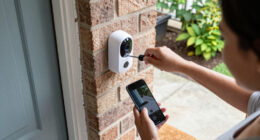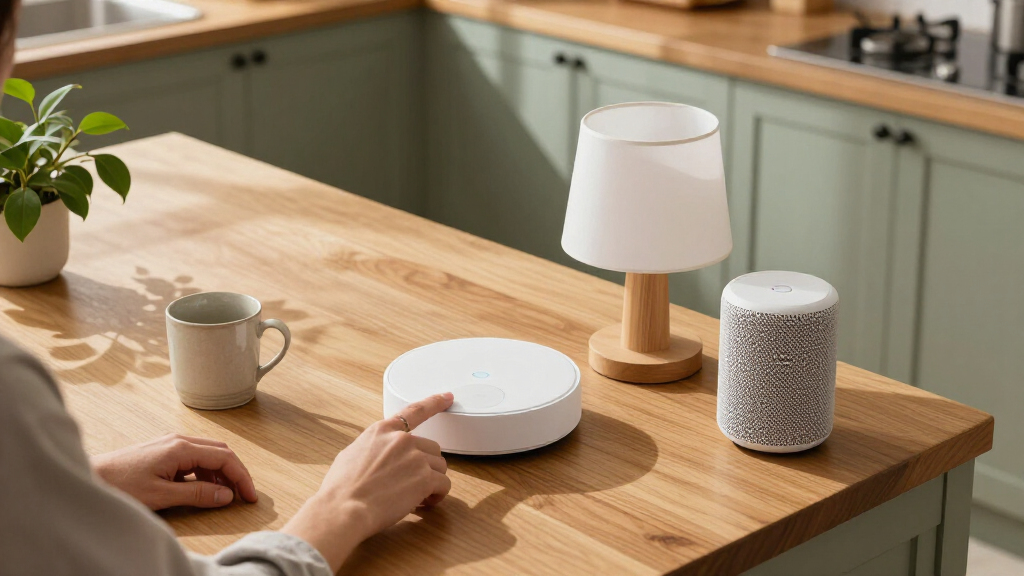

The best smart home hub for most people is the Aqara Smart Home Hub M3, with broad Matter support and automation features that suit a growing setup. For deeper customization, Home Assistant Green offers more control, while the Amazon Echo Hub gives Alexa households a dedicated control screen. The main choice is between a hub built to connect devices and a smart display that adds voice control, video, or household information. Device compatibility, local control, and setup effort vary widely across these options. Read on for the full comparison and recommendations by household and use case.

Get home appliances delivered free with Prime
- Fast, free delivery on millions of items
- Prime Video, Amazon Music and more included
- Member-only deals all year
Complete the kit



Key Takeaways
- Aqara M3 leads the roundup for shoppers who want a dedicated automation hub with Matter support and an IR blaster; its feature set makes more sense for involved setups than for a few basic smart plugs.
- Home Assistant Green and Hubitat Elevation C-8 Pro are the control-first picks, but both suit buyers willing to spend time configuring automations more than households seeking a quick voice assistant setup.
- Amazon Echo Hub is the most direct fit for Alexa users who want a wall-friendly control panel; Echo Show models add larger entertainment and household screens but are not equivalent substitutes for a dedicated multi-protocol hub.
- Tapo H110, H200, and H500 serve different Tapo ecosystem needs, from IR and chime functions to broader device coordination, so buyers should match the hub to their existing Tapo gear.
- Homey Pro (2026) stands apart for its wide mix of radio protocols and assistant compatibility, while the amazon.com/dp/B08TWDNQ5Q?tag=opulencefinder-20&ascsubtag=dc-1151570″ target=”_blank” rel=”nofollow sponsored noopener”>Aeotec and Tapo options offer narrower paths that may be easier to match to a specific ecosystem.
| Aqara Smart Home Hub M3 for Advanced Automation, Matter Controller, IR |  | Best for Protocol Flexibility | Model: HM-G01E | Connectivity: Zigbee, Thread, Bluetooth, dual-band Wi-Fi, PoE and USB-C | IR control: 360-degree smart IR with feedback and learning | VIEW LATEST PRICE | See Our Full Breakdown |
| Amazon Echo Show 11 Smart Display, 11-Inch Full HD Touchscreen, Graphite |  | Best for Everyday Family Control | Display: 10.95-inch Full HD touchscreen, 1920 × 1200 | Dimensions: 10 × 5 × 7.2 inches | Weight: 45.92 oz (1302 g) | VIEW LATEST PRICE | See Our Full Breakdown |
| TP-Link Tapo H110 Smart IR and IoT Hub with Chime |  | Best for IR Appliance Control | Model: H110 | Connectivity: 2.4 GHz Wi-Fi | Compatibility: Matter, Alexa, Google Assistant and Apple Home via Matter | VIEW LATEST PRICE | See Our Full Breakdown |
| Amazon Echo Hub (Newest Model), 8″ Smart Home Control Panel with Alexa+ |  | Best Dedicated Wall Control | Screen: 8 inches | Connectivity: Wi-Fi, Bluetooth, Zigbee, Matter, Sidewalk and Thread | Mounting: Wall mountable or tabletop compatible | VIEW LATEST PRICE | See Our Full Breakdown |
| Amazon Echo Show 21 (Newest Model) – 21″ Full HD Smart Display with Fire TV |  | Best Large-Screen Home Hub | Display: 21-inch Full HD, 1920 × 1080 | Dimensions: 21.4 × 13.2 × 1.5 inches | Weight: 10.7 lb | VIEW LATEST PRICE | See Our Full Breakdown |
| Aeotec Smart Home Hub with SmartThings, Matter, Z-Wave, and Zigbee |  | Best for Mixed-Protocol Homes | Brand: Aeotec | Model: V3 Smart Home Hub (2020) | Connectivity: Ethernet, Wi-Fi, Z-Wave, Zigbee, Matter | VIEW LATEST PRICE | See Our Full Breakdown |
| Amazon Echo Show 15 (2nd Gen) 15.6-Inch Full HD Smart Display with Fire TV and Alexa |  | Best Smart Display Hub for Family Spaces | Display: 15.6-inch Full HD, 1920 × 1080 | Dimensions: 16.1 × 10.1 × 1.4 inches | Weight: 4.96 pounds | VIEW LATEST PRICE | See Our Full Breakdown |
| Tapo H500 Smart Home Hub | 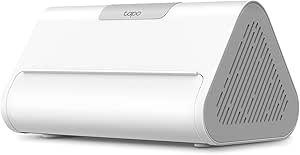 | Best for Tapo Camera and Sensor Systems | Model: H500 | Compatible devices: Up to 16 Tapo cameras and 64 Tapo Sub-1G devices | Continuous recording: Up to 4 cameras | VIEW LATEST PRICE | See Our Full Breakdown |
| Tapo H200 Smart Hub with Built-In Chime | 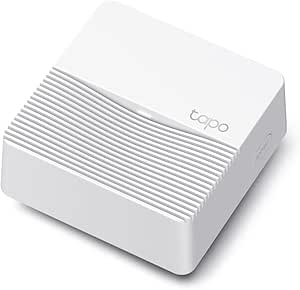 | Best Compact Hub for Tapo Alerts | Device capacity: Up to 64 switches, sensors, or buttons plus 4 cameras or doorbells | Compatible devices: Tapo C420, Tapo C400, Tapo D230, and other compatible Tapo devices | Connectivity: Wireless; 2.4 GHz Wi-Fi required | VIEW LATEST PRICE | See Our Full Breakdown |
| Aeotec Smart Home Hub 2 V4 – SmartThings Hub, Zigbee & Matter Gateway, Alexa & Google Assistant compatible (Wi‑Fi only) |  | Best for a New SmartThings Setup | Model: V4 Smart Home Hub 2 (2025) | Operating system: SmartThings | Supported protocols: Matter, Zigbee, SmartThings | VIEW LATEST PRICE | See Our Full Breakdown |
| Home Assistant Green Smart Home Hub |  | Best for Local Control | Operating system: Home Assistant OS | Processor: Quad-core | Memory: 4 GB LPDDR4X | VIEW LATEST PRICE | See Our Full Breakdown |
| eufy Smart Display E10 – 8″ Smart Home Hub |  | Best for Camera Monitoring | Display: 8-inch touchscreen | Storage: 64 GB | Model: T87A0 | VIEW LATEST PRICE | See Our Full Breakdown |
| Echo Show 5 (newest model) – Smart Display, Cloud Blue |  | Best Compact Smart Display | Display: 5.5 inches | Camera: 2 MP | Voice assistant: Alexa | VIEW LATEST PRICE | See Our Full Breakdown |
| Hubitat Elevation C-8 Pro Smart Home Hub – Z-Wave Zigbee Matter |  | Best for Offline Automation | Model: C8 Pro | Dimensions: 2.95 × 3.23 × 0.67 inches | Weight: 2.56 ounces | VIEW LATEST PRICE | See Our Full Breakdown |
| Homey Pro (2026) Smart Hub for Home Automation – Features Z-Wave Plus, Zigbee, Wi-Fi, BLE, Infrared, Matter & Thread, Compatible with Siri, Alexa & Google Home |  | Best for Mixed-Protocol Homes | Connectivity protocols: Wi-Fi, Zigbee, Z-Wave Plus, Bluetooth, infrared, Matter, Thread | Control methods: App, voice | Voice assistant compatibility: Siri, Alexa, Google Home | VIEW LATEST PRICE | See Our Full Breakdown |
| smart home hub | Connectivity |
|---|---|
| Aqara Smart Home Hub M3 for Ad | Zigbee, Thread, Bluetooth, dual-band Wi-Fi, PoE and USB-C |
| Amazon Echo Show 11 Smart Disp | — |
| TP-Link Tapo H110 Smart IR and | 2.4 GHz Wi-Fi |
| Amazon Echo Hub | Wi-Fi, Bluetooth, Zigbee, Matter, Sidewalk and Thread |
| Amazon Echo Show 21 | Wi-Fi 6E and Bluetooth A2DP/AVRCP |
| Aeotec Smart Home Hub with Sma | Ethernet, Wi-Fi, Z-Wave, Zigbee, Matter |
| Amazon Echo Show 15 | — |
| Tapo H500 Smart Home Hub | — |
| Tapo H200 Smart Hub with Built | Wireless; 2.4 GHz Wi-Fi required |
| Aeotec Smart Home Hub 2 V4 | Wi-Fi; Ethernet is listed in the supplied product specs |
| Home Assistant Green Smart Hom | Ethernet, USB, Bluetooth |
| eufy Smart Display E10 | — |
| Echo Show 5 | — |
| Hubitat Elevation C-8 Pro Smar | — |
| Homey Pro | — |
More Details on Our Top Picks
Aqara Smart Home Hub M3 for Advanced Automation, Matter Controller, IR
The Aqara M3 is the most connection-focused pick here: Zigbee, Thread, Bluetooth and Matter bridging give an automation-minded buyer room to mix devices across platforms. Its PoE option can keep the hub on a wired connection, while encrypted local storage supports privacy-conscious routines. The 360-degree IR blaster adds a job the Echo Show 11 and Echo Hub do not emphasize: controlling compatible air conditioners and reporting their status. That versatility has limits. Only one AC device can be exposed to Matter at a time, and the M3 lacks the screen-based household controls offered by Amazon’s displays. It also requires a separate USB power adapter if you do not use PoE. I’d choose it for a device-rich setup where flexible protocols and local automation matter more than an on-device dashboard.
Pros:- Combines Zigbee, Thread, Bluetooth and Matter bridging
- PoE and USB-C allow flexible wired or wireless installation
- 360-degree IR blaster supports learning and status feedback
- Encrypted 8 GB local storage and no microphone or camera
Cons:- Only one AC device can be exposed to Matter at a time
- USB power adapter is not included
- No display for at-a-glance household control
Best for: Smart home enthusiasts combining Aqara devices, Matter accessories and infrared-controlled air conditioning
Not ideal for: Households that want a touchscreen control panel or need to expose several IR-controlled AC units through Matter
- Model:HM-G01E
- Connectivity:Zigbee, Thread, Bluetooth, dual-band Wi-Fi, PoE and USB-C
- IR control:360-degree smart IR with feedback and learning
- Local storage:8 GB encrypted
- Supported platforms:Apple HomeKit, Alexa, SmartThings, Home Assistant and Matter
- Wi-Fi bands:2.4 GHz and 5 GHz
- Warranty:12 months
Our verdict“Choose the M3 if protocol range, local automation and IR control matter more to you than a built-in screen.”
Amazon Echo Show 11 Smart Display, 11-Inch Full HD Touchscreen, Graphite
The Echo Show 11 makes a smart home hub part of a room’s daily routine: its touchscreen, Alexa controls and video calling sit alongside Zigbee, Matter and Thread support. Presence and temperature sensors can help tailor routines to the room, while the 13 MP auto-framing camera is useful for calls when people move around. Compared with the Aqara M3, this is easier to use as a shared household control point, but it offers less emphasis on wired installation, local encrypted storage and IR control. The larger Echo Show 21 gives calendars and video more space, though it takes up far more wall or counter area. The 11-inch model still needs a visible place, and buyers should review its Sidewalk setting, which is enabled by default unless previously turned off.
Pros:- Built-in Zigbee, Matter and Thread Border Router support
- Full HD touchscreen combines device control with household information
- 13 MP auto-framing camera supports video calls
- Camera and microphone privacy controls are included
Cons:- Sidewalk is enabled by default unless it was previously turned off
- Bluetooth speakers requiring PIN codes are unsupported
- Camera and screen may not suit privacy-focused or discreet setups
Best for: Families who want a shared Alexa touchscreen for routines, household information and video calls
Not ideal for: Privacy-focused buyers seeking a hub without a camera, or automation enthusiasts who want PoE and dedicated IR control
- Display:10.95-inch Full HD touchscreen, 1920 × 1200
- Dimensions:10 × 5 × 7.2 inches
- Weight:45.92 oz (1302 g)
- Camera:13 MP with auto framing
- Audio:One 2.8-inch woofer and two full-range drivers
- Wi-Fi:Wi-Fi 6E
- Smart home hub:Zigbee, Matter and Thread Border Router
- Sensors:Ambient temperature, ambient light, presence detection and camera
Our verdict“Pick the Echo Show 11 if you want capable smart home control in a shared Alexa display that also handles calls.”
TP-Link Tapo H110 Smart IR and IoT Hub with Chime
The Tapo H110 is aimed at homes where infrared appliances are the main gap in smart control. It works with devices from more than 8,000 brands across 18 appliance types, and its 93 dB customizable chime gives the small hub a practical notification role as well. Matter support connects compatible devices with Alexa, Google Assistant and Apple Home, while core automations can continue during internet outages. Against the Aqara M3, the H110 brings a chime and broad stated appliance compatibility, but it lists only 2.4 GHz Wi-Fi and does not offer the M3’s Zigbee, Thread or PoE connectivity. IR commands also depend on compatible appliances being within range. The power adapter is sold separately, so factor that into setup.
Pros:- IR compatibility spans more than 8,000 brands and 18 appliance types
- Matter support works with Alexa, Google Assistant and Apple Home
- Core automations can continue during internet outages
- Customizable 93 dB built-in chime
Cons:- Requires a separate 5V/2A USB power adapter
- IR control depends on appliance compatibility and range
- Connectivity is limited to 2.4 GHz Wi-Fi
Best for: Tapo app users who want to automate IR appliances and add an audible chime without a smart display
Not ideal for: People who need Zigbee or Thread device support, wired PoE networking, or IR control beyond line of range
- Model:H110
- Connectivity:2.4 GHz Wi-Fi
- Compatibility:Matter, Alexa, Google Assistant and Apple Home via Matter
- IR compatibility:More than 8,000 brands and 18 appliance types
- Built-in alarm:93 dB
- Power:5V/2A USB adapter required; sold separately
- Operating temperature:32°F–104°F (0°C–40°C)
- Operating humidity:Up to 90%, non-condensing
Our verdict“Choose the H110 when broad IR appliance control and a built-in chime are more useful than Zigbee or Thread support.”
Amazon Echo Hub (Newest Model), 8″ Smart Home Control Panel with Alexa+
The Echo Hub puts device management first. Its 8-inch screen supports customizable dashboards for routines, cameras and controls, while Zigbee, Matter and Thread cover a broad mix of connected devices. Wall mounting or tabletop placement lets it serve as a shared control point, unlike the Aqara M3, which is a screenless automation hub. The Echo Show 11 is the better fit if calls, media and household information matter; the Hub’s smaller panel is designed around managing the home. Ring camera footage search and event summaries depend on Alexa+ and a Ring subscription, so those features add ongoing requirements. Mounting accessories and cable management are separate purchases, and without a PoE adapter it needs an outlet nearby.
Pros:- Built-in Zigbee, Matter and Thread support
- Customizable dashboard can group device controls and routines
- Wall-mount or tabletop placement options
- Uses 27% recycled materials and includes a mic-off button
Cons:- Ring camera summaries require Alexa+ and a Ring subscription
- Wall mounting and cable management accessories are sold separately
- Needs outlet power unless paired with a compatible PoE adapter
Best for: Alexa and Ring households that want a fixed touchscreen for controlling devices, cameras and routines
Not ideal for: Buyers who want a portable, battery-powered panel or a display centered on video calls and entertainment
- Screen:8 inches
- Connectivity:Wi-Fi, Bluetooth, Zigbee, Matter, Sidewalk and Thread
- Mounting:Wall mountable or tabletop compatible
- Power:Compatible with a separately sold power-over-Ethernet adapter
- Material:27% recycled materials
- Privacy:Mic-off button
Our verdict“Choose the Echo Hub for a fixed Alexa control panel, especially if your home already uses Ring cameras.”
Amazon Echo Show 21 (Newest Model) – 21″ Full HD Smart Display with Fire TV
The Echo Show 21 is for buyers who want a smart home hub to double as a large shared household display. Its 21-inch Full HD screen gives calendars, lists and device controls room to stay visible, and Fire TV adds streaming without another screen. Zigbee, Matter and Thread support make it a capable hub as well as an organizer. Compared with the Echo Show 11, the Show 21 gives video and widgets more space, but its 10.7-pound body needs a deliberate mounting or counter location. The Echo Hub is more focused on a wall-based control dashboard and takes up less space; the Show 21 makes more sense when calls and entertainment matter too. Its camera has a physical shutter, though some services and Alexa skills may require subscriptions.
Pros:- 21-inch Full HD screen gives widgets and controls substantial space
- Built-in Fire TV includes a remote
- 13 MP camera has auto framing, 3.3× zoom and a physical shutter
- Supports Zigbee, Matter and Thread
Cons:- At 10.7 lb, it limits placement flexibility
- Some streaming services and skills require additional subscriptions or fees
- Bluetooth hands-free voice control is unsupported for Mac OS X devices
Best for: Households seeking a large kitchen or family-room display for smart home controls, shared lists and streaming
Not ideal for: Small rooms, renters with limited mounting options, or buyers who want a compact hub dedicated to device control
- Display:21-inch Full HD, 1920 × 1080
- Dimensions:21.4 × 13.2 × 1.5 inches
- Weight:10.7 lb
- Camera:13 MP with shutter and 3.3× zoom
- Audio:Two 2-inch woofers and two 0.6-inch tweeters
- Connectivity:Wi-Fi 6E and Bluetooth A2DP/AVRCP
- Smart home protocols:Zigbee, Matter and Thread Border Router
- Orientation:Landscape or portrait
Our verdict“Pick the Echo Show 21 if you have room for a large shared screen that combines smart home control, video calls and streaming.”
Aeotec Smart Home Hub with SmartThings, Matter, Z-Wave, and Zigbee
Broad device support gives this Aeotec hub a clear role for homes combining older Z-Wave or Zigbee devices with newer Matter products. It runs through SmartThings, and supported automations can run locally, which can keep some routines responsive when internet access is interrupted. Compared with the Aeotec Smart Home Hub 2 V4, this V3 model adds Z-Wave Plus, making it a better fit for buyers whose existing devices depend on that protocol. It also offers both Wi-Fi and Ethernet, along with Alexa and Google Assistant control. The tradeoff is regional: this version is designed for North America, and Z-Wave Plus support applies to the V3 model. Choose it for protocol range and an established SmartThings setup; skip it if you need a hub for another region or want the newest Aeotec model.
Pros:- Supports Matter, Zigbee, and Z-Wave Plus on the V3 model
- Offers Wi-Fi and Ethernet setup
- Compatible with Alexa and Google Assistant
- Supported local automations can keep routines running with less dependence on the cloud
Cons:- Designed for use in North America
- Z-Wave Plus support is specific to the V3 model
Best for: North American SmartThings users combining Matter, Zigbee, and Z-Wave Plus devices
Not ideal for: Buyers outside North America or those who do not need Z-Wave and prefer the newer V4 model
- Brand:Aeotec
- Model:V3 Smart Home Hub (2020)
- Connectivity:Ethernet, Wi-Fi, Z-Wave, Zigbee, Matter
- Z-Wave frequency:908.42 MHz
- Control:App and voice
- Voice assistants:Amazon Alexa, Google Assistant
- Weight:1.1 pounds
- Warranty:1 year
Our verdict“Choose this V3 hub if your North American SmartThings home needs Z-Wave alongside Zigbee and Matter.”
Amazon Echo Show 15 (2nd Gen) 15.6-Inch Full HD Smart Display with Fire TV and Alexa
The 15.6-inch screen makes the Echo Show 15 a wall-friendly household dashboard that also handles entertainment, video calls, and smart home control. Its Zigbee, Matter, and Thread support gives it more direct device reach than a display focused mainly on Alexa controls, while the Fire TV and customizable widgets make it useful even when nobody is adjusting lights. Compared with the smaller Amazon Echo Show 11, this model gives family calendars and shared controls more room, but takes up more wall or counter space. The 13 MP camera can frame video calls and has a physical shutter for privacy. This is a smart hub for households that want a visible shared control point; buyers seeking a compact, discreet hub may find its size and display-first design excessive.
Pros:- Large Full HD display supports landscape or portrait orientation
- Zigbee, Matter, and Thread support add device connectivity
- Fire TV and customizable widgets make the screen useful beyond hub controls
- Auto-framing camera includes a physical privacy shutter
Cons:- Its large screen and 4.96-pound weight require substantial wall or counter space
- Some skills and services may require subscriptions or additional fees
- Does not support ad-hoc Wi-Fi networks
Best for: Families who want a shared wall display for Alexa smart home controls, schedules, video calls, and streaming
Not ideal for: Buyers seeking a compact, screen-free hub or a small device that can be tucked out of sight
- Display:15.6-inch Full HD, 1920 × 1080
- Dimensions:16.1 × 10.1 × 1.4 inches
- Weight:4.96 pounds
- Camera:13 MP with shutter
- Smart home connectivity:Zigbee, Matter, Thread Border Router
- Wi-Fi:Wi-Fi 6E; supports 802.11a/b/g/n/ac
- Audio:Two 2-inch woofers and two 0.6-inch tweeters
- Orientation:Landscape or portrait
Our verdict“Pick the Echo Show 15 if you want a large shared Alexa control screen that doubles as a family organizer and TV.”
Tapo H500 Smart Home Hub
The H500 is built around Tapo cameras and sensors, rather than acting as a general-purpose hub for every smart home protocol. It can manage up to 16 Tapo cameras and 64 compatible sensors, switches, or buttons, while local storage starts at 16 GB and can expand with a separately purchased SATA drive. That makes it a better fit for a growing Tapo monitoring system than the smaller Tapo H200, which has a built-in chime but a narrower camera capacity and microSD storage. The H500 also adds HDMI viewing, two-way audio, facial recognition, and a 110 dB alarm. Its limits matter: continuous recording covers up to four cameras, and Thread-based Matter devices need a separate Thread hub. Choose it for centralized Tapo security and local recording, not broad protocol coverage.
Pros:- Connects up to 16 Tapo cameras and 64 compatible devices
- Includes 16 GB local storage with support for a SATA HDD or SSD up to 16 TB
- HDMI output, two-way audio, and a 110 dB alarm add monitoring options
- Works with Google Assistant, Amazon Alexa, and Matter-compatible controllers
Cons:- Additional HDD or SSD is sold separately
- Continuous recording is limited to four cameras
- Thread-based Matter devices need a separate Thread hub
Best for: Tapo households managing several cameras and sensors that want expandable local recording
Not ideal for: Buyers seeking a protocol-neutral hub or Thread support without adding another hub
- Model:H500
- Compatible devices:Up to 16 Tapo cameras and 64 Tapo Sub-1G devices
- Continuous recording:Up to 4 cameras
- Built-in storage:16 GB
- Expandable storage:2.5-inch SATA HDD or SSD, up to 16 TB
- Video resolution:1080p
- Connectivity and ports:Wi-Fi, Ethernet, USB 2.0, USB Type-C, HDMI, LAN
- Dimensions:6.31 × 3.89 × 3.28 inches
Our verdict“Choose the H500 if your smart home is centered on Tapo cameras and you want expandable local video storage.”
Tapo H200 Smart Hub with Built-In Chime
For a Tapo setup that needs a simple connection point for sensors and doorbells, the compact H200 keeps its job focused: it links up to 64 switches, sensors, or buttons and four cameras or video doorbells, then adds motion alerts and a visitor chime. A microSD card can store local video, giving it an option the Aeotec Smart Home Hub 2 V4 does not emphasize. The tradeoff is ecosystem reach: the H200 relies on compatible Tapo Sub-1G devices and 2.4 GHz Wi-Fi, rather than offering broad Zigbee or Z-Wave support. Its 90 dB chime and Alexa or Google Home voice control suit buyers who want clear doorbell and sensor alerts without a larger camera-management box. Skip it if you need a hub for devices across different brands.
Pros:- Connects up to 64 switches, sensors, or buttons and four cameras or doorbells
- MicroSD local video storage supports cards up to 512 GB
- Built-in chime reaches up to 90 dB
- Works with Alexa and Google Home voice control
Cons:- Requires 2.4 GHz Wi-Fi and compatible Tapo Sub-1G devices
- MicroSD card is sold separately
Best for: Tapo users who want a small hub for doorbell and sensor alerts with optional local video storage
Not ideal for: Buyers building a mixed-brand smart home or using devices that require Zigbee or Z-Wave
- Device capacity:Up to 64 switches, sensors, or buttons plus 4 cameras or doorbells
- Compatible devices:Tapo C420, Tapo C400, Tapo D230, and other compatible Tapo devices
- Connectivity:Wireless; 2.4 GHz Wi-Fi required
- Wireless protocol:Sub-1G low-power wireless
- Local storage:microSD card up to 512 GB, sold separately
- Maximum range:30 meters
- Chime volume:Up to 90 dB
- Dimensions and weight:2.81 × 2.81 × 1.23 inches; 73 g
Our verdict“Choose the H200 for a compact Tapo doorbell and sensor setup with a built-in chime and optional local storage.”
Aeotec Smart Home Hub 2 V4 – SmartThings Hub, Zigbee & Matter Gateway, Alexa & Google Assistant compatible (Wi‑Fi only)
The V4 is a straightforward route into SmartThings with Matter and Zigbee, with supported local automations designed to keep routines running during an internet outage. It suits buyers starting fresh or simplifying a setup that does not depend on Z-Wave. That omission is the key difference from the Aeotec V3 Smart Home Hub: the older V3 supports Z-Wave Plus, while this V4 does not. The V4 listing describes Wi-Fi-only compatibility in its title, though its product data also lists Ethernet alongside Wi-Fi, so buyers should confirm the connection options for their intended configuration. Alexa and Google Assistant voice control round out a familiar setup. Choose this model for a focused SmartThings system built around Matter and Zigbee; skip it if your devices require Z-Wave.
Pros:- Supports Matter and Zigbee devices through SmartThings
- Supported local automations can continue when internet access is down
- Works with Alexa and Google Assistant voice control
Cons:- No Z-Wave support limits compatibility with some existing devices
- Product title and supplied specs conflict on whether Ethernet is supported
Best for: SmartThings users building a Matter and Zigbee setup without Z-Wave devices
Not ideal for: Buyers with Z-Wave devices or anyone requiring confirmed Ethernet connectivity before purchase
- Model:V4 Smart Home Hub 2 (2025)
- Operating system:SmartThings
- Supported protocols:Matter, Zigbee, SmartThings
- Connectivity:Wi-Fi; Ethernet is listed in the supplied product specs
- Voice assistants:Amazon Alexa, Google Assistant
- Color:White
- Return coverage:30-day return guarantee
Our verdict“Pick the V4 for a Matter and Zigbee SmartThings home, but choose the V3 if your setup relies on Z-Wave.”
Home Assistant Green Smart Home Hub
Home Assistant Green is a strong fit for buyers who want a dedicated hub for local device control and custom automations. With Home Assistant OS preinstalled, it avoids the extra work of choosing and installing an operating system, while its fanless design stays quiet in a living space. Unlike the Echo Show 5, which centers on Alexa, a screen, and everyday voice features, Green is built around managing a broader smart home through Home Assistant. Its 4 GB of RAM and 32 GB of storage provide room for the platform, but wireless device support takes extra hardware: Z-Wave, Zigbee, or Thread require USB devices. Setup also needs Ethernet, so it suits buyers comfortable connecting a hub to their router more than those seeking a wireless, screen-led setup.
Pros:- Home Assistant OS comes preinstalled.
- Local storage keeps home data on the device.
- Fanless design runs silently with low power consumption.
- Two USB ports allow added connectivity.
Cons:- Ethernet is required for setup.
- Z-Wave, Zigbee, and Thread require separate USB devices.
Best for: Smart home DIYers who want Home Assistant and local device data on a quiet, dedicated hub.
Not ideal for: Buyers who need built-in Zigbee, Z-Wave, or Thread radios, or cannot connect the hub by Ethernet.
- Operating system:Home Assistant OS
- Processor:Quad-core
- Memory:4 GB LPDDR4X
- Storage:32 GB
- Connectivity:Ethernet, USB, Bluetooth
- USB ports:2
- Dimensions:4.41 × 4.41 × 1.26 inches
Our verdict“Choose Home Assistant Green if local Home Assistant control matters more than built-in wireless protocol support or a touchscreen.”
eufy Smart Display E10 – 8″ Smart Home Hub
The eufy Smart Display E10 is a camera-first hub: its 8-inch touchscreen can show up to four live feeds at once, with hands-free door alerts and local event replay. That makes it more useful for checking who is at the door or scanning several camera views than the compact Echo Show 5, whose smaller screen and Alexa features serve a broader range of quick tasks. The E10 also offers daily reports with facial and package recognition, giving monitoring a more organized feel. Its focus is narrower, though: the supplied details describe camera viewing and alerts rather than broad smart home protocol support or automation. The display has a built-in battery, but it still requires an external power adapter, and its listed dimensions may make placement less flexible than a compact hub.
Pros:- Shows up to four camera feeds on one screen.
- Hands-free door alerts bring live video to the display.
- Local storage supports immediate event replay.
- Daily reports include facial and package recognition.
Cons:- The feature set is centered on camera monitoring rather than broad device automation.
- An external power adapter is needed despite the built-in battery.
- The listed dimensions could limit placement options.
Best for: Households with compatible eufy cameras that want a shared screen for door alerts and several live views.
Not ideal for: Buyers looking for a general-purpose automation hub with broad protocol support, or a compact display that can sit almost anywhere.
- Display:8-inch touchscreen
- Storage:64 GB
- Model:T87A0
- Weight:2.46 pounds
- Power adapter:5V/2A adapter included
- Included accessories:Charging station, Type-C cable, wall mount
- Warranty:12 months
Our verdict“Pick the E10 if camera alerts and multi-feed viewing are the main jobs for your smart home screen.”
Echo Show 5 (newest model) – Smart Display, Cloud Blue
Echo Show 5 is the compact, voice-led pick for a bedside table, kitchen counter, or other spot where a large control panel would be awkward. Its 5.5-inch screen puts quick-glance information and video calls within reach, while Alexa provides the familiar interaction layer. Compared with the camera-focused eufy Smart Display E10, the Echo Show 5 is smaller and broader in everyday use, but it does not offer the E10’s four-camera view or local event replay in the supplied product details. The built-in 2 MP camera supports calls and home monitoring, and recycled fabric and aluminum give its materials a more considered profile. The tradeoff is scale: this screen is suited to brief checks and calls, not extended video viewing or a detailed whole-home dashboard.
Pros:- Compact 5.5-inch touchscreen fits smaller surfaces.
- Alexa supports voice interaction and smart home control.
- Built-in 2 MP camera supports video calls and home monitoring.
- Uses recycled polyester fabric and recycled aluminum.
Cons:- The small screen limits media viewing and detailed controls.
- The supplied product details do not describe broad protocol support or local automation.
Best for: Alexa households that want a small display for quick updates, video calls, and light home monitoring.
Not ideal for: Buyers who want a large shared control screen or to watch several security camera feeds at once.
- Display:5.5 inches
- Camera:2 MP
- Voice assistant:Alexa
- Color:Cloud Blue
- Audio:Enhanced bass and clearer vocals
- Fabric material:100% post-consumer recycled polyester yarn
- Aluminum material:100% recycled aluminum
Our verdict“Choose Echo Show 5 for a small Alexa display that handles quick household tasks and calls.”
Hubitat Elevation C-8 Pro Smart Home Hub – Z-Wave Zigbee Matter
Hubitat Elevation C-8 Pro is aimed at buyers who want automations to run locally, including when the internet goes down. Its mix of Matter, Z-Wave 800 Series, Zigbee 3.0, and Bluetooth gives it a broader built-in protocol range than Home Assistant Green, which needs USB devices for Z-Wave, Zigbee, or Thread. Dedicated antennas are intended to extend range, and the rule engine suits people building more involved routines. Hubitat also works with Alexa, Google Home, Apple HomeKit, and Ring cameras, according to the supplied details. That breadth comes with a steeper learning curve: initial setup may feel technical, especially for buyers used to screen-led guidance such as the Echo Show 5. There is no subscription requirement, but this is a hub for configuring automations, not a touchscreen control center.
Pros:- Local processing supports fast response and offline operation.
- Built-in Matter, Z-Wave 800 Series, Zigbee 3.0, and Bluetooth support.
- Dedicated antennas are designed for extended range.
- No subscription is required, and updates are provided.
Cons:- Initial setup may be technical for non-DIY users.
- It lacks a built-in touchscreen for direct household control.
Best for: DIY-focused households that want local rules, multiple built-in protocols, and automations that keep running offline.
Not ideal for: Beginners who want guided setup and an on-device screen for browsing or controlling the home.
- Model:C8 Pro
- Dimensions:2.95 × 3.23 × 0.67 inches
- Weight:2.56 ounces
- Protocols:Matter 1.5, Z-Wave 800 Series, Zigbee 3.0, Bluetooth
- Automation processing:Local
- Voice and device integrations:Alexa, Google Home, Apple HomeKit, Ring cameras
- Subscription:No subscription required
Our verdict“Choose Hubitat C-8 Pro if offline automations and built-in protocol support matter more than an easy, screen-guided setup.”
Homey Pro (2026) Smart Hub for Home Automation – Features Z-Wave Plus, Zigbee, Wi-Fi, BLE, Infrared, Matter & Thread, Compatible with Siri, Alexa & Google Home
Homey Pro (2026) is the broad-compatibility choice for homes mixing devices across wireless standards and brands. Its listed support for Z-Wave Plus, Zigbee, Wi-Fi, Bluetooth, infrared, Matter, and Thread gives it a wider stated protocol mix than Hubitat C-8 Pro, particularly with infrared and Thread included. Local-first processing is intended to keep routines responsive and reduce cloud dependence, while the app and major voice assistants offer several ways to control the system. Homey’s stated capacity across thousands of brands makes it suited to an expanding setup, though the supplied specifications give conflicting device and brand counts, so I would treat those figures cautiously. Compared with Home Assistant Green, the wider built-in radio mix can mean fewer add-on devices; the tradeoff is that setup across many protocols may be more involved.
Pros:- Supports seven listed protocols, including infrared, Matter, and Thread.
- Local-first processing reduces reliance on cloud services.
- Works with Siri, Alexa, and Google Home.
- Designed to support a large, mixed-brand device setup.
Cons:- Setup may be complex for buyers unfamiliar with multiple protocols.
- The supplied data gives conflicting supported device and brand counts.
- The provided dimensions are incomplete.
Best for: Households combining devices across multiple protocols and brands that want local routines and voice assistant options.
Not ideal for: Buyers who want a simple starter hub or need clearly consistent, verified device capacity figures before choosing.
- Connectivity protocols:Wi-Fi, Zigbee, Z-Wave Plus, Bluetooth, infrared, Matter, Thread
- Control methods:App, voice
- Voice assistant compatibility:Siri, Alexa, Google Home
- Processing approach:Local-first
- Color:Black/Grey
- Mounting type:Wall mount
- Device capacity claim:Up to 70,000 devices (product description)
- Brand capacity claim:Over 2,000 brands (product description)
Our verdict“Pick Homey Pro if your home spans several protocols and you want one local-first hub to coordinate them.”

How We Picked
I ranked these products by how well they function as smart home hubs: connecting compatible devices, coordinating automations, and giving buyers a clear path to expand. Protocol support matters because a hub with Matter, Zigbee, Z-Wave, Thread, or infrared can reduce the number of separate bridges a household needs, though support varies by model. I also weighed local control, ecosystem flexibility, setup demands, and whether a screen adds useful control or mostly changes the product into a smart display.
The Aqara M3 ranks first for its balance of automation capability and broad standards support. Home Assistant Green, Hubitat, and Homey Pro follow for buyers who value customization or wider device coverage, with more setup complexity as the tradeoff. Amazon displays rank according to their usefulness as control surfaces and their fit with Alexa, while Tapo and Aeotec models are strongest when a buyer already favors those ecosystems. Product roles reflect those differences, so a display-focused pick may be the right choice for a kitchen or wall even when it is not the strongest standalone automation controller.
Factors to Consider When Choosing Smart Home Hubs
Before choosing a hub, map the devices and routines you want it to connect. A product can advertise broad compatibility yet still depend on a specific app, bridge, or assistant for the features you care about. These factors help distinguish a central controller from a convenient screen or an ecosystem-specific accessory.
Check Protocols Against Your Actual Devices
Start with the radios and standards used by the devices you already own, then check the hub’s compatibility list for those exact models. Matter support can simplify cross-brand connections, but it does not mean every feature from every device maker appears in every app. Zigbee and Z-Wave can bring established sensors and switches into one system, while Thread support matters for compatible newer devices. Infrared is useful for controlling legacy equipment such as some air conditioners, but it does not replace a modern device network. A common mistake is buying based on the number of protocols listed without checking whether the hub supports the specific product and automation behavior needed. Leave room for a bridge if one of your key devices requires it.
Decide How Much Setup You Want to Manage
Some households want a hub that discovers devices and offers a handful of routine templates; others want conditions, scripts, and fine-grained control. More flexible systems can handle complex routines, but that flexibility may bring extra configuration and ongoing troubleshooting. Think about who will maintain the setup after the initial installation, especially if multiple people rely on it. A system that only one household member understands can make simple changes harder than they need to be. Beginners often benefit from a familiar assistant ecosystem, while technically confident buyers may value local rules and custom integrations. Choose for the maintenance you are willing to do, not just the automation you hope to build.
Understand Local Control and Internet Dependence
Local control means some commands and routines can run within the home network, which may help keep automations responsive during an internet outage. It does not automatically mean every voice feature, remote notification, or device integration works offline. Cloud-connected hubs can be straightforward to access remotely, but their behavior may depend on the manufacturer’s services and account setup. Identify which routines matter when the broadband connection is down, such as lights, locks, or heating schedules. Then confirm that the hub and devices can run those routines locally. Buyers often confuse local device communication with complete offline operation, so check each feature separately.
Choose Between a Control Screen and a Dedicated Hub
A screen can make scenes and device status easier for guests or family members to access without opening an app. It also takes up wall or counter space and may be oriented toward video, voice assistant features, or household widgets rather than deep automation. A compact hub can stay out of sight and focus on connecting devices, but it offers less visible control on its own. Consider the location first: a kitchen display, a hallway panel, and a network closet solve different problems. If you want a shared dashboard, check whether it stays readable from the intended distance and whether the controls you use most are easy to reach. Avoid paying for a large screen when the household mainly needs background device coordination.
Plan for Growth, Placement, and Network Limits
Hub placement affects reliability, especially for battery sensors and devices spread across several floors. A central location can help, but metal enclosures, dense walls, and crowded wireless areas may weaken connections. Before adding many devices, check whether the hub can coordinate the size and type of network you expect and whether compatible devices can repeat signals. Also check network requirements: some models rely on Wi-Fi, while others may use wired connections or need a particular setup. If you expect to add devices from new brands, favor a platform with a clear compatibility path rather than assuming standards support will cover every future feature. A small amount of planning can prevent a second hub purchase simply to reach a distant room or fill a protocol gap.
Pay for Capabilities You Will Use
A more capable hub can be worthwhile when it replaces several bridges, supports the devices you plan to add, or runs routines that matter daily. It is less useful when the household only needs a few voice-controlled lights and a timer. Compare the ongoing effort as well as the hardware: account requirements, app maintenance, and automation upkeep all shape the ownership experience. Premium multi-protocol models make the strongest case for mixed-brand homes or planned expansion. For a single-brand setup, a smaller ecosystem hub may be simpler to install and manage. List your must-have devices and routines before choosing, then treat every extra capability as useful only if it solves a real household need.
Frequently Asked Questions
Can one smart home hub control devices from different brands?
Often, but the answer depends on the hub’s standards support and the specific devices. Matter can help products from different brands work together, while Zigbee and Z-Wave support varies by hub and device model. Some products still require their own bridge or app for advanced features. Check compatibility for the exact devices you plan to connect, including sensors and locks, rather than relying on a general claim of broad support. If your home already has several ecosystems, list them before choosing a central controller.
Do I need a hub if I already use an Echo Show?
Not always: an Echo Show can control many compatible Wi-Fi devices and provides a screen and Alexa voice control. A dedicated hub becomes useful when you want support for additional device protocols, more coordinated automations, or a system that serves as the center of a larger setup. Some Echo Show models are primarily smart displays, so their presence does not guarantee the same device connections as a dedicated hub. Check the protocols and routines you need before adding another device. If your current setup works reliably and covers your planned devices, a separate hub may add little.
Will my automations still run if the internet goes down?
Some may, but offline behavior depends on the hub, device, and automation. A routine processed locally can keep working across a broadband outage, while cloud-based voice commands, remote access, and notifications may stop. Even devices that communicate locally can rely on cloud services for setup or certain features. Look for explicit offline behavior in the documentation for the routines you care about. Test critical automations before relying on them for security or comfort.
Should I choose a hub with Matter, Zigbee, Z-Wave, or all three?
Choose based on the devices you own and expect to add, rather than collecting protocols for their own sake. Matter helps with cross-brand connections, while Zigbee and Z-Wave remain relevant for many sensors, switches, and established smart home products. A hub supporting several standards can reduce bridge clutter in a mixed setup, but may involve more configuration. Thread can also matter for compatible Matter devices, so check whether the hub supports the specific connection method each product needs. For a single-brand home, a narrower hub may be easier to operate.
Is a local automation system worth the extra setup?
It can be, if you want detailed rules, privacy-focused control, or routines that do not depend on remote services. The tradeoff is time: setup, device compatibility checks, and later changes may take more effort than using a simpler assistant app. Think about whether you will maintain the system and whether anyone else needs to edit its routines. For basic schedules and voice commands, a more guided hub may be a better fit. For a growing mixed-brand home, the extra control can pay off in flexibility.
Conclusion
For most mixed-device households, I recommend the Aqara Smart Home Hub M3 as the best overall balance of automation features and standards support. The best value depends on your existing ecosystem: Tapo owners can look to the H-series hubs, while Alexa households may get more practical use from the Echo Hub than a separate controller. For a best premium choice with broad protocol coverage, consider Homey Pro; choose Home Assistant Green or Hubitat when custom local automations matter more than simplicity. The best beginner route is an Echo display or a focused Tapo setup that matches devices you already own. For a dedicated wall control point, the Echo Hub is the specific-use pick; for a large shared screen, compare the Echo Show 15 and 21 with the smaller Show 11 before deciding how much display space your home needs.
Cold & flu season Picks
humidifiers
As an affiliate, we earn on qualifying purchases.