If your Keurig K-Mini or similar model isn’t brewing a full cup, it can be frustrating. This guide helps you identify the causes and follow safe, step-by-step solutions to restore full brewing capacity.

Get home appliances delivered free with Prime
- Fast, free delivery on millions of items
- Prime Video, Amazon Music and more included
- Member-only deals all year
Whether it’s a clogged nozzle, mineral buildup, or water reservoir issues, we’ll cover practical fixes so you can enjoy your coffee just the way you like it.
Key Takeaways
| Clogged or dirty needle | May block water flow, reducing brew size. |
| Mineral buildup | Can cause internal blockages affecting brewing. |
| Water reservoir issues | Low water levels or improper placement reduce brew volume. |
| Incorrect brew settings | Ensure proper cup size selected for full brew. |
| Needle or scale blockage fix | Regular cleaning prevents brewing issues. |
Check and Refill the Water Reservoir
- Ensure the water reservoir is filled to the appropriate level with fresh water.
- Remove the reservoir and rinse it if it appears dirty or has mineral deposits.
- Replace the reservoir securely back into the machine, making sure it clicks into place.
Clean the Brew Needle
- Turn off and unplug the machine for safety.
- Remove the water reservoir and drip tray.
- Use a paperclip or the cleaning tool that came with the brewer to gently clear any clogs in the needle.
- Run a water-only brew cycle to flush out residue.
Descale Your Keurig
- Mix descaling solution with water according to the product instructions.
- Fill the water reservoir with the solution.
- Run a brew cycle without a K-Cup, allowing the descaling solution to clean internal deposits.
- Follow up with multiple water-only brews to rinse out any remaining solution.
Check Brew Size Settings
Verify that you’ve selected the correct brew size on your control panel. For full cups, choose 8oz or larger, if available. Adjust if necessary and test brew again.
Use a Reusable Filter for Ground Coffee
If you brew with ground coffee, ensure you’re using a compatible reusable filter like the My K-Cup® Reusable Coffee Filter. Proper use prevents clogging and ensures full cups.
The Products in This Guide

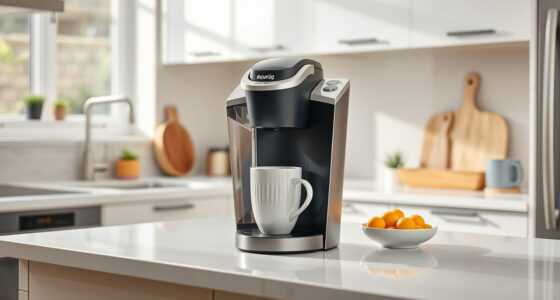
Keurig K-Mini Single Serve K-Cup Pod Coffee Maker
- ✔ Height: Less than 5 inches
- ✔ Mug Capacity: Up to 7 inches tall
- ✔ Power: Energy efficient

My K-Cup® Reusable Coffee Filter
- ✔ Material: Reusable plastic
- ✔ Capacity: Single cup
- ✔ Compatibility: Most Keurig models
Keurig K-Mini Single Serve K-Cup Pod Coffee Maker
The Keurig K-Mini Single Serve K-Cup Pod Coffee Maker is perfect for those with limited space who still want quick, fresh coffee. Its simple design makes maintenance straightforward, but regular cleaning is key to preventing brewing issues.
Pros:
- Space-saving design
- Brews up to 12oz
- Travel mug friendly
- Fast brewing
Cons:
- Limited water reservoir
- No auto-start feature
- Requires regular descaling
Best for: Small apartments, offices, or travel
Not ideal for: For those needing larger capacity or advanced features
Bottom line: A compact, reliable coffee maker suited for small spaces that needs regular cleaning.
My K-Cup® Reusable Coffee Filter
The My K-Cup® Reusable Coffee Filter is an excellent accessory for brewing your favorite ground coffee with your Keurig. It’s simple to use and ensures full flavor extraction, making it a versatile addition.
Pros:
- Custom coffee blends
- Cost-effective
- Easy to clean
- Compatible with many models
Cons:
- Requires proper packing
- May need occasional replacement
- Not for pods
Best for: Brewing ground coffee in a Keurig
Not ideal for: For users exclusively using K-Cup pods
Bottom line: A must-have for ground coffee enthusiasts using Keurig.
Frequently Asked Questions
Why is my Keurig not brewing a full cup?
Common causes include clogging of the brew needle, mineral buildup, low water levels, or incorrect brew settings. Regular cleaning and descaling can resolve these issues.
How often should I descale my Keurig?
It’s recommended to descale every 3-6 months, depending on usage and water hardness, to prevent mineral buildup that can affect brewing.
Can I use ground coffee in my Keurig?
Yes, using a compatible reusable filter like the My K-Cup® allows you to brew your favorite ground coffee in your Keurig.
What safety precautions should I take when cleaning?
Always unplug your Keurig before cleaning or descaling. Use gentle cleaning tools and avoid harsh chemicals to prevent damage.
Get Your Brew Back to Full Strength
A partially brewed cup can often be fixed with simple cleaning and maintenance steps. Regular descaling and needle cleaning ensure your Keurig operates optimally, providing you with delicious coffee every time.
Following these troubleshooting tips will help you enjoy full, flavorful brews and prolong your machine’s lifespan.
Affiliate disclosure: As an Amazon Associate we earn from qualifying purchases. Prices and availability are accurate as of the time of publishing.
Fall yard work Picks
leaf blowers
As an affiliate, we earn on qualifying purchases.