TL;DR
Smart home security cameras let you view live video, receive motion alerts, and review recorded clips, but their usefulness depends on placement, power, connectivity, and storage. Compare local and cloud recording, check which features require a subscription, and secure your account with a unique password and multifactor authentication. Treat detection alerts as helpful clues rather than guaranteed identification.
The alert arrives while you’re at work: a package has landed on the porch, but the camera view shows only a blurry corner of the box. That moment captures the promise and limits of smart home security cameras: they can put a live view in your hand, but they can only show what you aimed them at.

Get home appliances delivered free with Prime
- Fast, free delivery on millions of items
- Prime Video, Amazon Music and more included
- Member-only deals all year
These cameras let people view live video, receive motion alerts, and review footage through a phone, computer, or smart display. Models range from small indoor cameras to weatherproof outdoor units and video doorbells. The right setup depends on what you want to see, how you want recordings saved, and what you’re comfortable sharing with a camera maker.
This guide explains how detection, storage, power, and placement work in everyday use. You’ll also get a practical way to compare costs and privacy settings before a lens starts watching your front door.
Choose the camera angle and mounting spot for the event you need to see; resolution alone cannot fix a blocked or poorly lit view.
Check whether live view, clip history, continuous recording, and smart detection work without a subscription.
Match battery or wired power, local storage, and Wi-Fi coverage to the camera’s location and likely outage conditions.
Use a unique password, multifactor authentication, software updates, and limited sharing to protect camera access.
Test day and night recordings and treat AI detection labels as alerts that need human judgment.
Choose a camera that captures the view you actually need
A smart home security camera is a connected camera that sends video and alerts to your devices, and its real usefulness depends on what fits inside its view. Resolution matters, but so do field of view, lighting, and camera angle. A crisp image of an empty driveway won’t help you identify a visitor hidden by a porch post.
Suppose you want to watch a narrow side gate. A wide lens may show the whole path, while a camera with a narrower view may capture a clearer face near the latch. That is a practical tradeoff: a broad view helps you understand where someone went, while a tighter view can preserve detail at a distance. Higher resolution may help you crop into a recording, but only if the subject is well lit, in focus, and large enough in the original image. It can also use more Wi-Fi bandwidth and storage, which may mean slower uploads or fewer days of saved clips on a limited plan. At night, infrared or color night vision can help, though a porch light or reflective surface may create glare and wash out the detail you hoped to gain.
Motion detection also varies. Basic systems react to changes in pixels, so moving leaves, headlights, and shadows can trigger alerts. Some cameras use on-device software or other sensors to label people, vehicles, pets, or packages; filtering those events can make alerts easier to act on, but it can also create false confidence. A label is a software interpretation of the image, and a shadow may look like a person while someone far from the lens may be missed.
Before buying, map the view you want: a front step, a garage door, or a hallway. Check the manufacturer’s angle and low-light examples, then imagine the camera mounted at your actual height. A quick paper sketch of the entryway can reveal a blind spot that a higher megapixel number cannot fix. The useful question is whether the camera can show the approach and the person’s face clearly enough for your purpose, not simply whether it can produce a high-resolution file.
Products Worth Considering

Bose TV Speaker (2nd Gen) Compact Soundbar with Bluetooth and HDMI-ARC, Black

Dyson Purifier Cool PC2 De-NOx

Roborock Qrevo 2 Pro Robot Vacuum and Mop, 20,000 Pa Suction
As an affiliate, we earn on qualifying purchases.
Compare recording options before subscription fees surprise you
Smart home security cameras can save footage to a memory card, a local hub, or a vendor’s cloud, and each choice changes what you can review later. Local storage can keep clips at home and may continue recording without internet, while cloud storage lets you retrieve footage away from home when the camera and service are online. These choices affect more than convenience: they determine whether a clip survives a connection problem, theft, or the end of a paid plan.
Imagine a delivery arriving at noon and you only spot the empty doorstep at dinner. If your camera offers live view but no saved clips without a paid plan, you may never see who took the package. That makes the subscription part of the camera’s real purchase price. Check whether the base price includes event history, how many days clips remain, whether recording is continuous or event-based, and what happens when you cancel. Short retention may be sufficient if you check alerts promptly, but it leaves little room to notice an event late.
Cloud plans can make it easier to review footage after a camera is stolen because the copy is stored off-site, but they depend on both your connection and the provider’s service. A local memory card can offer a fallback during an internet outage, though remote viewing may still stop, and footage stored in the camera may be lost if the camera is damaged or taken. A hub may keep recordings separate from individual cameras, but adds equipment and a point of failure. Some cameras offer both local and cloud storage, which can balance these risks, at the cost of more setup or a subscription.
Use this quick comparison before checkout:
| Storage choice | What it offers | What to check |
|---|---|---|
| Memory card or camera storage | Clips saved at home, sometimes without internet | Capacity, overwrite rules, theft protection |
| Hub storage | Several cameras may save to one local device | Hub cost, compatibility, outage behavior |
| Cloud plan | Off-site clip access through an app | Monthly fee, retention period, cancellation terms |
For a single indoor camera aimed at a pet, live view may be enough. For a front door where evidence matters, saved clips and a clear retention policy deserve more weight. Compare the ongoing cost with how often you need to review footage and how costly it would be to discover that the clip has already expired.
Match power and Wi-Fi to the spot you want to watch
Smart home security cameras work best when their power source and network connection match the location, so decide where the camera will go before choosing a model. Plug-in cameras avoid battery charging but need a suitable outlet or wiring. Battery models install more easily, yet frequent activity and cold weather can shorten the time between charges. That means a convenient mounting spot can become inconvenient if reaching it to recharge is difficult.
Picture a camera above a detached garage. A battery model may be simple to mount, but a weak Wi-Fi signal could delay alerts or prevent cloud clips from uploading. A wired model can avoid charging, but it still needs reliable network coverage and a safe power arrangement. Solar accessories may reduce charging where sunlight reaches the panel for enough of the day, but shade or short winter days can make their contribution unreliable. Power and connection are separate needs: a camera may stay on while losing the network it needs to send alerts or save cloud video.
Outages change the picture, too. A battery camera with local storage may keep recording when the router goes down, while a plugged-in camera can stop if the power fails. Cloud recording and remote access usually need an internet connection. Some devices buffer clips and upload them later; others may lose the opportunity to save them. Check these details in the product specifications rather than assuming every camera keeps working the same way, especially if uninterrupted recording is part of the reason you are buying it.
Walk around with your phone and check signal strength at the proposed mounting point. A phone reading is only a rough guide, so test the camera itself if possible: walls, metal doors, and distance can affect its connection differently. Test the view through the app before fixing the camera in place; poor coverage can turn a good image into delayed or missing footage. If you choose a wired outdoor model, have a licensed professional handle any electrical work that requires new wiring, and follow the manufacturer’s mounting and weatherproofing instructions.
Protect household privacy with placement and account controls
Smart home security cameras can expose private video if someone gains account access, so protect both the device and the footage it stores. Start with a unique password, turn on multifactor authentication, install software updates, and review which household members can view or share clips. These steps reduce common risks, though no internet-connected device is risk-free. A password reused on another service can put the camera account at risk if that service is breached, while multifactor authentication adds a second check even if the password is exposed.
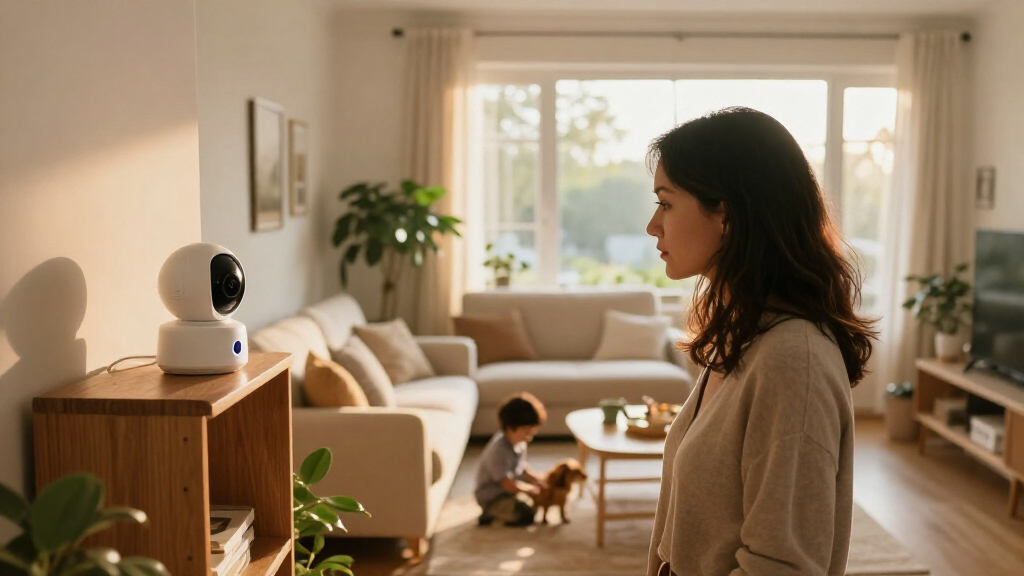
Placement matters as much as account security. An indoor camera aimed at a living room might capture a visitor or family member in a private moment. A front camera pointed too far across the street could record a neighbor’s windows. Aim at the entry or path you need to monitor, and use privacy zones or a physical shutter if the model offers them. Narrowing the view can reduce unnecessary capture, though it also means accepting that activity beyond the chosen area will not be recorded.
Think through a normal evening: a friend comes to the door, the camera sends an alert, and you share the clip with someone in your household. Can you see who has access? Can you delete the clip afterward? Does the app explain how long footage stays on the camera or in the cloud? Those answers matter because a clip may remain available to multiple users or in backups even after it disappears from the main timeline, depending on the provider’s controls.
Give each camera a clear job, then point it only where that job requires. Check local rules for video and audio recording, especially where visitors or neighbors may expect privacy.
Manufacturers differ in encryption, data retention, sharing controls, and whether processing happens on the camera or in the cloud. On-device processing can limit how much video needs to leave the home, while cloud processing may enable features that the camera itself cannot run; each design has implications for privacy and service dependence. Read the current privacy and storage terms for the specific model. Product features and policies can change, so confirm them at purchase rather than relying on an old review.
Install cameras in five steps that prevent missed footage
Smart home security cameras are easier to rely on when you test their view, connection, and recording before calling the setup finished. A ten-minute check can catch a glare problem or dead Wi-Fi zone while the camera is still easy to move. Use these five steps for a porch, hallway, or garage entry.
- Pick the target. Choose an entry, gate, or package drop-off point rather than trying to watch every inch of the property. A focused target gives detection a more manageable area and makes it easier to tell whether an alert matters.
- Check privacy and rules. Keep the lens off private spaces where possible and check local requirements for video and audio capture. A camera aimed only at the necessary area collects less incidental footage and is easier to explain to visitors.
- Test the angle. Preview the image in the app at the intended height. Look for roof edges, plants, or bright lights that block faces or wash out the picture. If a visitor is visible only after they have passed the door, the camera may record activity without capturing useful context.
- Confirm power and signal. Check the Wi-Fi connection and decide how you’ll manage charging or wiring. For electrical work, use a licensed professional and follow appropriate power-off and protective-equipment procedures. Weak coverage can mean missed uploads, while an inconvenient power source can leave the camera offline during charging or maintenance.
- Trigger a test recording. Walk through the detection zone, wait for an alert, then play back the clip to see whether it captured the approach and departure. This checks the whole chain—detection, notification, recording, and playback—rather than merely confirming that the camera appears online.
For example, a homeowner might mount a porch camera and discover that the porch light turns every visitor into a dark silhouette. Tilting the camera slightly and moving it away from the light can improve the image more than changing resolution. Test at dusk as well as midday; a bright afternoon preview won’t reveal every night-time problem. If the clip fails, identify whether the cause is the view, connection, or recording setting before deciding that a different camera is needed.
Keep expectations realistic when alerts and smart features make mistakes
Smart home security cameras provide useful information, but they don’t guarantee prevention or usable evidence. A motion alert tells you the camera detected activity according to its settings; it does not prove who caused it or what happened outside the frame. Treat people, pet, vehicle, and package labels as helpful clues, not certain identification. The practical value of a feature depends on whether its alerts are timely and accurate enough for you to respond, and whether the recording preserves enough context to check what happened.
Consider a windy day when a shrub brushes across the edge of the image. Basic motion detection may send a burst of alerts, while a model with person detection may filter some out. Yet a person walking behind the shrub could also be missed. Too many false alerts can lead people to ignore notifications; overly aggressive filtering can hide an event they wanted to see. Lighting, distance, camera angle, and software all affect accuracy, so test detection on your own property before relying on it. Adjusting zones or sensitivity may help, but can trade fewer nuisance alerts for a greater chance of missing activity at the edge of the frame.
Newer models increasingly offer on-device detection, searchable clips, and activity summaries. Processing on a camera or local hub can reduce cloud dependence or speed up alerts, but capabilities vary, and some features may require a paid plan. Matter is a developing smart-home standard, but camera support has historically lagged behind other device types. Verify exact compatibility with your phone platform, voice assistant, or smart display before buying; a shared standard does not guarantee that every camera feature works across every app or device.
Make a simple weekly check part of your routine: open the app, confirm the camera is online, review a recent clip, and check that alerts still reach your phone. If an important camera goes offline or stops recording, you want to find out on Tuesday—not after a Saturday night incident. This check cannot guarantee the next recording will work, but it can catch a dead battery, changed setting, or lost connection before it quietly undermines the setup.
Frequently Asked Questions
Do smart security cameras need Wi-Fi or internet?
Wi-Fi commonly connects a camera to its app, and internet access usually supports remote viewing, cloud clips, and alerts while you’re away. Some models can record locally without internet, but check the product’s outage behavior before you buy.
Can I use a smart camera without a subscription?
Often, yes, but features may be limited. Check whether live view, local recording, saved clip history, and person or package detection are included without a paid plan.
Where is camera footage stored, and who can access it?
Footage may stay on the camera, a hub, or a vendor’s cloud. Review retention and deletion controls, encryption details, account access, and clip-sharing permissions in the current product terms.
Can a smart security camera tell people from pets or cars?
Some cameras label people, pets, vehicles, or packages, but accuracy depends on the model, lighting, distance, and surroundings. A detection is a useful prompt to check the clip, not infallible identification.
Will my camera keep recording during an internet or power outage?
It depends on the camera’s power and storage. A battery camera with local storage may continue recording without internet, while cloud access and remote alerts usually stop; a plugged-in model may also stop if power fails.
How can I keep a security camera account safer?
Use a unique password, enable multifactor authentication, install updates, and remove account access people no longer need. Keep your home Wi-Fi secured and review shared users and footage permissions from time to time.
Is it legal to record visitors, neighbors, or audio?
Rules vary by location, especially for audio and recording areas where people expect privacy. Point cameras toward the entry or property area you need to monitor, limit unnecessary capture, and check local requirements.
Conclusion
Give each camera one clear job, then check whether its view, storage, power, and privacy settings support that job. Before you rely on an alert, walk through the frame and play back the clip in daylight and after dark.
A well-placed camera can turn a vague ping into a useful answer. Aim carefully, secure the account, and make sure the footage is there when you need it.